
For two weeks, I applied for jobs every day. When I took a screenshot of my hh account, its Applications and Invitations section contained 756 records. Most were still waiting. In the chat list, different companies opened their messages with almost identical phrases, even when the jobs involved different kinds of engineering. I could see plenty of activity on the screen. What I actually needed to know was whether anyone had looked at my work and what would happen next.
Short answer: If you get no meaningful replies to software developer applications, start with four checks: whether the roles are open to you, which profile or resume you submitted, how quickly someone can see relevant work, and whether the messages you receive contain a next step. Treat an acknowledgment, an interview invitation and a completed conversation as separate events. Once you know where the search stalls, change one thing and check what happens on the next set of comparable roles.
This guide uses my hh search, reports from people applying through LinkedIn, and specific examples you can reproduce with your own resume. It applies if you are looking for a first developer role, changing stacks or applying with several years of experience and finding that the old approach no longer starts conversations.
What 756 records over two weeks actually showed
The numbers came from one screenshot of the candidate dashboard.
| Dashboard category | Records | Share of records on the screenshot |
|---|---|---|
| All | 756 | 100% |
| Waiting | 631 | 83.5% |
| Rejected | 90 | 11.9% |
| Interview | 35 | 4.6% |
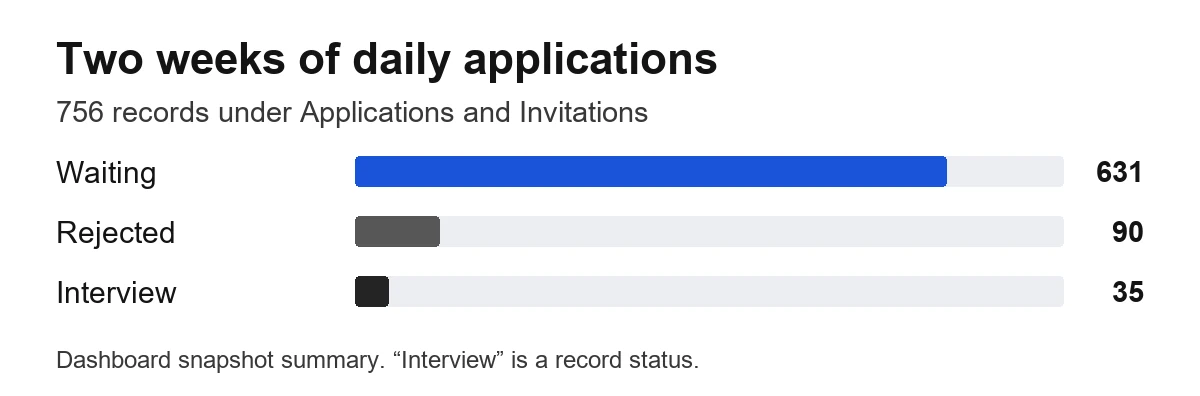
The percentages use 756 as their denominator and are rounded to one decimal place. “Waiting” is the label shown when I took the screenshot. “Interview” names a section in the interface. The 35 records do not tell us how many conversations took place. To answer that, I would need to record calls and outcomes individually. Treat the table as a snapshot of one person's search rather than a benchmark for your own.
My second screenshot showed message previews. Different companies appeared to be using similar openings across web development, backend and other roles. A preview can show the repetition, but it cannot tell me who wrote each message or whether the same tool was used. Some messages that look automated still contain a real question or a choice of times when opened. Others are simple confirmations. The useful distinction is whether somebody has offered a concrete next step.
When a new message arrives, I check it against the role and what I submitted. An invitation to pick a time goes in one column. A request for a relevant example goes in another. A delivered email is recorded as a receipt. If I only count notifications, a busy inbox can make an unchanged search look encouraging.
Why the same problem shows up on LinkedIn
The details of the platforms differ. A LinkedIn listing can be an entry point to an employer's careers site. The job information and the submission can live in two different places. Check whether you completed an application in the destination form or only clicked through from the listing, and record the route you used. An inbound recruiter message is a third route. You can compare those routes once you have a consistent definition of a reply.
In a Reddit thread about cold LinkedIn applications, one commenter reported getting their current job through LinkedIn after more than 200 applications over several months. They attributed their progress to customizing messages rather than relying entirely on Easy Apply. The account shows what happened in one search. It cannot tell us how much the wording mattered compared with the roles or the time spent applying. What you can test is whether a shorter, role-specific message gives the recipient a clear reason to respond. Discussion of cold LinkedIn applications
In a separate thread, experienced developers described an increase in unsolicited recruiter messages in their LinkedIn inboxes. One participant reported that some contacts did turn into interviews. Others described outreach that seemed generic or arrived as repeated follow-ups. The thread illustrates why I track inbound messages separately: some begin a conversation, while others tell you little beyond the fact that a message was sent. Discussion of recruiter outreach among experienced developers
The gap between an application and a conversation also shows up among new graduates. One person about to graduate reported roughly 500 applications, 12 replies and two interviews. In a Russian-language discussion, a frontend developer described seeing thousands of responses on one posting, including heavy competition for unpaid internships. These figures have different denominators. The graduate was describing applications they sent. The frontend developer was describing the crowd around a particular opening. Use both to understand the pressure rather than averaging them into a hiring rate. Graduate's job-search account · Frontend applicant's account
The same applies to a “clicked apply” label. In one LinkedIn example shared on Reddit, the listing explicitly said people had clicked apply and that applications were handled off LinkedIn. Those two statements are enough to tell you that the visible label is about clicks for that posting. You cannot use it as your count of completed submissions. Example of the label on a backend posting
Where an ATS enters the process
An applicant tracking system gives a hiring team a place to handle applications and work through a queue. Depending on the employer, it may extract the text of a resume, use structured answers to check eligibility, help staff search or sort candidates, or send status messages. These steps can occur independently. A clean PDF can sit next to an outdated role title in an application form. A resume that accurately lists your experience may still go to a role that requires office days you cannot make.
A walkthrough of the hh employer view showed incoming applications and a separate search through the candidate database around 23:17, filters around 28:14, and a relevance sort around 33:02. For a candidate, that suggests two separate checks. Look at the version attached to your application. Then look at the information visible on your profile if a recruiter finds you without an application. Put the same accurate role, location or work arrangement and relevant skills in both where appropriate.
In another recorded hh experiment, the assistant flagged Linux as missing when the resume listed Astra Linux. The example appears around 5:38. Around 4:12, the creators showed a candidate who received a negative recommendation after falling several months short of an experience threshold. Those are different problems. In the first, clearer naming would help someone recognize a skill. In the second, the useful question is whether the employer treats the experience threshold as mandatory.
| What to investigate | What you can observe | First thing to try |
|---|---|---|
| Text extraction | Copied dates appear under the wrong roles | Simplify the layout and export the file again |
| Form data | The preview shows an old title or location | Correct the selected profile and check it before submitting |
| Eligibility | A posting specifies office days, location or experience | Ask about the condition or filter out similar mismatches |
| Evidence of a skill | The posting names a tool, but the work sample only names its result | State what you used and show the task it helped you complete |
| Next step | A message confirms receipt without offering any action | Mark the receipt separately and keep other applications moving |
Neither example identifies why a given LinkedIn application went unanswered. To diagnose your own search, use the parts you can inspect: the posting, the form, the file and the actual messages.
Employer dashboard and relevance sorting walkthrough · Recorded experiment with the hh assistant
Check the resume and application the way a stranger would
Open the final file, select the text and paste it into a plain-text editor. Find the target role, dates, projects and relevant skills. Check that each date still sits next to its role and that links are recognizable. If you use columns, this is a quick way to see whether headings and dates are interleaved. Use the format the employer requests. When an application form populates fields from a file, review the result before you submit. The full resume and ATS check
Next, open the job description and underline three categories: mandatory conditions, responsibilities and preferences. “Three days in the office” is a condition. “Maintain account forms” is a responsibility. “Familiarity with Vue is a plus” may be a preference. If you cannot meet an explicit requirement, settle that question before spending time on a rewrite. If the work itself fits, choose one example that makes this easy to see.
A before-and-after example for a frontend role
Suppose a team needs someone to maintain React forms and API integrations. A resume says “Built modern interfaces and improved user experience.” A reader cannot tell which component you owned or whether you handled failure cases. If the work matches your experience, write something at the level of this example:
React and TypeScript. Connected a service request form to a REST API, displayed validation errors beside the relevant fields and kept typed data when the connection dropped. Added instructions for testing recovery in the README.
The new bullet supplies a technical starting point for a conversation. An interviewer can ask what happened before the change and how you checked it. You can show the fields, simulate the failure and retry. If the project was personal or academic, give it that label and show the same sequence. If you did similar work in Vue and built a React version for practice, explain which work belongs to which context.
Before sending, open the evidence in a private browser window. If the link only takes someone to a large repository, point to the README or the part that handles the error. If the client code is private, create an independent example using dummy inputs. Keep the workflow and the verification, and make clear that the example is a reconstruction. A change you can reproduce gives a colleague something they can actually discuss with you.
Reply to recruiter messages without guessing who wrote them
Open the full message and check whether the role exists, whether it matches your specialty and what the sender proposes. If they ask about your work, answer the question directly. If they offer a time, confirm the time zone and ask what to prepare. If they have only greeted you, reply with one question that moves the conversation forward.
Thanks for reaching out about the frontend role. Is the immediate work more about maintaining customer forms or building the new dashboard? I can share an example of a React form with API recovery if that would help. What would the next step be?
If the contact asks for work, give a link and one instruction. “Open the demo, select the failed request example and retry the submission” makes the check immediately clear. If a recruiter messaged you about a different specialty, clarify what role they mean before spending an evening tailoring a resume. When a message has no identifiable role, request a public posting or a short description of the team and the work arrangement.
Apply once and record the route
If a LinkedIn posting leads to a company form, open the form and confirm what you actually sent. When you also find the same role on hh or in a community, record both discovery sources. Keep one application row for the job. If a recruiter approaches you independently, record the message as inbound rather than crediting it to a resume version you submitted elsewhere.
If the employer promised a decision date and it passes, a short follow-up naming the role is reasonable. If you have no contact or date, make a note and move on to other applications. The goal is to keep a reliable history of meaningful activity rather than to send repeated messages across several channels.
Build an application tracker you can use next week
Keep one row per opening. Record your submitted version, location or work arrangement, channel, latest event and next action. Use separate labels for acknowledgment, role-specific response, invitation, completed conversation and decision. If a scheduled call is postponed, keep the invitation and add the reschedule. If you label it as an interview before it happens, you lose the ability to tell a scheduling issue from an interview issue.
| Sample application | What happened | How to record it | Next action |
|---|---|---|---|
| Junior React role, agency site | Received a receipt email | Acknowledgment | Let the role sit for several business days and continue applying |
| Frontend, LinkedIn outreach | Asked about React and time zone | Role-specific reply | Answer and offer two time slots |
| Dashboard role, hh | Call was booked and moved | Invitation, call pending | Confirm the new time |
| Web application support, job board | Call completed and asked for a sample | Completed conversation | Send a direct link and verification steps |
These are fictional rows. Use actual dates and events in yours. If you find a role you did not qualify for after applying, mark the condition you missed. If the role disappeared or dates changed, write down what you can observe. Keep any theory about what happened in a separate note. That separation is useful when you return to the list after several days and no longer remember which parts were confirmed.
Compare one change with a worked example
In a hypothetical batch, resume A gets two role-specific replies from 20 comparable applications, and B gets four from 20. That is 10% and 20%. A also received eight acknowledgments and B received ten. The second pair of numbers tells you that applications went through. The first pair is more useful for deciding whether someone wanted to discuss the work. With a sample this small, treat the difference as a reason to test again.
Keep the role family and work arrangement broadly similar. Try one change, such as moving your forms project to the top. Give both groups the same number of business days to get a reply. If one group went to hybrid roles and the other to remote ones, record the difference. If an internship evaluates applications after a fixed deadline, make it a separate group.
A simple rule is to check the initial outcome five business days after submitting and keep later events in the tracker. Choose the interval before looking at the result. The exact length is up to you and should fit the openings. Using one rule for both groups is what makes a comparison interpretable.
What to change at each point in the search
You send suitable applications and mostly hear nothing
Open your last five plausible listings and check the actual conditions. Can you meet the location, schedule and start date? Does the job title on your submission match the work you want? If a reader sees only the first third of the resume, can they name a project that fits? Ask someone to look at that part and tell you what they would open next. If they cannot find an example, move the relevant project higher and name the task in plain language.
Review the search filters as well. A search for “developer” can produce a mix of roles, locations and expectations. Try one narrower search for the work you can show, such as customer forms, React and TypeScript maintenance, or web application support. Compare what you see before sending another large batch. A better match at the search stage makes the next resume comparison easier to interpret.
Recruiters reply and calls rarely happen
Look for the last agreed action. Did somebody offer a date or only say they wanted to talk? When you offer two times, include the time zone. If several people ask about office days or work hours, answer the condition early in future messages and refine your search. If they repeatedly request a project in the same technology, prepare one direct link with a description of what to open. Confirm that the link works outside your account.
Take care with one other case: a person can ask a reasonable question but leave no indication that they reviewed a sample. Keep it as a role-specific reply. Mark a conversation completed only when it takes place. That way your tracker shows both progress and the stage that needs work.
Calls happen and the process stops afterward
Write down the questions that recur. Separate practical conditions, your own contribution and the technical decision. If interviewers ask what you personally did, prepare a one-minute explanation: the issue, your part, the change and how it was verified. If they also ask about a technology you listed, reproduce one small example before the next call. If the process repeatedly stops at hours or location, adjust your filters first. Prepare for a recruiter screen
You can rehearse without a mock interview. Record the explanation and ask another developer to name which part they would inspect. If the listener cannot tell where to look, add a result or a reproduction step. For work that needs to remain private, review an independent demo or a small diagram instead of sharing a client repository.
A one-week diagnostic plan
- Day 1. Collect your recent applications and their outcomes. Split receipts, role-specific replies, scheduled calls and completed calls.
- Day 2. Check your exported resume and any form preview. Choose a group of roles you can take based on the work and conditions.
- Days 3 and 4. Change one visible part of the application and send it to new comparable roles. Record which version you sent and what you expect the change to improve.
- Day 5. Rehearse one project explanation and verify the link you might share. If someone reads only the summary, check which work they can identify.
- End of the week. Note where there has been movement and which applications are too recent. Set the next review date before drawing conclusions.
By the end you should have an observed issue, a single change and a record you can use. If people are seeing the resume but asking for work authorization, your next task is different from a file that loses its reading order. If the clearest result is that most listings were outside your location range, change the search before running another test.
Common questions about ATS and LinkedIn applications
Does a fast rejection mean the ATS rejected me?
Speed is a clue to investigate. It does not reveal which condition was involved. Check the screening answers you supplied, the location and work arrangement requirements, and the version you submitted. Correct an actual mismatch and track what happens on similar openings. If several jobs had a firm condition you could not meet, change the next batch of roles.
Should I apply via LinkedIn or the company website?
Follow the employer's stated application route and save the listing. If LinkedIn takes you offsite, finish the form and record its confirmation. When more than one channel is genuinely available, compare a few similar openings and note where meaningful responses arrive. Avoid counting the same company and role as two results because you found it twice.
Can I get past screening when I have less experience than requested?
Check whether the threshold is firm and whether the employer considers equivalent work. State your real dates and format. If your best example comes from another stack, coursework, freelance work or an internship, name the context and explain what you did. Keep searching for roles where the team can consider that experience. Adding terms can make a skill easier to recognize. It cannot make an ineligible schedule or missing work arrangement fit.
Does it help to keep rewriting the whole resume?
Start with the stage you can observe. If there are few meaningful replies, check eligibility, the file and the first relevant example. If calls already happen, examine the conversation and any technical feedback. A targeted change is easier to learn from than a full rewrite followed by a new search in a different market.
When a resume and job-search review is useful
If the tracker still leaves you unsure what to change, you can write to me. We start with one version of your resume, two or three suitable postings and a few recent outcomes. I review the extracted text, the role and project order, and what happens between application and conversation. You get prioritized edits, one or two specific examples of wording and a way to check their effect on a comparable group. If the issue happens after a call, we can rehearse the story around one project and prepare for likely follow-up questions.
I’m Evgeny Volkov, a full-stack developer. I can look at the work behind a bullet and help you explain your engineering contribution in terms somebody else can verify. For the first message, include your target role, job market or time zone, work arrangement and where the search stalls. A redacted resume extract and a public posting are enough to start. We agree on the scope and fee before proceeding.
Email Evgeny about a resume and job-search review
For the preceding step, see How to Find Your First Frontend Developer Job.
Need help with your website?
Development and SEO services →