
Why matching the job description matters
In a recorded experiment on the hh job platform, the creators opened an entry-level developer vacancy and tried its recruiting assistant. Around 5:38, the resume lists Astra Linux while the assistant reports that Linux is missing. Around 4:12, the assistant marks a candidate down when their experience falls several months short of the stated criterion. These observations apply to the test vacancy in the recording. They suggest two checks you can run on your own application: how clearly you name a skill and whether you meet the conditions in the posting.
Check the actual file you will submit
- Copy its text into a plain-text editor. Read the content from top to bottom.
- Search for the role heading, contact information, project names, dates and three relevant skills. Check whether the dates still sit next to the correct roles.
- If the content is out of order or appears only as an image, rebuild the file in one column with recognizable headings. When a site offers a preview, check the populated fields before submitting.
Compare two exports with identical content
Suppose you are choosing between a one-column template and a two-column design. Both look clean in your PDF viewer. In the second version, the skills sit in a sidebar. When an application platform imports the file, it may read the underlying page in an order different from the one you use with your eyes. Try the example below before you commit to a layout.
I made two PDFs for a fictional applicant. Both contain the same name, role, contact details, project and skills. Download the single-column PDF and the two-column PDF. Open them in the same viewer, select the text, and paste it into a plain text editor. Look for the role, project date and email address, and see what appears first.
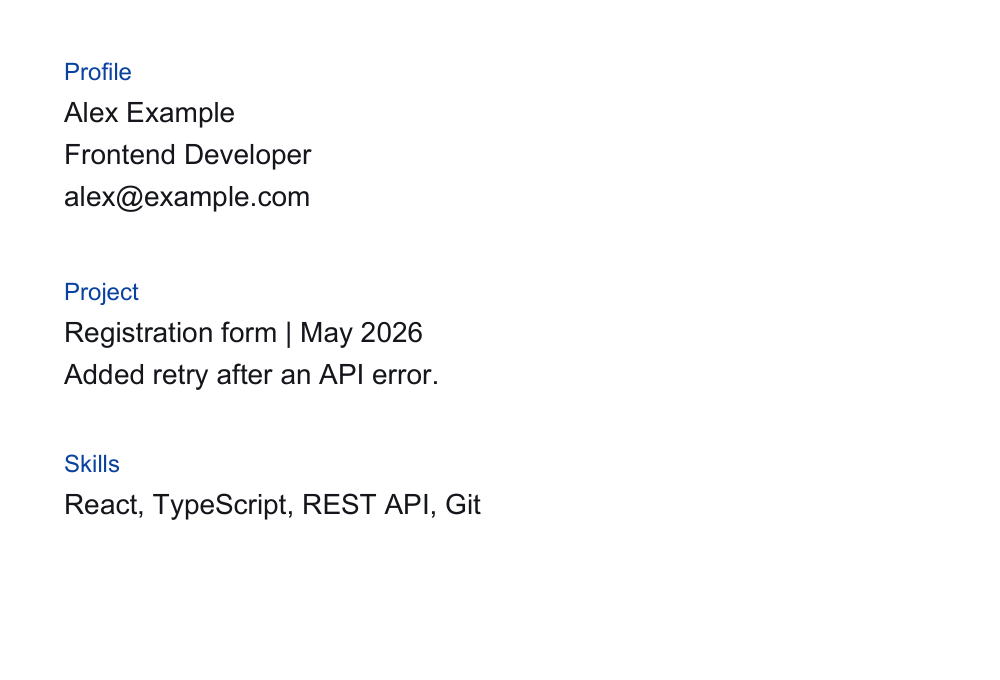
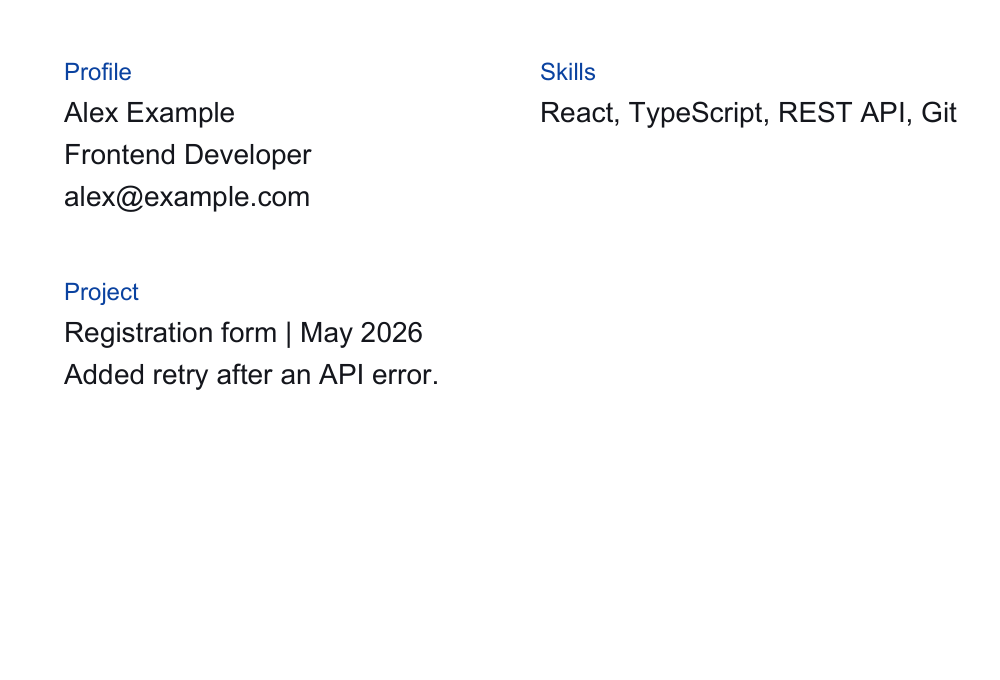
In the first extraction, pypdf returned Profile, Project and Skills in that order. In the second extraction, it read Skills first, then Profile and Project. The generator wrote the sidebar into the page before the main text. A viewer that infers order from position can produce a different result. This exercise gives you a quick way to test your own file, and the form’s import preview gives you a second check.
A reordered section is worth looking into, especially if dates or roles become detached from their project. Check for details that disappear altogether. For example, if your portfolio is represented by an icon, someone reading the extracted text might have no address nearby to follow. Replace it with a short, readable link. When you export again, repeat the same search in the new PDF and check the link from a device where you are signed out.
Check what the form stored
Take the sample resume above. It gives Alex the title Frontend Developer and lists a registration form as a project. Imagine the application imports the previous job title as the desired role and places the entire project paragraph in the skills box. Edit both fields if the platform lets you. Review the saved application, including the filename and date. This is particularly useful when repeat applications reuse a profile or attach whichever resume was uploaded most recently.
Use the same approach for working location, timezone, language, and work authorization questions. If the job description gives a region for remote work, check it against the employer’s posting and the form. Where the information conflicts, ask a precise question before you apply. For example, “I am based in Warsaw and can overlap from 9 am to 2 pm Eastern. Is this role open to applicants outside the US?” You can then decide whether to proceed with the information the team actually provided.
Give the skill a recognizable name and add evidence
Review duties across roles that fit. Mark each skill as something you can demonstrate, have tried, or still need to learn. Put the strongest relevant examples near the top.
| Job description | Vague line | Example for someone who did the work |
|---|---|---|
| REST API and error handling | Worked with data | Connected an order list to a REST API in React and added loading, empty and retry states |
| Git and collaboration | Know GitHub | Used Git branches and pull requests, and addressed requested changes before merging |
| Linux | Used Astra Linux | Linux (Astra Linux). Ran the local environment and examined application logs |
Use the file format requested by the employer where specified. If the role lists multiple languages, check whether they are alternatives or separate requirements. State which ones you used and what you built with them.
Check the application form and the posting separately
Open the version of your resume you intend to submit. Check the role heading, location, work arrangement and the fields related to the role. A PDF can describe the right work while the application form still contains an old role title or location. Where a form fills those fields automatically, inspect the result and fix errors before submitting.
Split the posting into requirements, duties and preferences. If the role requires time in the office, settle that question first. If its main task is maintaining forms and your strongest example appears at the bottom, move it up. For a technology you have not used, describe comparable work and state the stack you used.
One bullet before and after
Imagine the posting calls for React, TypeScript and form integrations. “Built interfaces using modern technologies” gives a reader little to investigate. A more useful bullet reads, “Built a service request form in React and TypeScript. Connected it to a REST API, displayed a validation error when the request was rejected and added a retry action for network failures.” Keep the parts you can demonstrate. Open the demo and check them before sending.
| Check | Pass condition | What to change if it fails |
|---|---|---|
| Text layer | You can select the role, skills and contact information | Export a text-based file in a format the employer accepts |
| Reading order | Dates stay next to the roles they belong to | Try a single column and repeat the plain-text check |
| Relevance | One example of work in the posting is easy to find | Move the example up and name the skill accurately |
| Form preview | The employer’s form shows the right contact and role information | Correct the fields and verify the selected file |
Run a small batch before changing the entire resume
Suppose you save ten React postings. Four require travel or office attendance you cannot offer. Two are copies of the same opening. Of the remaining four, three involve forms, API integration, and validation, and one asks you to own a component library. Send the form-focused resume to the three relevant teams if you can show work in that area. For each application, record which bullet you used and why it belongs near the top. Consider the component library vacancy if you have an example of maintaining shared components and can talk about its constraints.
Record the date, posting, resume revision, response, and confirmed next step. Log an acknowledgement, a template rejection, and a request to see your work as different events. A small batch can help you catch repeated mistakes, such as sending a PDF with a broken portfolio link. It cannot reveal how a recruiter ranked all applicants. If two employers ask how you tested a form, put the test or a short reproduction guide in a place they can access. Then choose another small batch with similar tasks.
Before submitting, ask a colleague to open the PDF without hearing your pitch. Give them a minute to find the role, your best evidence, and the way to reach you. Ask them to tell you what they can verify from the document. When they cannot find a project or misread a date, you have an exact place to revise. Keep the file that passed the check and use its name or date when you log the application.
Common questions
Is PDF or DOCX better?
Use the format specified in the posting. If both are accepted, open each exported file and check its text order, links and dates. Submit the version that passes your checks. Repeat this once the final version is exported from a resume builder or design file.
What should I do with a resume checker score?
Look at the specific issue it identifies. If dates appear under the wrong roles, rebuild the layout and check it again. Different application systems use different fields and employer rules. Track changes you can observe in the document, form preview and applications you send.
How often should I repeat a keyword?
Use the term where it describes the work: in a relevant skill list and in an example that uses it. A single bullet that connects React to a feature you can explain is useful in a call. Repeated terms without a task leave the interviewer with more questions.
What to try after you submit
Text extraction is one part of the application. Screening rules, eligibility and the employer’s review happen separately. If the file reads cleanly and similar applications still get no response, try making the job fit easier to see in the opening lines, then compare the results over your next batch. If you get interviews, rehearse how you explain your own work. The junior job-search guide has a table for deciding what to change.
If a role asks for experience and your work comes from personal projects or freelance assignments, see what interviewers may ask and how to describe that work.
If you are still writing the document, start with contact information, your target role, skills and one relevant project. See how those details fit into an application in the guide to finding your first frontend job.
How to check if your developer resume is ATS-friendly
Why am I not getting interviews for software developer jobs?
Need help with your website?
Development and SEO services →