Download the sample HTML and the Python script. The fixture has two tables, a two-level header, Cyrillic text, quotes and a leading-zero SKU. The script runs on local files.
How to select the right table from an HTML file
The fixture starts with a summary table, followed by orders. Taking read_html(...)[0] would select the summary. Pass the target ID through attrs instead. For a table without a stable ID, inspect its attributes and headers, choose a clear selector and validate the returned columns. That last step matters when the export runs repeatedly and the page template changes without warning.
python -m pip install pandas==3.0.1 lxml==6.1.3
python convert-table.py
I tested the fixture on Python 3.12. Put both files in the same directory. The downloaded script writes orders-python.csv next to itself and checks its contents. If you use a virtual environment, run the script with the same Python executable that installed the packages.
source = Path('table-fixture.html').read_text(encoding='utf-8')
(orders,) = pd.read_html(
    StringIO(source), attrs={'id': 'orders'}, flavor='lxml',
    header=[0, 1], converters={1: str}, keep_default_na=False,
    thousands=None,
)
orders.columns = ['Region', 'SKU', 'Product', 'Orders']
orders.to_csv('orders-python.csv', index=False,
              encoding='utf-8-sig', lineterminator='\r\n')
The two header rows become a multi-level column index. The downloaded script checks all four column pairs in order before assigning flat names. If a redesign swaps SKU and product name, it stops before writing values into the wrong columns. This is more reliable than checking that the output file has four columns. pandas.read_html documentation.
How to preserve leading zeros, literal NA and Unicode
In this fixture converters={1: str} reads the second column as text. A numeric-looking identifier can lose its leading zeros when inferred as a number. keep_default_na=False preserves the literal value NA, and thousands=None turns off thousands-separator interpretation. These choices match the example’s schema. If your ID moves to another column, update the converter index and the schema assertion together.
CSV encoding and spreadsheet type inference are separate. A UTF-8 byte order mark helps spreadsheet apps detect the encoding. To keep 0017 visible in Excel, import through the data menu and set SKU to Text. Check the file with a CSV reader first. If the raw value is right and opening it displays 17, adjust the import rather than modifying the original ID.
Same HTML, two different treatments of merged cells
I used the same fixture in Python and the Reproleaf HTML table to CSV converter. I selected Orders in the browser and id=orders in Python. Both outputs retained three order rows with four fields each. The exporters made different choices about the header and the continuation of the North region cell.
| Check | Python | Reproleaf |
|---|---|---|
| Header rows | One flat row: Region, SKU, Product, Orders, after explicit renaming. | Two rows with empty positions under merged cells. |
| Second order’s region | North. In this fixture pandas repeats the rowspan value. | Blank. The value stays in the upper-left cell of the merged area. |
| Identifiers and text | Retains 0017, 0008, 0042, quotes, Cyrillic and literal NA. | Retains the same values in the corresponding columns. |
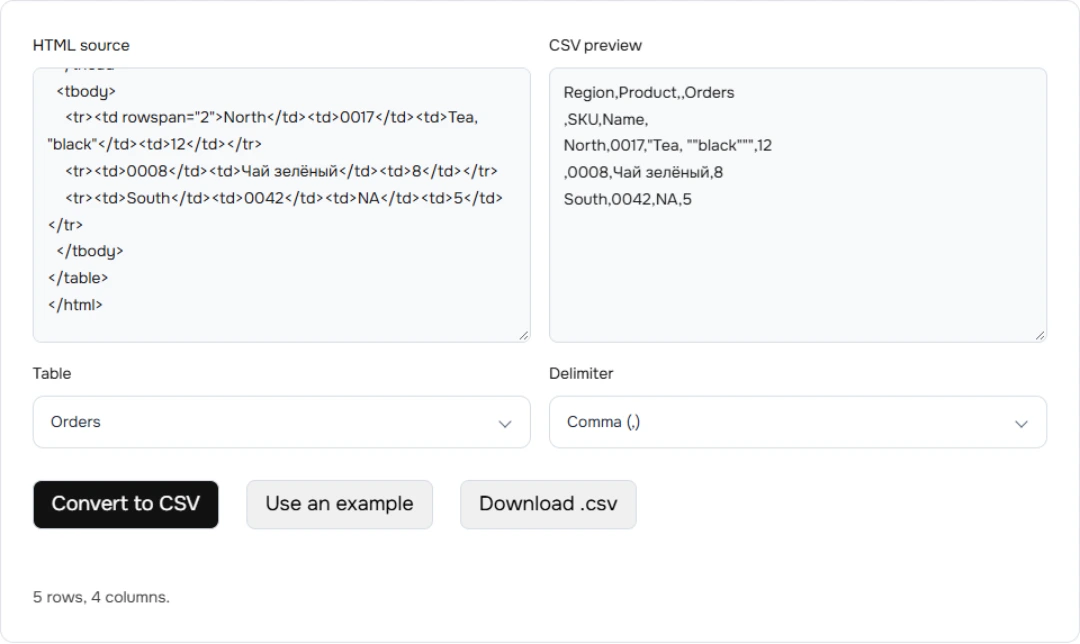
When loading a flat database table, repeating the region lets every order carry its own value. The Reproleaf output makes it easier to compare empty positions against the original layout. Before filling a blank with the value above it, confirm it is a continuation of a merged cell. An actual blank in the source may have a meaning of its own. For a text documentation workflow, see the separate guide to HTML tables with rowspan in Markdown.
Download the Python CSV and the Reproleaf CSV to compare the exact files. Both exports quote the comma in Tea, "black" and double the quotes inside the field. Reading the CSV returns the original value. A call to line.split(',') would create an extra column at the comma in the product name. Python’s CSV documentation.
How to verify the export before importing it
Open the file with csv.reader, using encoding='utf-8-sig' and newline=''. Compare the headers, row widths, and a few known values that exercise the tricky cases. The example checks every parsed row. For production feeds, add checks on row count, identifier uniqueness and control totals under matching filters. A file can open normally in a spreadsheet even when values shifted into the wrong fields.
Simulate a schema change before scheduling the export
Make a copy of the fixture and swap the SKU and Name headings in the second header row. Run the script in a separate folder. It should stop at Unexpected columns before writing CSV. In a scheduled job, write the candidate to a temporary file and replace the previous export only after validation passes. Log the HTML snapshot and the detected header pairs. When a layout changes between two runs, those details let you reproduce the failure and keep the last good file available to downstream users.
Choose the delimiter based on where the file will be read. If Excel shows each row in one column, import it with the comma delimiter selected. For a system that requires semicolons, set to_csv(sep=';') and use the same delimiter on read-back. CSV quoting does not stop spreadsheet apps from interpreting some text as formulas. The script here uses trusted sample records. Test a separate text-handling policy before opening third-party data in a spreadsheet.
Frequently asked questions
Why does pandas say No tables found?
Check that the saved HTML contains a table element with the matching ID. If the app fills the rows with JavaScript, copy the populated element from the browser inspector. read_html() does not run the page’s application scripts.
Why is there an extra index column in my CSV?
Use index=False in to_csv(). Keep a business identifier as an ordinary column when you need it in the destination. For a one-time export, use the browser converter and confirm the selected table before downloading.
Need help with your website?
Development and SEO services →