What an internal linking audit checks
You can audit internal links by loading a known page set, checking which pages receive observed links, reviewing unresolved targets, and then comparing the before and after reports after one real content edit.
This guide uses a reproducible five-page educational example tested in the published Reproleaf interface. It is not a live crawl or a client report. The goal is to show how to read the report correctly and verify one contextual link correction without overclaiming what the sample proves.
For the workspace, start here: Reproleaf. For the link-graph approach used in this example, see the methodology.
Prepare the source data and choose the right mode
Use the downloaded files from the same locale so the example can be repeated exactly. Include all four files:
Select Site inventory, paste the file contents into Or paste the JSON / XML inventory, then click Run analysis.
Use the before JSON for the first run, then repeat the same steps with the after JSON. This sample is synthetic, so you do not need to crawl example.org to reproduce it.
A sitemap file can help with URL discovery, but it is not a list of internal links. Google says crawlable links need real hrefs and useful anchor text: links crawlable. Google also notes that a sitemap can help discovery, but it does not replace link inventory: sitemaps overview.
Run the before report and read the counts
Paste the before input JSON into Or paste the JSON / XML inventory, then click Run analysis. After the report loads, check the counts, the graph, and the rows that show where links are observed and where they are not.
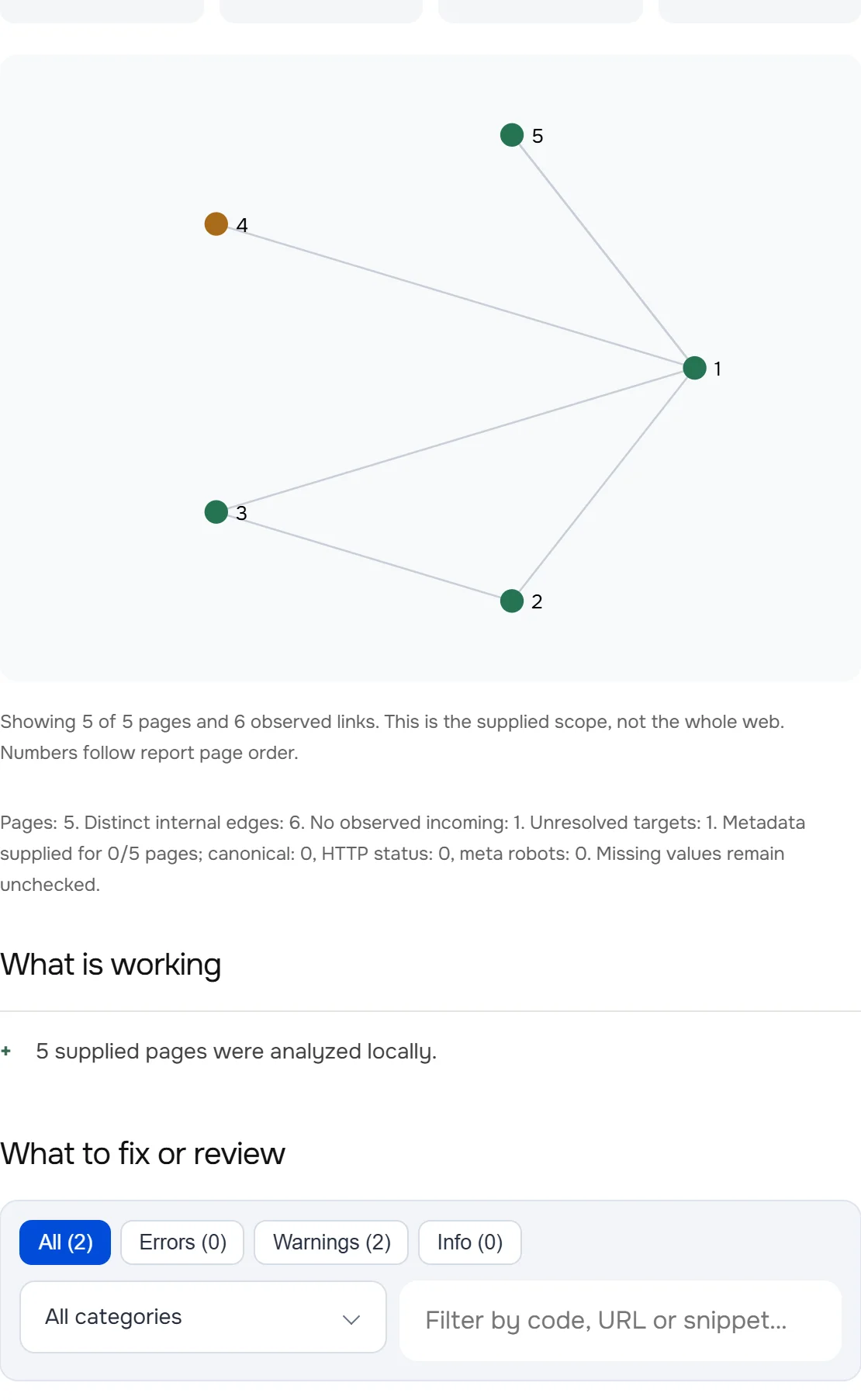
The before report for this five-page sample contains 7 internal link occurrences, 6 resolved internal link occurrences, 6 distinct internal edges, 1 article without observed incoming links, and 1 unresolved target.
Read those numbers carefully. One page with zero observed incoming links is an orphan candidate inside this sample, not proof that the page is a site-wide orphan. One unresolved target is unresolved inside the stored-link dataset; it is not confirmed 404.
The before visual report is here:
Make the one contextual link change
On https://example.org/internal-links, one link record was updated: the destination changed from /not-in-export to /migration, and the label from Related guide to Website migration checklist. The previously omitted region field was set to content. This is a declaration in the sample JSON, not a measurement of placement in a live page.
This edit matters because internal-link review is part of a site migration, so the checklist is the right follow-up reading for the changed destination. That is an editorial reason to keep the link, not a claim about algorithmic relevance.
Before:
<a href="/not-in-export">Related guide</a>After:
<a href="/migration">Website migration checklist</a>This is a data-only change in the synthetic fixture. To fix a real site, edit the real HTML or CMS entry, then re-export the same known page set and run the same check again.
Run the after report and compare the result
Now paste the after input JSON into Or paste the JSON / XML inventory and click Run analysis again. Compare the new counts with the before report and check that the changed href is now resolved within the same scope.
| Metric | Before | After |
|---|---|---|
| Pages | 5 | 5 |
| Articles | 2 | 2 |
| Internal link occurrences | 7 | 7 |
| Resolved internal link occurrences | 6 | 7 |
| Distinct internal edges | 6 | 7 |
| Articles without observed incoming links | 1 | 0 |
| Unresolved targets | 1 | 0 |
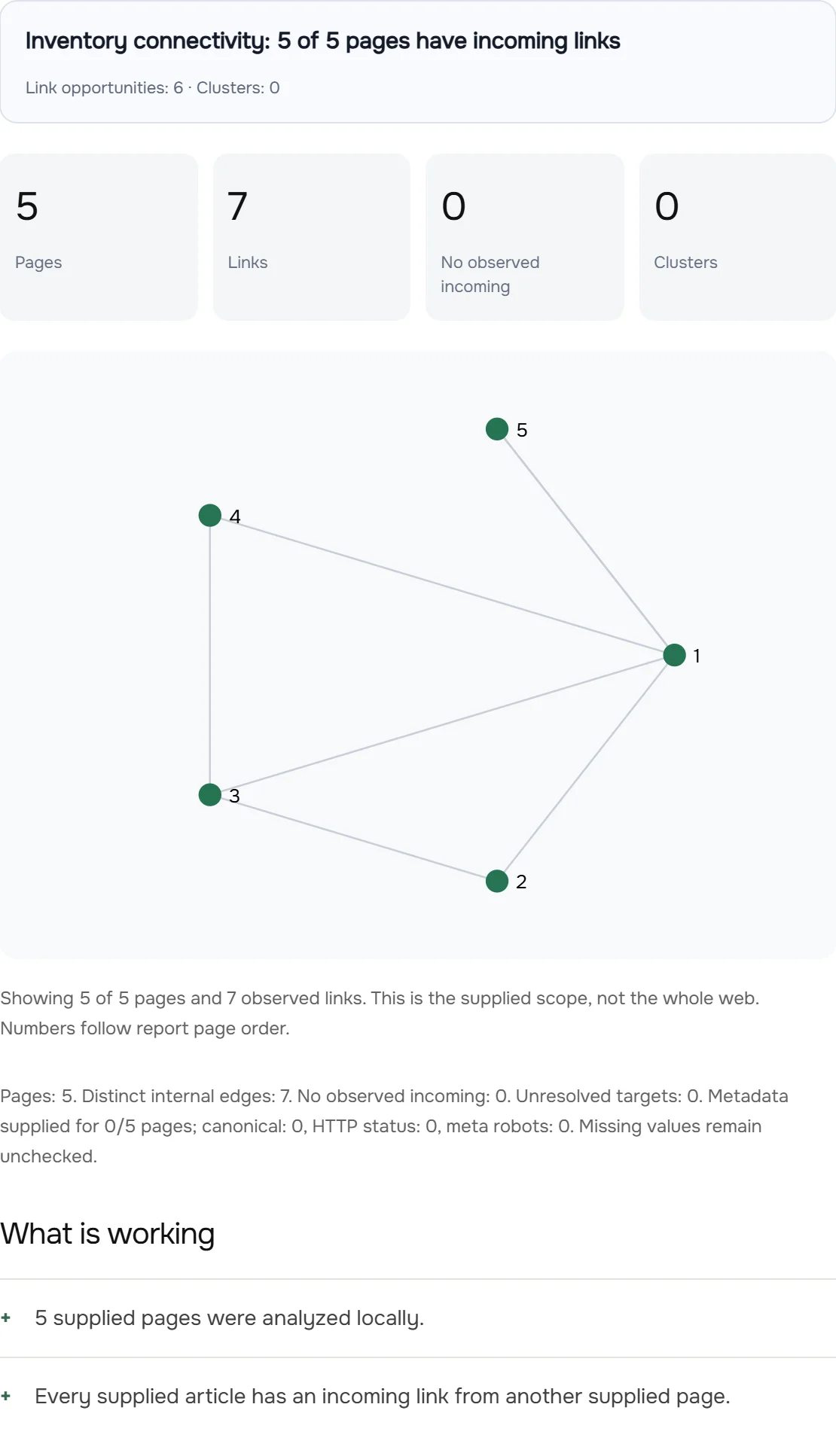
The after report shows 7 internal link occurrences, 7 resolved internal link occurrences, 7 distinct internal edges, 0 articles without observed incoming links, and 0 unresolved targets.
The after visual report is here:
What to do on a real site and what this check does not measure
On a real site, use the same workflow as a verification step after you edit the real HTML or CMS. Re-export the same known page set, run the analysis again, and confirm the count changes in the report.
This check does not measure rankings, traffic, backlinks, or indexing outcomes. It only shows what is present in the supplied internal-link inventory. A sitemap can still help discovery, but it does not show incoming links, and metadata-only handoffs do not give you the internal graph.
If you want a separate discovery check, use the sitemap checker: sitemap checker. It validates the supplied XML input; it does not crawl or discover live pages itself.
Release checklist and useful next steps
Before publishing the fix, review this checklist:
- Confirm you are in Site inventory.
- Paste the correct before or after input file into Or paste the JSON / XML inventory.
- Click Run analysis and compare the rows, graph, and unresolved targets.
- Treat zero observed incoming links as a sample result, not site-wide proof.
- Treat a missing inventory target as unresolved in the dataset, not confirmed 404.
- Use the same edit in the real HTML or CMS if this is a live site change.
- Re-export the same scope and repeat the after check.
For implementation details, keep the methodology notes open: methodology. If you need a broader technical SEO implementation after the audit, the service page is here: technical SEO service.
Use the supplied files to reproduce the example. For your own site, make the change in its real content source and analyse a fresh export of the same page set.
Questions about the report
Can a sitemap alone identify orphan pages?
No. It supplies URLs, not incoming hyperlinks. Compare that URL set with an adequately scoped link export, then investigate pages with no observed incoming links.
Does an unresolved target mean a broken link?
Not in this report. It means the destination is absent from the supplied page set. Check the live response separately before calling it a 404.
Need help with your website?
Development and SEO services →