X-Robots-Tag noindex: find and fix the HTTP header
This guide is based on three local GET responses: /meta returns 200 with meta robots noindex and no HTTP header; /header returns 200 with no HTML meta but with X-Robots-Tag: noindex; /clean returns 200 with neither signal. That narrow evidence is enough to separate HTML-based indexing control from header-based control and avoid confusing either one with redirects or unrelated resources. Google documents both methods: the HTML meta robots tag and the HTTP header. Sources: robots meta tag, blocking indexing.
How to reproduce the example and spot the difference
Do not inspect only the URL you started with. Follow redirects and save both headers and body:
curl -L -D headers.txt -o page.html https://example.com/meta
curl -L -D headers.txt -o page.html https://example.com/header
curl -L -D headers.txt -o page.html https://example.com/clean
Then check three things:
- Final status: the evidence must come from the last response, not an intermediate redirect.
- Repeated headers:
X-Robots-Tagcan appear on the final response or earlier hops, so inspect the full chain. - HTML body:
<meta name="robots" content="noindex">only applies to HTML documents.
In PowerShell you can use Select-String; in Unix shells, grep is enough. The practical goal is the same: prove whether the directive lives in the body or in the header. Source: Google Search Central.
Observed vs expected values
Use a simple comparison table:
| Path | Expected | Observed | Meaning |
|---|---|---|---|
/meta |
200, noindex in HTML |
200, meta robots noindex, no header |
HTML emits the exclusion rule |
/header |
200, noindex in header |
200, X-Robots-Tag: noindex, no meta |
The HTTP layer emits the exclusion rule |
/clean |
200, no directives | 200, no meta and no X-Robots-Tag |
Control page is clean |
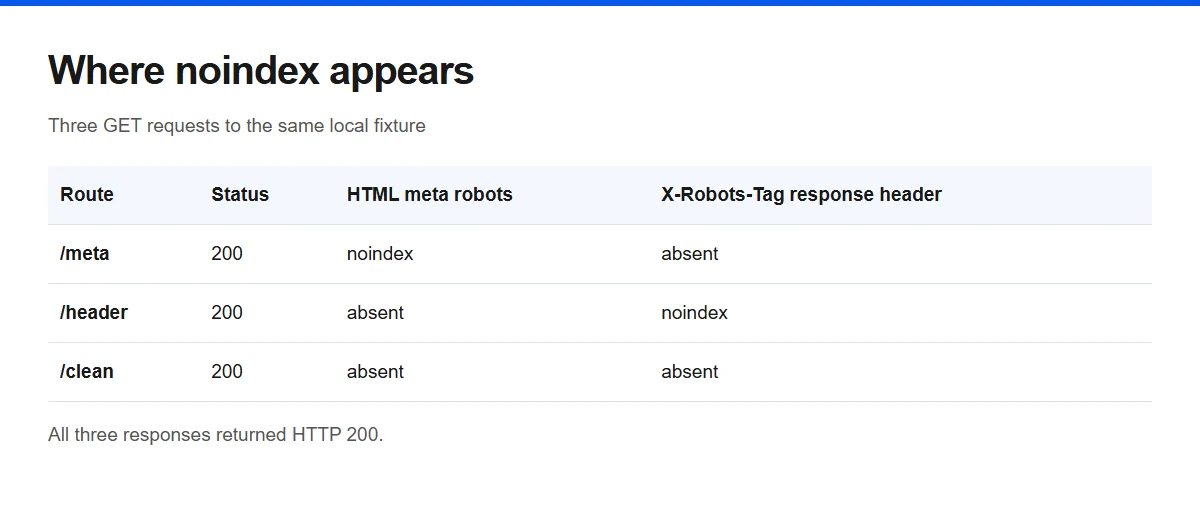
That distinction is the core diagnostic: if Google says Excluded by noindex but HTML looks clean, the next place to inspect is the response headers on the final URL. A template change alone is not enough if the application, plugin, or CDN adds the header later.
Step-by-step troubleshooting workflow
- Capture the final response. Run
curl -L -D headers.txt -o page.html URL. The-Lflag is important because the directive may be on the destination, not the original URL. - Inspect the body. Search
page.htmlformeta robots. If it is absent, the page may still be blocked by a header. - Inspect headers. Search
headers.txtforX-Robots-Tag. Google supports this mechanism for both HTML and non-HTML content. - Check the final URL. Make sure the tested URL matches the canonical destination after redirects.
- Fix at the emitting layer. Remove the unwanted directive in the application, plugin, or CDN rule that adds it.
Search Console’s Excluded by noindex state can reflect either deliberate or accidental exclusion. The help doc does not measure how quickly recrawling or reindexing happens, so do not treat the label as a timing forecast. Source: Search Console help.
Symptom, cause, check, fix, verification
| Symptom | Cause | Check | Fix | Verification |
|---|---|---|---|---|
GSC shows Excluded by noindex |
Directive in HTML or header | Run curl -L -D headers.txt -o page.html URL and search for noindex |
Remove or change the directive at the source | Repeat the request; both body and headers are clean |
| HTML is clean but the issue remains | X-Robots-Tag on the final response |
Inspect the final 200 OK headers |
Remove the header in the app, plugin, or CDN | headers.txt no longer contains X-Robots-Tag: noindex |
| The directive is on a different URL | Redirects lead to another destination | Compare the initial and final URL | Place the directive on the intended page only | The final destination is checked without extra signals |
The page is blocked in robots.txt |
Google cannot fetch the page to see the directive | Confirm the URL is crawlable | Do not use robots.txt as a substitute for noindex |
Google can fetch the page and see the intended rule |
Practical caveat: robots.txt and noindex solve different problems. If you want exclusion from the index, but need Google to read the directive, do not block the URL at crawl level. That matches Google’s documentation on indexing control.
What to do in a real site
If noindex is accidental, inspect three layers: the HTML template, the server response header, and any delivery layer such as a plugin or CDN rule. Many surprises come from a layer above the page template adding X-Robots-Tag to an entire path or host. If the directive is intentional, verify it is attached to the page you really want excluded, not to the canonical destination or an important category page.
For a quick sanity check, aim for a control state like /clean: no X-Robots-Tag in headers, no meta robots noindex in HTML, and a final 200 response on the canonical URL. That is the baseline to confirm before you recheck in Search Console.
What if X-Robots-Tag appears only after a redirect?
The live.headers file contains one header group per response. Record the status sequence and final URL first. Then compare the final X-Robots-Tag on the affected page and a related page you expect to be indexable. If it differs for one route, check its page-type rule. If it appears across a section, inspect templates, proxy rules and the CDN in turn.
After the fix, repeat the public GET. Check an intentionally excluded control URL as well: its directive should still be present. For private resources, separately verify that access requires authentication. noindex controls indexing, while authorization protects access to the resource.
Where to check once the directive is gone
If the live test cannot crawl the page, check the robots.txt restriction. If the directive is gone but the page still is not indexed, inspect its Search Console indexing status. Use Reproleaf for adjacent technical checks.
FAQ
Can I detect noindex from HTML alone?
No. Google accepts noindex both in HTML and in the X-Robots-Tag header. A clean body does not rule out a header-based block.
Why must I follow redirects?
Because the directive may exist only on the final destination. The final 200 OK is what matters.
Is robots.txt the same as noindex?
No. Blocking crawling is not the same as instructing indexing, and it can prevent Google from seeing the directive at all.
Why can Search Console still show the state after a fix?
Because the help documentation does not promise immediate index refresh. Recrawl and reprocessing take time.
Should non-HTML files be checked too?
Yes, if the directive could be sent as a header. Google documents X-Robots-Tag for non-HTML responses as well.
Sources: Google Search Central: blocking indexing, Google Search Central: robots meta tag, Search Console help: Excluded by noindex.
Need help with your website?
Development and SEO services →