Sample CSV export · Finished CSV report · Audit script. The example contains ten fictional deals. Run the same checks, inspect the results, or adapt the fields to your own reporting process.
Save crm-fixture.csv and check-crm.txt in a separate directory and run python check-crm.txt. Open the generated crm-report.csv and confirm that D04 and D08 are the only stale deals. The script overwrites the report on each run. Save the first result under a different name if you plan to compare runs.
How to define the first CRM data quality snapshot
Choose a snapshot date, intake window and inclusion rules. The sample is dated November 20, 2026, in UTC. It counts inbound inquiries created from November 1 up to the snapshot date, excluding the snapshot day. An active deal has status open. Activity is stale if the last action was more than 30 days ago. A missing activity date is recorded separately because there is no observed date to compare with the cutoff.
Export one row per deal and retain a stable ID. If multiple phone numbers cause the export to repeat a deal, keep contacts in a separate table and count at the level the rule is meant to measure. For an initial snapshot, include the ID, status, creation and last activity dates, owner, inbound flag, source, channel and contact detail. Keep exports containing customer data in approved storage with restricted access.
This audit concerns data in an operating CRM. In CRM user acceptance testing, staff check a release candidate against their workflows. In a CRM migration, the team reconciles the destination with the source. A recurring quality check answers the follow-up question: after launch, do new inquiries, rule changes and integration updates still leave the data usable?
Five checks, calculated on ten fictional deals
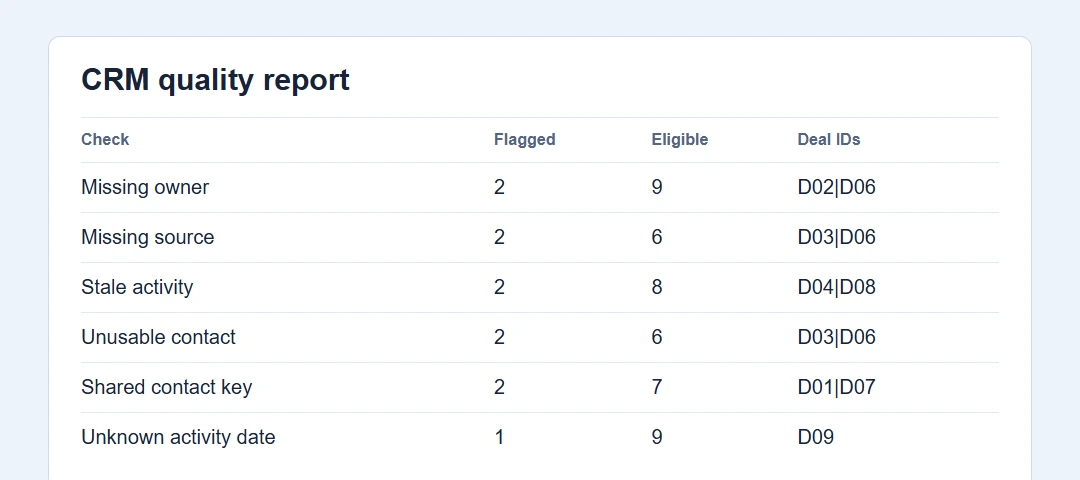
For each rule, calculate flagged records / eligible records. If no record is eligible, show the denominator and leave the percentage blank. In the fixture D06 is flagged by three separate checks. The rates describe different populations and can overlap, so adding them does not yield a meaningful error rate.
| Check | Eligible records | Sample result | What to inspect |
|---|---|---|---|
| No owner | 9 open deals | 2 of 9, D02 and D06 | Check routing, backup assignment and owner history. |
| No source | 6 new inbound inquiries | 2 of 6, D03 and D06 | Compare the source event with the integration mapping. |
| Stale activity | 8 open deals with known activity date | 2 of 8, D04 and D08 | Review the activity log, overdue task and last meaningful action. |
| Unusable contact | 6 new inbound inquiries that require contact details | 2 of 6, D03 and D06 | Check the intake form and confirm missing or malformed details. |
| Duplicate candidates | 7 records with a usable contact key | 2 of 7, D01 and D07, one group | Compare the account, history and deal context before deciding. |
Check the date boundary and missing dates separately
D04 and D08 fall before the cutoff. D05 falls exactly on October 21 and passes the example’s strict “more than 30 days” rule. The report lists D09 separately as unknown activity date, one out of nine active deals. D10 is closed and is excluded from the activity and ownership denominators. If routine edits update the field in your CRM, measure the last meaningful action in the activity history. A bulk sync can otherwise make a neglected deal look recent.
Review shared contact keys before merging records
For this sample, Sales@EXAMPLE.COM and sales@example.com produce the same normalized email key. The two deals share a contact point, which can be legitimate for a company with several open opportunities. Use the account, activity history and ownership to decide what the match means. The separate CRM contact deduplication guide covers how to review merge candidates safely. A contact string that fits the format is only usable for this check. Verifying that it exists and belongs to the right person is a separate task.
Turn findings into a fix and run the audit again
Take D06. For the missing owner, identify the queue and its maintainer, then test assignment with a fresh inquiry. For the source, restore the value from the originating event when the log supports it. If the source is unknown, preserve that fact and fix the mapping for future leads. Correct the contact from a verified channel rather than entering a value to improve the completeness rate.
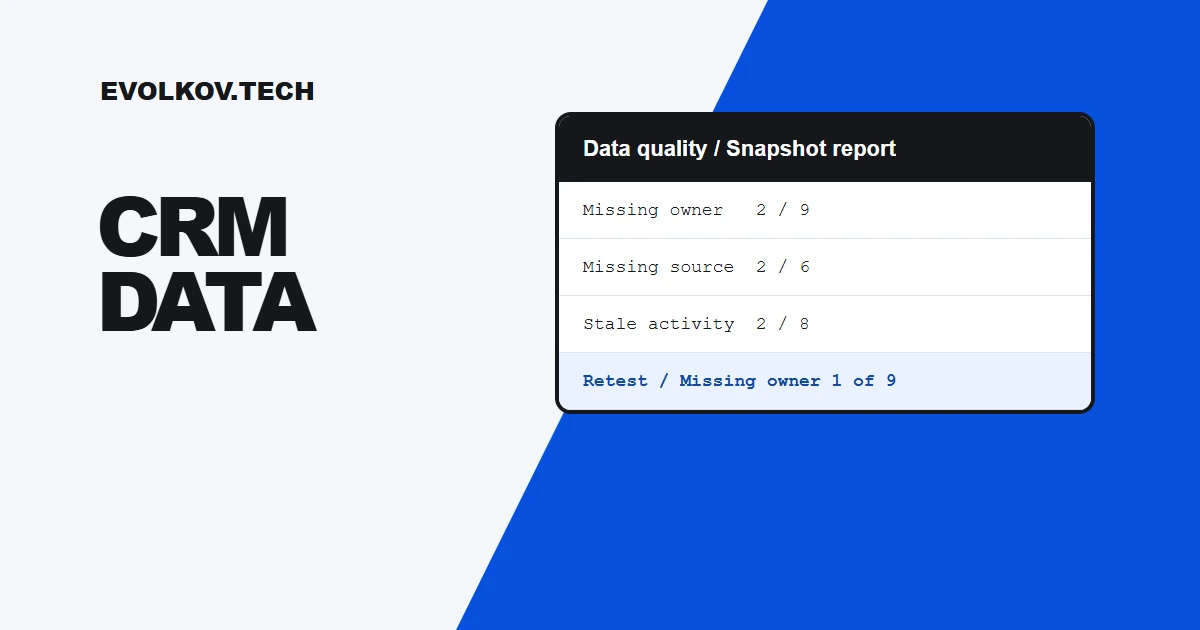
For a controlled retest, I changed only D06’s owner_id to U2. On the same snapshot, the owner check fell from 2/9 to 1/9, leaving D02. The other checks produced the same results. Compare the next export separately and report both counts and percentages so a change in the number of eligible deals is visible. For example, 1/9 and 3/30 show roughly similar rates but imply different remediation workloads. Assign an owner for each rule and schedule the next review.
Completeness, validity and accuracy answer different questions. A non-empty lead source can still be wrong, and a valid phone format cannot confirm that a number is current. Define the purpose of each field before deciding how to validate it. A field might route a lead, support attribution, let sales reach a prospect or tie events to the right record. The Government Data Quality Framework guidance describes those distinctions.
Frequently asked questions
How often should you audit a live CRM?
Pick an interval that gives the team time to recover a lead or correct an assignment. Check more often after launch or after an integration change. Once the process is stable, keep the rules, time zone and intake window consistent between runs so results remain comparable.
Should these rules move into the CRM itself?
Use an export for an initial audit. When a rule is stable and directly affects the sales team, it can become a write-time check or an alert. Keep periodic reporting to catch paths that bypass the front end. If you are scoping custom CRM development, include those checks alongside integration and maintenance work.
What should you check when a CSV passes through Excel?
Import IDs and phone numbers as text. Check a few values in the exported file, including a leading-zero ID, a country code with a plus sign and a date in YYYY-MM-DD format. Correct the import settings before running the audit if the spreadsheet changed any values. Otherwise the next report may reflect a spreadsheet conversion alongside genuine changes in CRM data.
Need help with your website?
Development and SEO services →