Download the CRM UAT checklist (CSV). It includes eight scenarios and separate columns for the actual result, evidence, defect ID and retest. The screenshot further down shows a worked example with fictional records. The downloadable checklist leaves your test results blank.
What should CRM user acceptance testing cover?
UAT begins when the team has a build it can use. The CRM requirements template is where you define a rule such as “route inquiries from North to the North queue.” During user acceptance testing, sales staff follow the workflow under their own roles. They confirm who can see the lead, how many records were created, whether the original details made it through, and whether a sales rep can take the next step without help from a developer.
An integration test may show that the website sent an HTTP request and the CRM returned 200. The workflow can still fail if the lead has no owner or reached the wrong team. Open the sales view and compare the recorded result with the delivery log. Run security, migration and load checks as separate activities. Microsoft’s Dynamics 365 guidance also calls for representative data, role-specific accounts and sign-off from business stakeholders. Microsoft’s go-live checklist.
Set up a staging environment that reflects how sales works
Record the build and import date. Create test accounts for sales reps on different teams, a sales lead and an intake operator. Use fictional contacts under example.com, one existing opportunity, and inbound inquiries marked UAT-01 through UAT-08. Route email and webhook delivery to test destinations. If routing depends on business hours or time zone, write that context into the scenario and run it during the relevant window.
For workflows with two roles, have one person execute the steps and another capture the result from their own account. A rep should see their assigned deals while the team lead can confirm the wider queue. If staging uses migrated records, complete the CRM migration reconciliation first. Include at least one existing deal with notes and activity so that you can exercise a real continuation, such as adding a task to an open opportunity.
Eight CRM UAT test cases for a sales team
Start with these scenarios and adapt the expected results to the signed requirements. Decide what makes a test release-blocking before the first run. Losing a lead during a retry or exposing a different team’s customer record can justify a release hold. A visual spacing issue can often be assigned an owner and a deadline while the team goes live.
| Scenario | Role and action | Expected result | Evidence to record |
|---|---|---|---|
| UAT-01. Intake | The operator submits the form with the UAT-01 marker and campaign source. | One lead appears with the original source, time and contact. | Lead and delivery IDs. |
| UAT-02. Ownership | The sales lead removes the primary rep from the queue. The operator submits a lead from that region. | The backup rep sees the lead within the agreed time. The primary rep receives no task. | Assignment history and time. |
| UAT-03. Delivery retry | The operator resends the event with the original delivery identifier. | One lead, one task and one notification. The log records both attempts. | Both attempts and one lead ID. |
| UAT-04. Record permissions | A rep on the other team searches for a restricted opportunity and tries its known link. | Permissions apply to search, the record view and export if that role can export. | Account role and result in each view. |
| UAT-05. Required field | The rep tries to mark an opportunity lost without a reason, then supplies one. | The first attempt is blocked with clear guidance. The second creates one history entry. | Validation message and audit entry. |
| UAT-06. Migrated opportunity | The rep finds an existing imported deal and creates a follow-up from the record. | Contact, owner and history remain present. The new task is linked to the correct deal. | Opportunity and task IDs. |
| UAT-07. Integration outage | The operator submits a test inquiry while the integration sandbox returns an error, then retries after recovery. | The log records the failure and the integration owner receives an alert within the agreed time. One lead appears after recovery. | Queued state and later delivery. |
| UAT-08. Pipeline totals | The sales lead closes two test deals and filters the report by date and team. | Deal count and value match the control list under the same filters. | Report filters and matching rows. |
Record observable results and verify access from both roles
“Notification received” hides an error if two people received it. A useful result is “Within five minutes, one task appeared in the backup rep’s queue. The primary rep received no email.” For pipeline totals, record the time zone, exclude prior test deals and compare the same opportunity IDs. If totals diverge, inspect the filter dates, currency and selected deal stage before changing the reporting logic.
In UAT-04, open the test record link and search from the second team’s account. If export is available, inspect the exported records as well. Record what the sales lead can do alongside what the rep is prevented from doing. That pair helps verify that an access change preserves the same team’s legitimate work.
Worked example: one failed retry blocks go-live
In the fictional run on build 1.8.2, six of eight scenarios passed. UAT-03 failed because two requests with the same delivery identifier created leads L-03A and L-03B. UAT-07 was marked Not run because the team had not started the outage scenario. The release decision was to hold. The duplicate was reproducible and recovery after a failed delivery still needed a test.
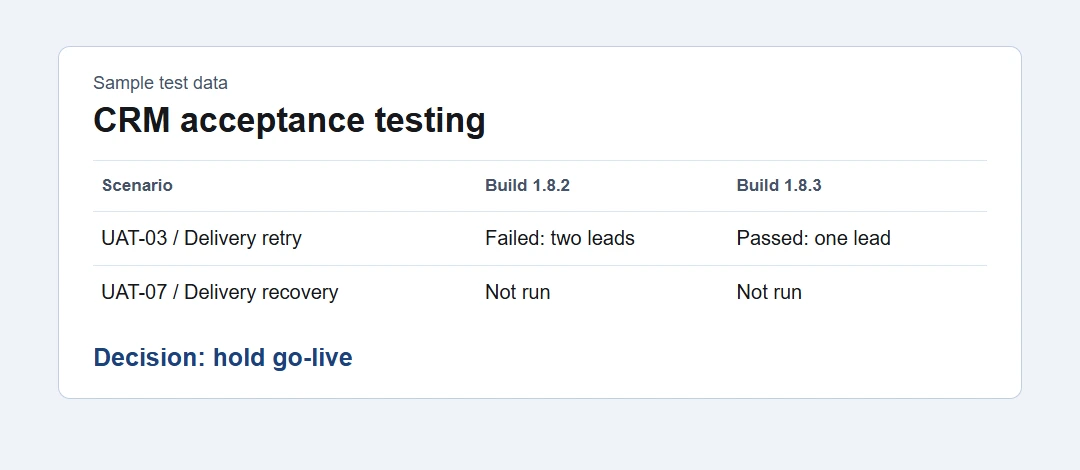
In the defect report, record the event identifier, both timestamps, the two lead IDs and the build. After a fix, resend the same event. Then send a new event from the same contact with a fresh delivery identifier. The first check verifies that delivery retries are safe. The second confirms that legitimate repeat inquiries still reach the team.
For build 1.8.3 in this example, expect one lead from repeat delivery and a separate record from the new event. Close the defect when both results have evidence and record the build used. Also run the outage case, which exercises the same delivery path. A worked retest entry reads “UAT-03, build 1.8.3, passed: one lead after replay and a separate lead after a new event.” UAT-07 is still open, so the release stays on hold. Keep the original and retest outcomes in the log so the approver can see what changed.
Who signs off on CRM go-live?
Name the business owner who can approve the release before the team starts testing. The sales lead can confirm the queues and pipeline, the integration owner can confirm delivery, and the deployment lead can verify the build and readiness of the technical checks. The final record should identify the release candidate, the decision date, open defects, and the owner of any risk the business accepts.
A practical release rule is that every mandatory scenario has passed on the build being shipped or was rerun after a relevant change. Use Blocked when an environment or dependency prevents execution, and Not run when the test has not begun. Either status requires a release decision. A pass-rate summary helps the team track progress. Go-live depends on the evidence for essential workflows and any accepted risks. Microsoft Learn’s implementation test plan.
Frequently asked questions
How many test cases do you need for CRM UAT?
Use the eight cases as a baseline for lead handling. Add cases for mandatory business rules specific to the team, such as discount approvals, an after-hours queue or confidential accounts. Where the cost of failure is high, cover a normal run and a realistic failure or exception.
Can CRM acceptance tests be automated?
Yes. Automation helps set up records and repeat checks consistently. Ask sales staff to complete end-to-end workflows and let the business owner confirm that the outcomes match how the team operates. Link the automated results as additional evidence in the release record.
When should you agree on CRM acceptance with a contractor?
Before development, agree on the workflows in scope, who controls staging and what can stop the release. If you are budgeting custom CRM development, include time for setting up staging data, running acceptance tests and repeating scenarios after fixes.
After go-live, follow up with CRM data quality after launch: five checks to run on an export.
Need help with your website?
Development and SEO services →