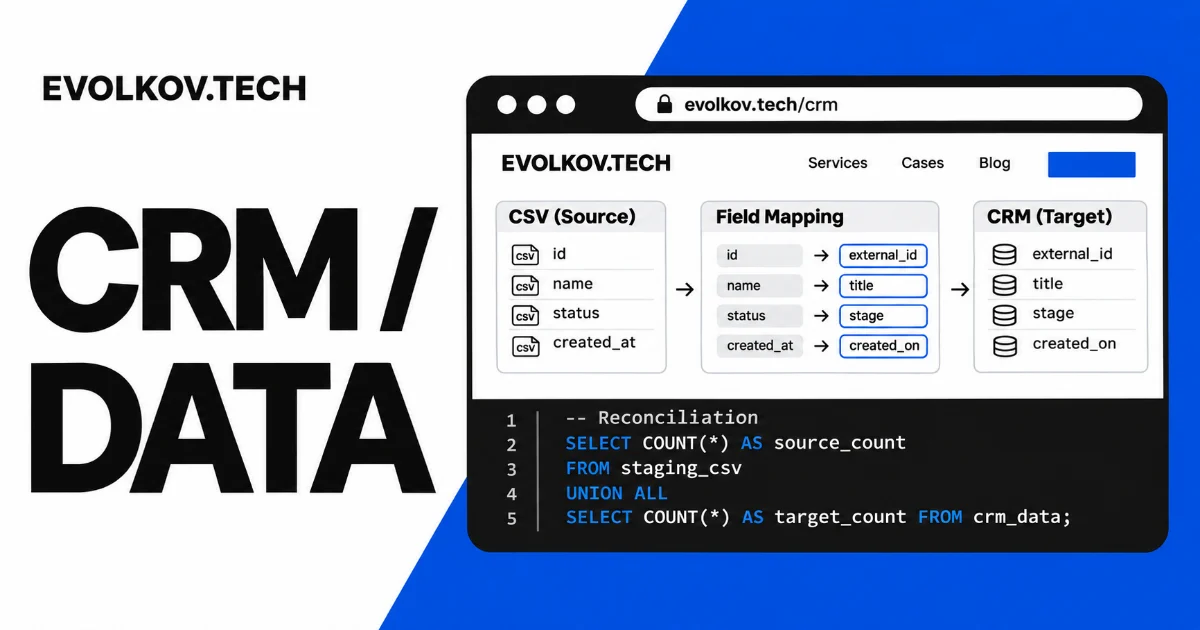
For your project, hold the pilot source of truth until the approved scope, row outcomes, relationship checks and rollback responsibility are reconciled. The six-row fixture below illustrates one narrow gate; it is not the production dataset. If field meanings are undecided, use the CRM requirements template before agreeing mapping and acceptance.
Scope first: what this checklist does, and what it does not
This article is about CRM record migration, not public URL migration, redirect planning, or search visibility work. The specimen is a deterministic six-row CSV fixture. It does not model companies, contacts, deals relationships, attachments, timelines, vendor APIs, or live production throughput.
Use the checklist to approve a data transfer that depends on field mapping, row-level acceptance, reconciliation, and cutover/rollback responsibility. That is a different task from redesigning a CRM, and it should be treated as a separate acceptance workflow.
Before any import, define three things in writing: the source fields, the target fields, and the rule for records that collide on the chosen business key. Requirements recommendations are planning choices, not proof that the migration was implemented.
The guide to custom CRM development cost explains scope and budgeting; prepare the migration test plan separately.
Build the field map before you touch the import tool
Mapping is the first acceptance gate because every later report depends on it. Keep the mapping small enough that a reviewer can read it without guessing how a source value becomes a target value.
| Source field | Target rule | Owner | Exception |
|---|---|---|---|
| Business key / email-like identifier | Match on the agreed unique key for this fixture | Data owner | Merge only records identical under the fixture rule; reject conflicting values |
| Status | Map approved source statuses to target statuses | Process owner | Unknown values are rejected until mapped |
| Owner | Resolve to an approved sales owner value | Sales ops | Missing owners are rejected until assigned |
| Record identifier | Preserve source row identity in the ledger | Migration lead | Every source row must be accounted for |
The map should also state who approves exceptions. In this fixture, the approved change was simple: the source status paused was explicitly mapped to inactive, and one missing owner was resolved to a named sales owner. That is a project decision, not a universal CRM rule.
If your field definitions are still unstable, stop here and finish the requirements conversation first. Unapproved mapping leaves a business decision unresolved even when the import tool accepts the file.
Deduplication: agree the matching rule before import
Agree what makes records identical before merging them. In this fixture, r3 can merge into r2 only when the normalized records match exactly and the merge flag is enabled. The same business key with a different ID, status or owner is a conflict and remains rejected. Keep both the source-row identity and the merge target in the ledger.
Matching rules are provider-specific. HubSpot documents different contact-email, company-domain and import-identifier rules. Confirm the selected workflow rather than treating email as a universal record identity.
For the buyer, the real question is not “does the system deduplicate?” but “which field is the matching key, what happens to collisions, and who approves the merge outcome?” Put that decision in the checklist before trial import.
An owner must also approve what each correction means. The example maps paused to inactive and supplies sales-c for r5; these are explicit fixture decisions, not defaults for arbitrary customer data. In a real import, a convenient default can change responsibility or record meaning. Preserve unresolved rows as exceptions until the data owner makes a decision.
Worked example: six source rows, one ledger, two rule sets
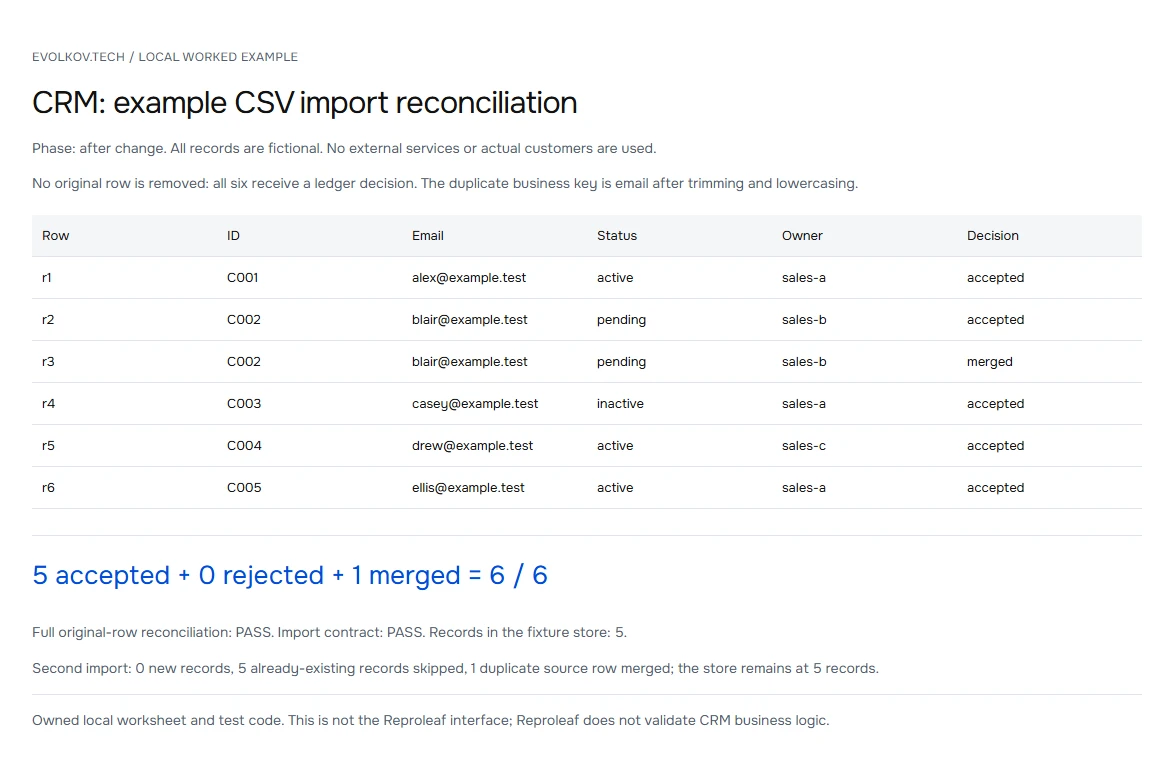
The local fixture uses six flat CSV source rows. The before and after outputs below show the same source rows with different acceptance rules. Every source row is accounted for, and the ledger records what happened to each row.
| Source row | Before outcome | After outcome | Notes |
|---|---|---|---|
| r1 | Accepted | Accepted | Stored as a normal record |
| r2 | Accepted | Accepted | Target row for the duplicate merge |
| r3 | Rejected: duplicate business key | Merged into r2 | Same business key as r2 |
| r4 | Rejected: unknown status | Accepted | Status mapped to inactive |
| r5 | Rejected: missing owner | Accepted | Owner set to sales-c |
| r6 | Accepted | Accepted | Stored without exception |
The before state is straightforward: six observed rows, three accepted, three rejected, zero merged, zero skipped, and three stored records. The findings were r3 duplicate-business-key, r4 unknown-status, and r5 missing-owner. That is a clean rejection set because no row is missing from the ledger.
After the rule changes, the same six rows became five accepted, zero rejected, one merged, and zero skipped, with five stored records. The duplicate row r3 merged into r2, r4 mapped to inactive, and r5 resolved to sales-c. The source set did not change; only the acceptance rules did.
Use the checklist and reproduction file together. The checklist states the required decisions; the local fixture files show one deterministic way to account for the rows. The files are examples, not proof of a production migration.
The JSON inputs retain the same fictional CSV and the two versions of mapping rules. The reports retain row outcomes. The Markdown contains a function and reproduction instructions; save and run that code with the input files. Downloading JSON or Markdown does not execute a migration or connect to a CRM.
Download the fictional before inputs
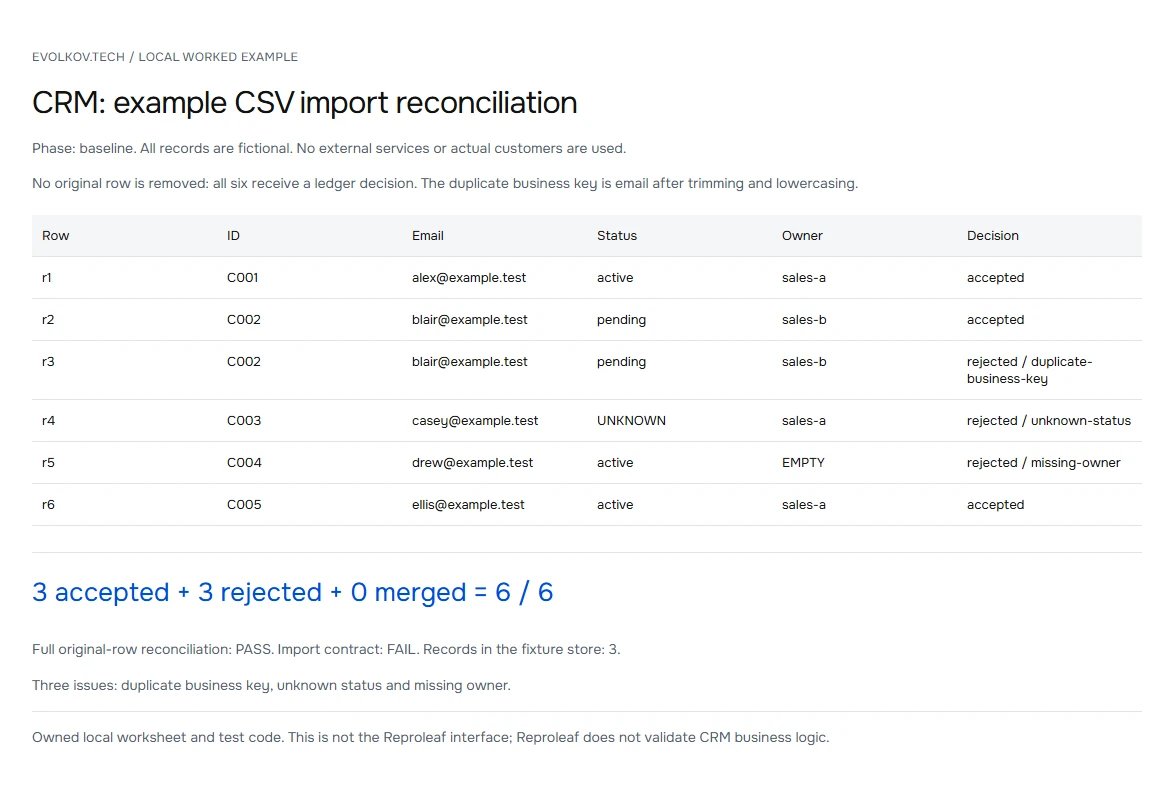
Reconciliation: counts are not enough unless the ledger matches
Reconciliation is not the same as comparing final counts with source counts. A migration can have six source rows and five stored records and still be correct if one row was merged under an explicit rule and every row is accounted for.
That is why the report must include row-level evidence, not only totals. In the after state, the fixture shows six observed rows, six accounted rows, five accepted rows, one merged row, zero rejected rows, zero skipped rows, and five stored records. The repeat import then shows a stable outcome: zero new accepts, zero rejections, one merge event, and five skipped rows.
The repeat result matters because it demonstrates the tested fixture behavior on a second import: the same six rows do not create duplicate stored records. That is not a universal production guarantee; it is the observed behavior of this deterministic specimen.
When you review the after report, verify three things: the source count, the accounting count, and the merge target. The actual missing-row control removes r4: observed and accounted rows become 5 against 6 expected, missing contains r4, and accepted, scopeComplete and reconciled are false. There are no row-level findings, yet scope is incomplete. Do not shrink the expected set simply to obtain a passing report.
For the first after import, row accounting is 6 = 5 accepted + 0 rejected + 1 merged + 0 skipped. On the second import it is 6 = 0 + 0 + 1 + 5, with five records still stored. The ledger accounts for input actions; the record count describes the resulting store. Compare both, then sample field values and rejected-row reasons against your approved rules. Relationship and attachment checks need separate evidence because this fixture is flat.
Cutover plan: gate, owner, and rollback line
Cutover should happen only after the pilot import and reconciliation are both accepted. The switch is not a clerical step; it is a responsibility change between the old source of truth and the new one.
| Gate | Evidence | Owner | Hold or proceed condition |
|---|---|---|---|
| Field map approved | Signed source-to-target rule set | Data owner | Proceed only when every required field has a target rule |
| Deduplication rule approved | Written merge policy for collisions | Migration lead | Hold if duplicate handling is ambiguous |
| Trial import reconciled | Row ledger with accepted, rejected, merged, and skipped counts | QA or migration lead | Proceed only when all source rows are accounted for |
| Rollback path agreed | Named owner and reversal trigger | Project owner | Hold if rollback cannot restore the previous source of truth |
No cutover or rollback was executed in this fixture. A passing after report and a repeat import with five stored records establish only the declared row-processing contract. Before a real switch, test representative project data, entity links, critical workflows and the recovery procedure in the agreed environment.
Real projects should also define who freezes changes during the switch, who validates the first live write, and who authorizes rollback. Record the final reconciliation time, the pause or delta-transfer rule, permitted lag, the first-write owner and a stop condition. Check how new records created after switching will be retained if you restore an older database. A backup file alone does not settle that recovery decision. These are project gates to verify, not outcomes measured by the six-row specimen.
Download the checklist and reproduction code
What this fixture does not prove
The fixture proves a specific row-ledger workflow. It does not prove relationship migration, attachment migration, timeline migration, API behavior, vendor-specific bulk-import limits, or legal compliance.
It also does not prove that every CRM should treat email as the universal unique identity. Provider rules differ. If the selected platform has a different matching model, your checklist must follow that platform, not the sample fixture.
Keep the specimen boundary visible in the document so reviewers do not mistake a deterministic example for a production promise. The safest language is precise: this is a tested fixture with six rows, not a universal guarantee for all migrations.
If you are still deciding whether the program is a migration, a rebuild, or a phased CRM change, finish the requirements discussion first and use the next document to capture field ownership and acceptance references.
FAQ
Q1. What is the minimum checklist for a CRM data migration?
Start with the field map, the deduplication rule, the trial import, the reconciliation ledger, and the rollback owner. Without those five items, the import result is hard to trust.
Q2. Is a matching record count enough to approve cutover?
No. The after count can be correct while a row is missing from the ledger. Approval should depend on all source rows being accounted for and every merge being visible.
Q3. Can a duplicate row be accepted instead of merged?
Only if the approved business rule says so. In this fixture, the duplicate business key was merged into an earlier row after the rule change.
Q4. What should the buyer ask before trial import?
Ask which field is the match key, how unknown statuses are handled, who resolves missing owners, and who signs off on rollback if the pilot source of truth has to be restored.
Q5. How do I know whether the sample reports are production-ready?
You do not infer that from the specimen alone. Treat the reports as local fixture outputs and add your own environment, relationship, and rollback tests before production cutover.
Next step: freeze the checklist, run the report, then finish the parent brief
First reproduce the fictional example to understand the ledger. Then approve your project field map, expected source-row set and representative test data, and run the agreed trial import. If the ledger cannot explain every source row, stop before cutover.
The checklist file in this package is the working document to use for that review. It includes the reproducible mapping and row-accounting structure; do not replace it or rewrite the fixture logic before you have compared the reports.
After testing the import, read the guide to custom CRM development cost for implementation scope and budgeting, then use the requirements template to close any remaining field or owner questions before production approval.
Before importing, use How to deduplicate CRM contacts without merging different people to dry-run identity matches and conflict handling.
After migration, use CRM data quality after launch: five checks to run on an export to monitor new records and integrations.
Need help with your website?
Development and SEO services →