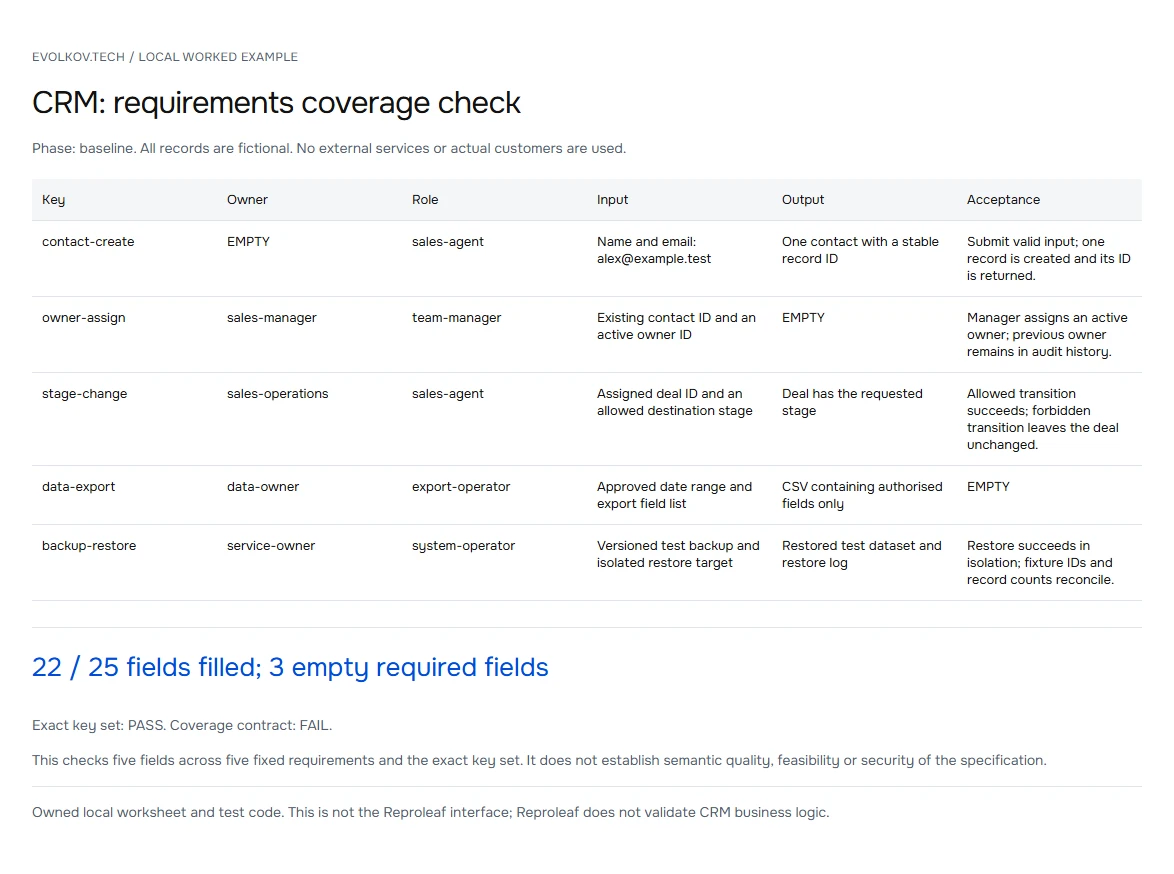
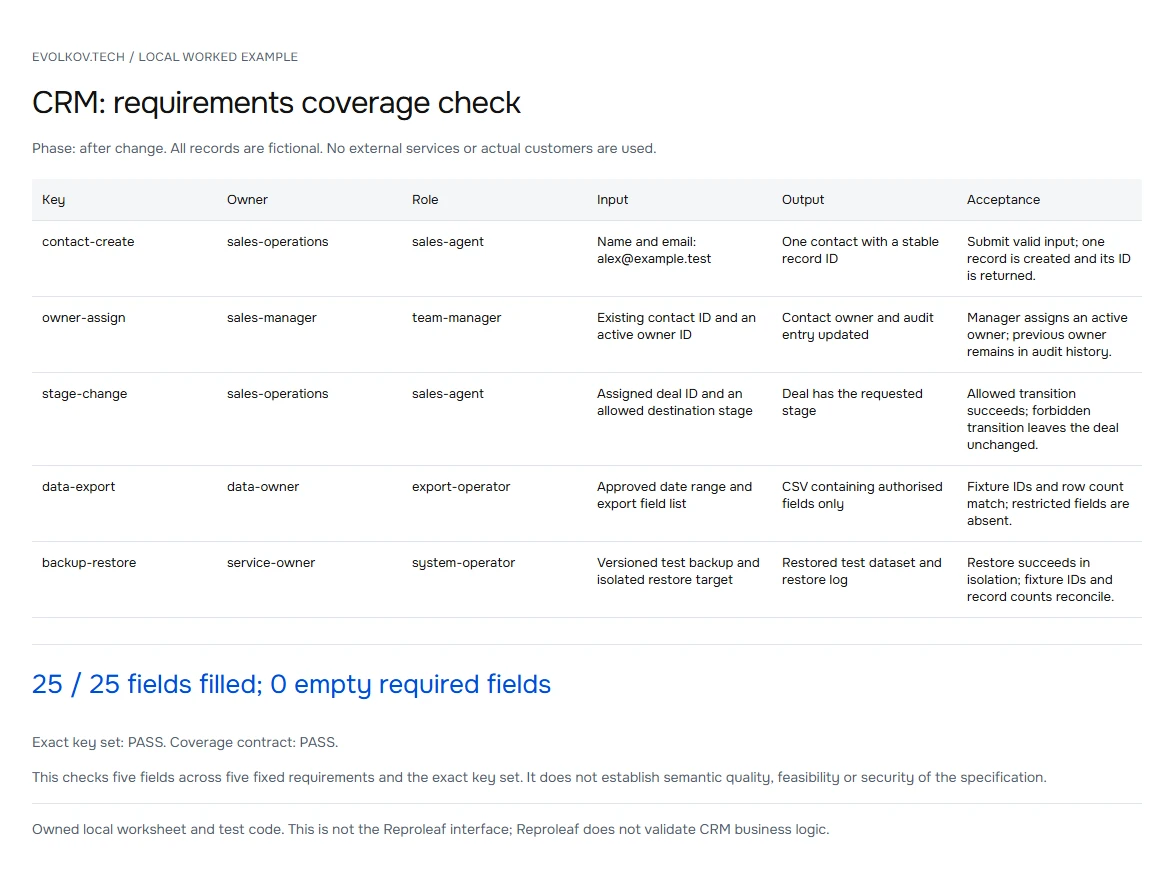
For the example in this article, the fixture accepts only one exact structure: five requirements named contact-create, owner-assign, stage-change, data-export, and backup-restore. Each requirement needs five nonempty fields: owner, role, input, output, and acceptance. That yields 25 expected field values. Before the fix, 22 of 25 fields were filled and three were empty; after the fix, 25 of 25 were filled and the exact-key-set check passed.
Use that structure as a buyer-facing brief, not as proof that the CRM will work correctly. A nonempty sentence can still be vague, and this article does not claim semantic completeness, security, feasibility, or legal compliance.
Scope: what belongs in the CRM requirements document
Start by writing the boundary of the document. The point is not to describe every future feature; it is to prevent vague estimates and prevent the team from guessing which workflows are included in the project.
A practical scope section answers four questions:
- Which workflow is in scope?
- Which record types and user roles are in scope?
- Which integrations, exports, or migration inputs are in scope?
- Which items are explicitly out of scope?
Use the document to request comparable estimates before development starts. If existing data is in scope, agree on export, mapping, rejection rules, and reconciliation separately; use the migration checklist to plan that work: CRM migration checklist.
| Area | What to state | Concrete example | Acceptance owner |
|---|---|---|---|
| FR | Workflow steps | Create a contact, assign an owner, change stage | Product owner |
| NFR | Measurable constraint | Proposed target: 95% of searches finish within 2 seconds with 10,000 contacts and 20 concurrent users | Business analyst |
| Constraint | Role or data limit | Only sales managers can edit reassignment rules | Process owner |
| Exclusion | What is not included | Marketing automation is excluded from this phase | Sponsor |
The numbers in the NFR row are an illustrative target to negotiate, not a measured capability or a universal threshold. For your system, name the dataset, load, environment and measurement method. Keep scope statements testable and attach a decision owner.
Processes: how to structure the specification so estimates stay comparable
A useful CRM requirements template is organized around decisions, not around paragraphs. Each requirement should show who acts, what data is touched, what system interaction happens, what error case is expected, and what counts as done.
Use this order for each functional requirement:
- Purpose of the workflow.
- Trigger and actor.
- Input data and validation rules.
- Output or system side effect.
- Priority.
- Acceptance criteria.
- Open questions or excluded variants.
This structure helps contractors compare the same scope rather than estimate different interpretations. It also makes review easier for a buyer who needs to approve a brief before asking for a quote.
For nonfunctional requirements, replace broad words such as “fast” with a measurable quality condition and its operating assumptions. Response time needs a dataset and load; recovery needs an agreed restoration target and method. Required fields, rejection paths and logging actions also need behavioural rules of their own. The fixture in this article does not test quality semantics; it only confirms that the required fields exist and are nonempty.
When the workflow includes integration, define input and output independently. Input should say what arrives from another system or from a user; output should say what the CRM returns, stores, or exports. If an error is possible, define the message or status the team should expect.
Requirements: what to include in each functional and nonfunctional item
Write each requirement so that another person can review it without guessing the business rule. That is the main practical value of the template: it forces the scope into a shape that can be discussed, redlined, and estimated.
A strong requirement usually includes five ingredients:
- Actor or role — who performs the action.
- Action — what happens.
- Data — which fields or records are involved.
- Restriction — who may or may not do it.
- Acceptance — how the team will judge completion.
For nonfunctional requirements, keep the same discipline. Write measurable quality conditions with their context: availability windows, response-time limits under agreed load, or recovery-time targets. Validation and rejection paths describe functional behaviour and should be specified separately. If the requirement is about export, backup, or restore, say whether you need a file, a status, a log entry, or a rejection response.
A filled specimen makes the distinction concrete. In contact-create, the rule owner is sales-operations, the acting role is sales-agent, the input is a name and alex@example.test, the output is one contact with a stable ID, and acceptance says valid input creates one record and returns its ID. Those are documented expectations, not observations of a working CRM. The rule owner approves behaviour; the acting role performs it.
Before approval, ask what identifies the same contact, what a repeated request should do, and who can see the result. For an integration, record the source of truth, transmitted fields, trigger, response and failure path. If the answer is undecided, name the question and its decision owner instead of writing “default behaviour.” A timeout alone does not decide whether an upstream record exists; agree how the team will establish the result before retrying.
Do not assume the template itself guarantees correctness. The specimen used for this article is fictional, and the checks only validate field presence plus an exact set of keys. They do not prove that the requirements are good, complete, or implementable.
A written specification prepares the scope and cost discussion; product analysis still needs its own review. For help comparing development scope and costs, read: custom CRM development cost.
Roles: define who may act, and when they must be blocked
Role rules are one of the easiest places for a CRM brief to become ambiguous. A buyer may say “users can edit records,” but that phrase leaves open who counts as a user, which actions are restricted, and what happens when permission is missing.
Use role rules to separate business logic from interface convenience. State the permitted actor, the data involved, and the forbidden case in the same line. If a process touches more than one team, identify the acceptance owner for each side of the rule.
| Action | Data | Allowed role | Forbidden case |
|---|---|---|---|
| Create contact | Contact profile fields | Sales agent | Guest or unauthenticated visitor |
| Assign owner | Owner field | Sales manager | Agent changing another team’s assignment |
| Change stage | Deal stage | Assigned salesperson | User without record access |
| Export data | Filtered record set | Authorized admin | Restricted role requesting full export |
These are planning examples, not universal standards. The right rule depends on your organization, but the document should still state the rule clearly enough for review and pricing.
Keep the permissions language short. If you need exception handling, note it explicitly instead of burying it inside a workflow paragraph.
Example: the fixed requirement set and the before/after observations
The example below shows the exact field-presence issue the fixture caught. The specimen is fictional. It is not a real client document, and it is not a statement about CRM quality beyond the narrow contract of field presence and key set.
The before document contains 22 of 25 populated required fields. The three gaps are shown below.
| Requirement key | Before observation | After observation |
|---|---|---|
contact-create | owner empty | All five fields present |
owner-assign | output empty | All five fields present |
stage-change | No missing fields | No missing fields |
data-export | acceptance empty | All five fields present |
backup-restore | No missing fields | No missing fields |
Observed result: before completion, the check rejected the document because three fields were empty even though the expected five requirements were present. After completion, the check accepted it because all 25 fields were filled and the key set matched exactly.
The control cases are useful because they show what the check is and is not doing. A document with only four requirements was rejected even though all 20 of its own fields were filled: the expected backup-restore key was missing. A document with six requirements, including a duplicate key, was rejected. A document with one unexpected key replacing an expected one was rejected. That behavior matters because it protects the exact set of required keys, but it still does not test whether the wording is operationally sufficient.
The JSON inputs retain the fictional documents before and after completion. The reports retain findings for each state. The Markdown file contains the check function and reproduction instructions; save and run that code in the stated environment. The JSON and Markdown files do not run checks by themselves.
The screenshots described here are actual local fixture outputs, not Reproleaf screenshots and not client system captures. They show the observed acceptance state and the field-presence difference, nothing more.
Download the fictional before inputs
Acceptance: how to decide whether the CRM brief is ready for estimates
Acceptance should answer a simple buyer question: can a contractor estimate this brief without inventing missing scope? For that reason, the acceptance section should verify the completeness of the document, not just the presence of an idea.
In this fixture, acceptance means the expected key set is exact, every required field is nonempty, and the declared requirement count matches the observed count. The accepted result shows 25 of 25 fields filled, five observed requirements, no missing keys, no unexpected keys, and no duplicates.
The completed five-key specimen passes this declared presence contract. The four-key control remains rejected despite 20 populated fields; the six-row duplicate control and unexpected-key replacement are also rejected. Do not change the expected key set simply to obtain a passing report: approve and version any scope change first.
That is a narrow technical acceptance rule for the specimen. In a real CRM brief, you would usually add business acceptance too: who approved the scope, which open questions remain, what exclusions were confirmed, and whether the next estimate can be requested.
Keep the acceptance wording concrete. Examples of acceptable statements are:
- The owner of each requirement is named.
- The role, input, output, and acceptance fields are nonempty.
- The key set matches the approved list exactly.
- No duplicate requirement keys remain.
Remember the boundary: the fixture checks only the contract of fields and keys. It does not validate implementation, security, data retention, backup restoration, or legal compliance. A filled-in sentence can still be wrong or too vague for delivery.
Changes: how to keep scope edits visible and reviewable
A change log matters because CRM briefs usually evolve after the first review. Without a change log, the team cannot tell which version was approved, which requirement was rewritten, or which assumption changed the estimate.
Write changes as decisions, not as narratives. For each change, record what changed, why it changed, who requested it, and whether acceptance criteria need an update. If a change affects export, migration, or a role restriction, note that separately instead of hiding it in a paragraph.
The article’s specimen includes a useful lesson: a brief can be structurally close to complete and still fail because three fields are empty. That is why the change log should track both scope edits and completeness corrections. A missing acceptance field is not the same as a new business requirement.
General planning practice recommends versioning, but that recommendation is not a universal standard. Use the level of control that fits your procurement process and approval flow.
Do not confuse the documentation checklist with implementation validation. The document can be approved for estimate requests while still requiring separate discovery for technical feasibility or migration design.
Download the checklist and reproduction code
FAQ: buyer questions that usually come up before approval
1. Is this template a universal CRM standard?
No. It is a practical structure for buyer review and estimation. The exact wording should match your process and risk profile.
2. Does a filled template prove the CRM will work?
No. The fixture only checks that required fields and keys are present. It does not prove semantic quality, feasibility, security, or compliance.
3. Why do the examples use five requirements and 25 fields?
Because the local checker in this article expects five requirements with five fields each. That is a fixture rule, not a universal documentation rule.
4. Should migration details be inside the same CRM brief?
Only if the scope explicitly includes existing data. If migration is in scope, define export, mapping, rejection rules, and reconciliation clearly, and use the migration checklist as the separate next read.
5. What should a buyer ask the contractor after drafting the brief?
Ask whether the estimate covers the exact scope, exclusions, roles, inputs, outputs, and acceptance criteria; then confirm whether any open questions remain before approval.
Next step: finish the brief, then compare estimates
Before requesting estimates, do one final pass through the document and check that every requirement has an owner, role, input, output, and acceptance field; then confirm that every explicit exclusion is written down. If existing records or a platform migration are in scope, add the separate migration plan next.
To compare implementation scope and costs, read: custom CRM development cost.
If your next task is data transfer, use the CRM migration checklist. If your next task is estimation, keep this brief as the single source of scope and send the same version to every bidder.
Use your own approved key set and required fields when reviewing your project document. The five keys in the downloadable specimen are only the example scope. Run the structural check, review ambiguous statements with the responsible people, retain unresolved questions, then send the same approved version to each bidder.
Add contact identity rules and review criteria to your requirements using How to deduplicate CRM contacts without merging different people.
Once the requirements are implemented, turn them into test cases and run them on the release candidate. See CRM UAT testing: 8 sales workflows to verify before launch.
Need help with your website?
Development and SEO services →