Direct answer
To audit duplicate title tags, load the supplied inventory JSON into the SEO checker’s Site inventory mode, run the analysis, then compare the before and after reports for the same inventory. In the supplied example, six records are synthetic metadata checked in the real tool, not a client crawl. The before report shows two duplicate-title groups; the after report shows zero.
Use the comparison table as the summary: pages 6 to 6, known titles 6 to 6, duplicate groups 2 to 0, changed title fields 2. Grouping uses normalization and locale partitioning, so it measures repeated supplied strings, not meaning, penalties, duplicate content, or cannibalization. It also does not check canonical tags or the link graph; those are separate next steps.
For Google-specific title guidance, use the official document on title links: Google title link guidance. Google recommends descriptive and concise title text that distinguishes pages, and it may generate different title links from multiple sources; it does not define duplicate string groups as penalties or require title text and H1 to differ.
What the before report shows
Open the checker, choose Site inventory, and paste the supplied inventory JSON into the Or paste the JSON / XML inventory field, then run the analysis. The workflow is the same for before and after: save the report and compare a new report for the same inventory.
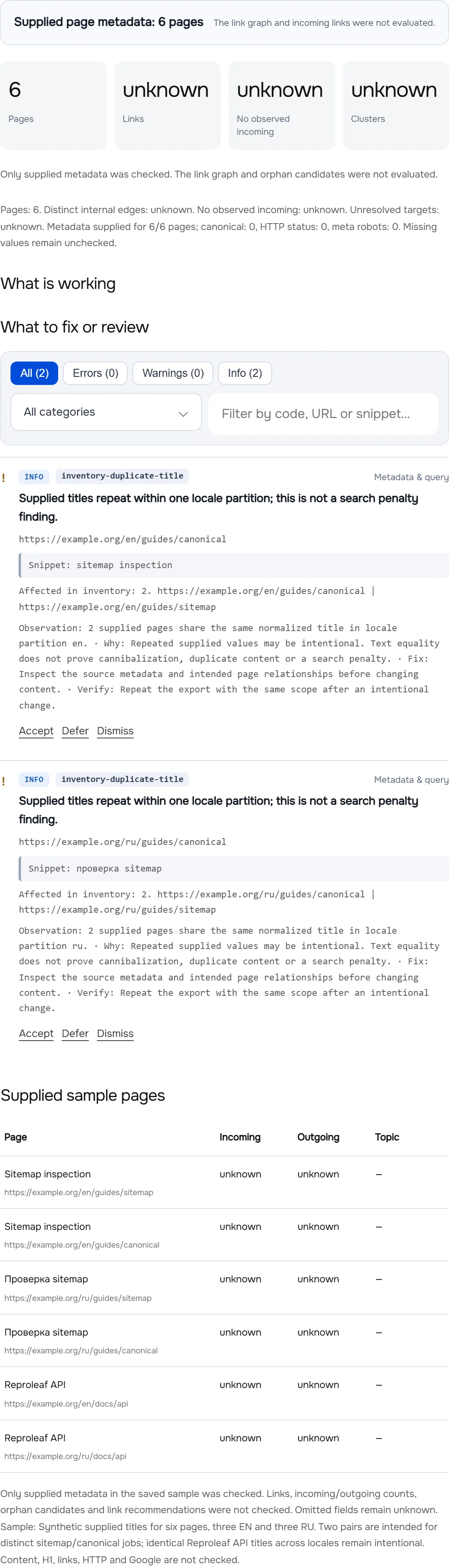
The before set contains six pages across EN and RU. The titles include these exact supplied examples:
https://example.org/en/guides/sitemap—Sitemap inspectionhttps://example.org/en/guides/canonical—Sitemap inspectionafter whitespace normalization fromSitemap inspectionhttps://example.org/ru/guides/sitemap—Проверка sitemaphttps://example.org/ru/guides/canonical—Проверка sitemaphttps://example.org/en/docs/api—Reproleaf APIhttps://example.org/ru/docs/api—Reproleaf API
That yields two duplicate-title groups in the before report: one EN pair and one RU pair. Do not confuse two groups with two pages; each group contains two pages. The intentional cross-locale Reproleaf API match is left ungrouped across locales because the method partitions by declared locale. That means the audit is checking repeated supplied titles, not whether the title text is globally unique across the whole site or whether it is a good title.
The same test also shows why this is not a content or crawl audit. Content, H1, links, HTTP and Google are not checked in the supplied inventory. This is a metadata-only duplicate-title check.
How to choose which titles to change
Change the titles in the real HTML/CMS template, then recapture the same inventory set. Do not treat editing the demonstration JSON as a website fix. The synthetic example is useful because it isolates title strings, but it does not deploy anything.
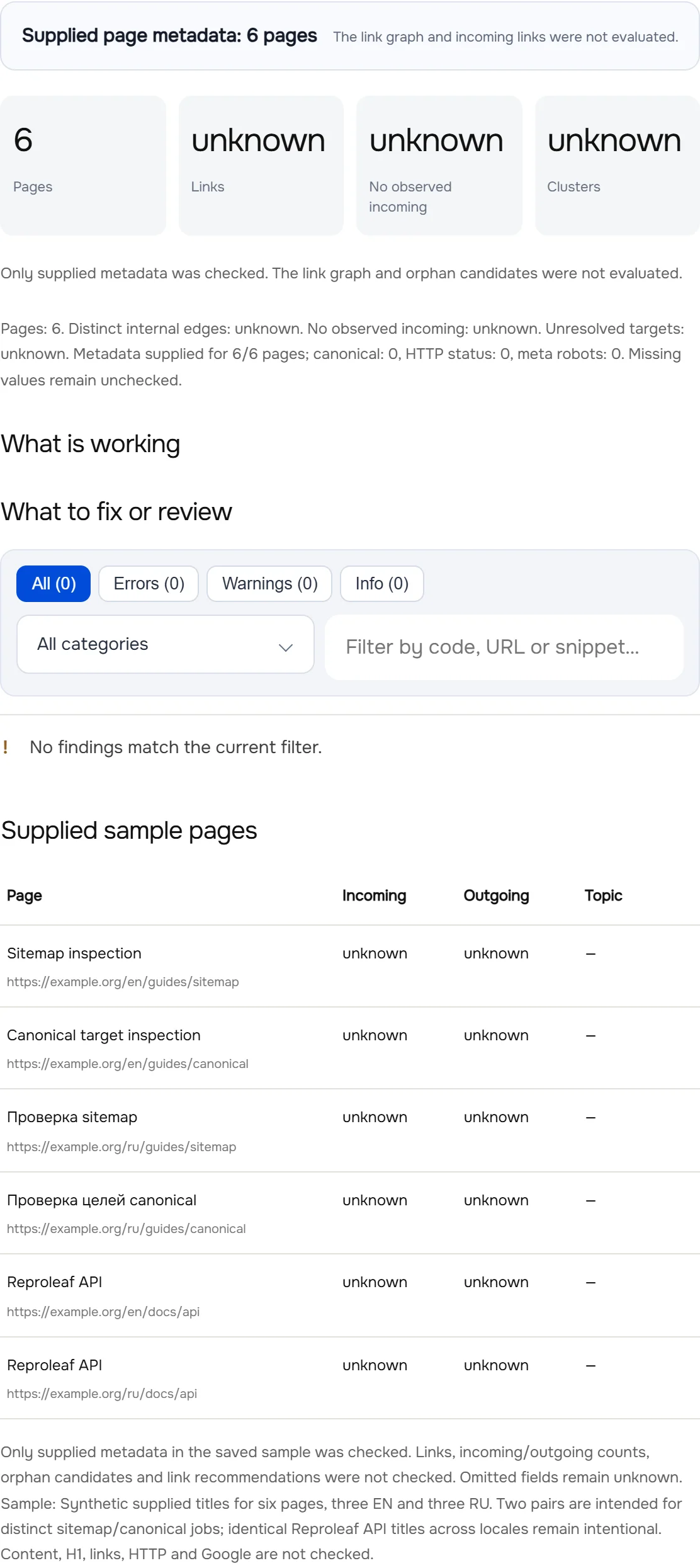
The example owner declares the sitemap and canonical guides to serve different purposes. In the supplied after set, exactly two title fields change:
https://example.org/en/guides/canonical: from the normalized valueSitemap inspectiontoCanonical target inspectionhttps://example.org/ru/guides/canonical: fromПроверка sitemaptoПроверка целей canonical
The remaining four titles stay known and unchanged, including the intentional Reproleaf API pair. That is why the after comparison can show zero duplicate groups without claiming that the pages themselves are better, more relevant, or more likely to rank. It only confirms that the repeated supplied strings were resolved in the after inventory.
For editorial work, the practical rule is simple: make titles specific enough that pages can be told apart, and keep boilerplate from flattening distinctions. Google’s title-link guidance supports descriptive, concise titles and acknowledges that repeated boilerplate can be handled differently by Google; it does not promise that the supplied title will be displayed unchanged.
What the after report proves
For a real website, capture the same inventory after editing the template and compare the saved reports. Here we rerun the corrected supplied JSON. In the supplied after report, there are still six pages and six known titles, but duplicate groups drop from two to zero. That is a verified change in the supplied metadata set.
| Metric | Before | After |
|---|---|---|
| Pages | 6 | 6 |
| Known titles | 6 | 6 |
| Duplicate groups | 2 | 0 |
| Changed title fields | 0 | 2 |
The important distinction is that the comparison verifies the disappearance of duplicate groups in the supplied records. It does not by itself prove any live indexing change, any traffic effect, or any Google title display change. Also, this title grouping step does not evaluate canonicals or links; those should be checked separately in follow-up audits such as the canonical-tag audit or internal-linking audit.
Use the locale-specific inventory links for the exact report set you need:
For tool context, see the parent product page: Reproleaf. For methodology context, see Reproleaf methodology. A related operational pattern is described in the canonical tag audit.
How to read the unknown control
We also repeated the check with the same URL list and coverage description but without the two replacement titles: their supplied values were empty strings. Only four titles were then available, and no duplicate groups formed. The comparison nevertheless marked zero findings resolved and retained two as unverified.
Without the replacement values, the comparison cannot establish that the earlier repetition was corrected. An empty string in this input represents missing information; it does not prove that an HTML title element is empty. A finding disappearing from a report is therefore not always a confirmed fix.
FAQ
Are duplicate titles a penalty?
Not in the evidence here. The method only groups repeated supplied strings after normalization and by locale. Google’s title-link guidance says to write descriptive, concise titles and notes that repeated boilerplate may be handled differently, but it does not define duplicate string groups as a penalty.
Must the title differ from the H1, or fit a hard character limit?
There is no general requirement for a title and H1 to differ, and Google does not set a hard character limit for title eligibility. Write descriptive text that distinguishes the pages rather than optimizing for a fixed character count.
Why can disappearance remain unverified?
The comparison needs new title values for the same pages. In our control the scope stays unchanged, but two titles are unavailable: four known titles produce zero groups, while two earlier findings remain unverified. Missing values cannot establish that the original repetition was corrected. For a real website, separately confirm the template change using a fresh export.
Need help with your website?
Development and SEO services →