Reproduce the Nuxt hydration mismatch
Create broken.vue and fixed.vue in app/pages of a Nuxt 4 app with SSR enabled. Paste the same template into both files. The data-value attribute makes the element easy to find in the source and in DevTools. Use the first setup block in the broken route and the second in the fixed route.
What to put in broken.vue and fixed.vue
Broken route
<script setup lang="ts">
const value = import.meta.server ? 'SSR-01' : 'CLIENT-02'
</script>
<template>
  <main><h1>Hydration test</h1><p data-value>{{ value }}</p></main>
</template>
Fixed route
<script setup lang="ts">
const value = useState('article-sample-id', () =>
  import.meta.server ? 'SSR-01' : 'CLIENT-02'
)
</script>
<template>
  <main><h1>Hydration test</h1><p data-value>{{ value }}</p></main>
</template>
Compare server HTML with the DOM after hydration
Run npx nuxt dev --host 127.0.0.1 --port 41875 and save the response HTML for both routes. Open each URL directly in a fresh browser context. Inspect the text of [data-value] in DevTools and read the Console. Repeat the fixed run after a hard reload. Clicking a link inside an app that has already hydrated does not exercise the initial SSR visit.
curl -fsS http://127.0.0.1:41875/broken -o broken.html
curl -fsS http://127.0.0.1:41875/fixed -o fixed.html
What the Nuxt fixture showed
| Variant | Server HTML | Browser DOM | Vue messages |
|---|---|---|---|
| Different values | SSR-01 |
CLIENT-02 |
2 |
| Shared state | SSR-01 |
SSR-01 |
0 |
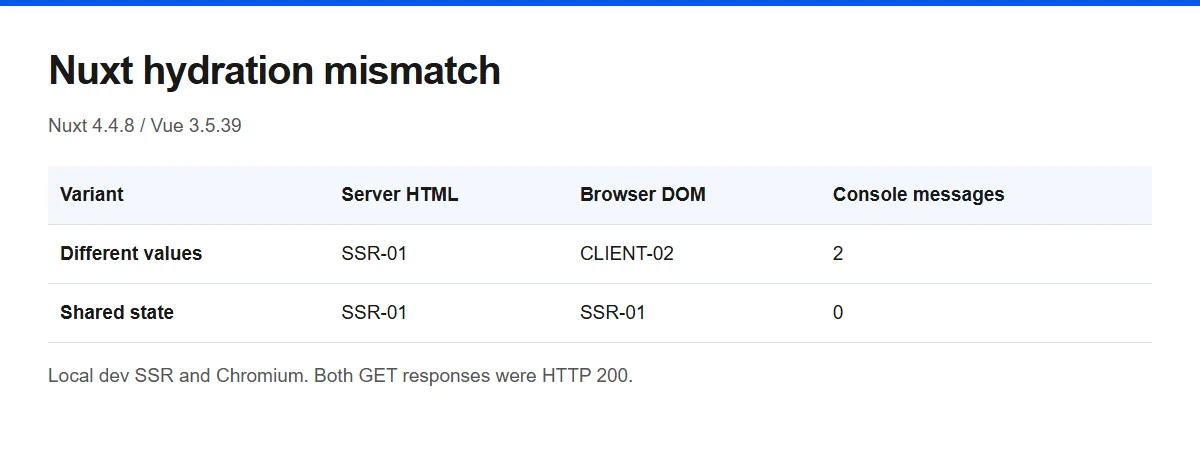
Vue received HTML containing SSR-01, while the first route’s browser code expected CLIENT-02. In the fixture, Vue replaced the text and emitted Hydration text content mismatch and Hydration completed but contains mismatches. The fixed route read the value Nuxt had already placed in the SSR payload. The client therefore started with SSR-01. In an application, that initializer could use a revision label that came from server data.
These results come from Nuxt 4.4.8, Vue 3.5.39, and Chromium in a local development run. Both routes returned HTTP 200. The fixture tests a text mismatch. For other differences, start with the HTML response and identify the element named in the Vue warning.
Choose a fix for a different cause
| Source of divergence | Does useState fit? | What to check | Comment |
|---|---|---|---|
| Date/time | Yes, if the original value can be serialized | Same format and timezone on server and client | Prefer storing the raw timestamp and formatting deterministically |
| Locale formatting | Sometimes, but with care | Whether locale matches across environments | Localization can change the first-render text |
| localStorage | Usually not for the initial value | Whether the UI depends on browser storage before mount | Move that logic into a mounted-only path |
| Invalid nesting | No | Check DOM structure and HTML validity | Fix the markup, not the state |
See Nuxt’s hydration guide and Vue’s SSR documentation for the framework behavior.
If the mismatch occurs around midnight or only for visitors in another time zone, compare the timestamp, locale, and timeZone on each side. If HTML contains a paragraph nested inside another paragraph, the browser may close it before hydration begins. Compare the source fragment with the parsed DOM and fix the markup in the template.
Validate the fix before release
Use the SEO regression checklist to pick the original failing route, another page on the same template, and an independent control.
Use Reproleaf to inspect the response HTML. Collect the Vue warnings separately in the browser console.
If the fix also changes when content becomes visible or interactive, compare Lighthouse reports before and after release in a separate run.
FAQ
Can I reproduce the failure on one route?
Yes. Load that route directly. In DevTools Elements, find the element mentioned in the warning and copy its selector. Run the command below with that selector, then compare the output with the original response in Network or curl.
document.querySelector('[data-value]')?.textContentWhy did useState work in this example?
Nuxt reuses the server-initialized value from the page payload. Keep the state serializable and use distinct keys for independent widgets, since two widgets with the same key can share a value.
How should I verify the production build?
Repeat the direct load in a preview build and compare the affected element with the HTTP response. Exercise an action that depends on hydration, such as opening a filter or submitting a test form. The production console can be less detailed, so keep assertions for the resulting text and interaction.
Need help with your website?
Development and SEO services →