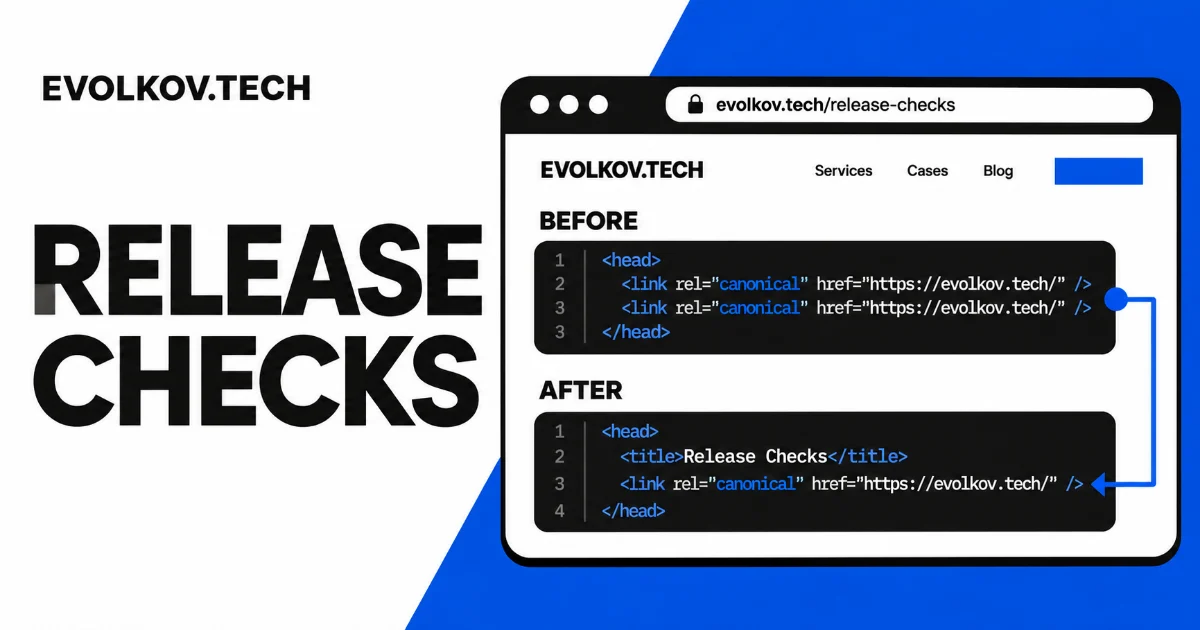
- Retain the expected URLs, capture time, and collection method.
- Compare the before and after observations, then verify coverage.
- Record verified fixes, remaining findings, and unverified conditions separately.
Which baseline to retain before changes
The baseline is a small, explicitly declared set of pages and a versioned capture timestamp. Here the scope is two educational local pages, one in Russian and one in English, with the same URL set before and after. That matters because release checks are only meaningful when you know what was actually tested, when it was tested, and which data source produced the result.
This guide uses captured metadata rather than assumptions. That means you should distinguish three things in your own workflow: declared metadata, rendered DOM, and Google inspection. Declared metadata is what the capture tool reads from the page source or snapshot. Rendered DOM is what the browser actually ended up with after scripts and templates ran. Google inspection is a separate system and should not be inferred from local checks.
| Check | Input | Pass condition | Unknown |
|---|---|---|---|
| Scope definition | Two expected URLs, versioned release timestamp, same capture method | The URL set is fixed and reviewed before testing | Whether the same fix applies to broader site areas |
| Metadata capture | HTML title, canonical links, H1 count | Observed values match the release contract | Rendered behavior not present in the capture |
| HTTP response | URL returns 200 | Both pages respond successfully | Indexing, rankings, and canonical selection |
Google’s guidance on titles and canonicals is useful here. A title should be descriptive and concise, and a canonical declaration signals a preferred URL. But Google still selects what it considers canonical, and title links may be rewritten. That is why local checks are only part of the picture, not the whole verdict.
Helpful references for deeper implementation are the canonical guide at canonical tag audit, the practical fix guide at implement SEO audit fixes, and the broader service page for technical SEO.
What to compare after publication
The release check here is narrow and practical. It does not try to measure traffic, rankings, crawl budget, accessibility, or performance. It checks metadata and page-level contract items that can be observed directly from the fixture and the browser capture.
| Check | Input | Pass condition | Unknown |
|---|---|---|---|
| Document title | Captured page metadata | Title is present and nonblank | Whether Google will rewrite it in search results |
| Canonical element | Canonical link declarations | Exactly one canonical element per page | Which URL Google will choose as canonical |
| H1 count | Rendered or captured DOM | Exactly one H1 in the example contract | Whether more than one H1 is harmful on every site |
| HTTP status | Response code | HTTP 200 on both pages | Whether the page is indexable or preferred |
One important limitation: HTTP 200 alone is insufficient. A page can load successfully and still fail the release contract if the title is blank or if duplicate canonicals appear. That is why the checklist must combine response status, metadata presence, and structural expectations.
For release-oriented search work, the distinction between migration preparation and post-release verification matters. A preflight migration checklist is not the same as a release comparison, and a release comparison is not a full website audit. Use the narrower tool for the narrower job.
A real educational example: four findings across two pages
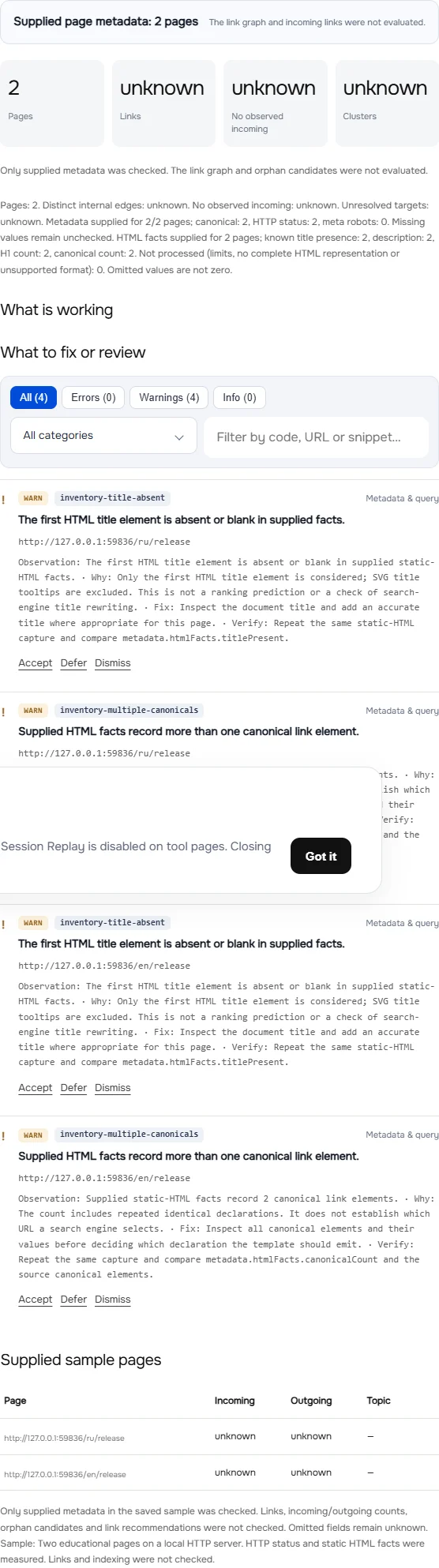
The example fixture contains two educational local pages, one Russian and one English, with the same URL set before and after. In the before state, both pages returned HTTP 200, both had no document title, both had one H1, and both had two identical canonical link elements. That is a concrete metadata warning, not a claim about indexing or rankings.
| Page | HTTP | Title | Canonical count | H1 count |
|---|---|---|---|---|
| ru / release | 200 | Absent | 2 | 1 |
| en / release | 200 | Absent | 2 | 1 |
Those before-state findings produced four total warnings across the two pages: two missing titles and two multiple-canonical observations. That is the raw outcome of the capture, not a universal penalty statement. The project contract for this example was explicit: before accepted was false, after accepted was true, and partial accepted was false.
The browser inventory mode used in the published toolchain does not crawl the fixture. It checks supplied captures. That is why the evidence set stays bounded to the recorded local pages and the exportable reports. If you need to revisit the exact fixture data, use the downloadable inputs and the markdown checklist together:
- Before inventory JSON
- Before report JSON
- Editable release checklist MD
Repeat check and executable acceptance conditions
The CI gate here is a bounded application acceptance contract, not an SEO dogma. It requires two expected URLs, HTTP 200, a nonblank title, one canonical, and one H1. The one-H1 rule is the example project contract; it is not a universal ranking rule. The point is to make the release either accepted or rejected based on the declared scope.
| Page | Before | After | Result |
|---|---|---|---|
| ru / release | No title, 2 canonicals, 1 H1 | Title present, 1 canonical, 1 H1 | Accepted within scope |
| en / release | No title, 2 canonicals, 1 H1 | Title present, 1 canonical, 1 H1 | Accepted within scope |
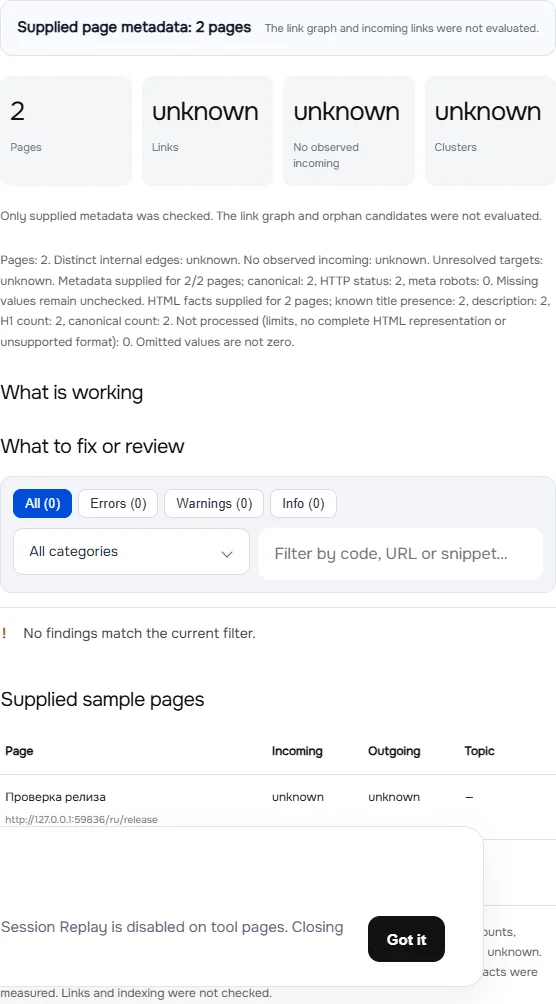
The after state reduced the findings from four to zero across the two pages. That is a resolved example release under the contract. It does not mean a broader site is fixed, and it does not mean Google has already selected the desired canonical or rewritten the title in search. It only means the checked pages now satisfy the local acceptance criteria.
For the after-state evidence, keep the same capture method and the same URL set, then review the export:
- After inventory JSON
- After report JSON
The downloadable template includes the executed Node.js contract. It checks the exact URL set, rather than only the page count. The baseline exited with code 1; the fixed inventory exited with code 0. Both the one-page partial input and a two-page input containing an unexpected URL exited with code 1. The one-H1 condition belongs to this example contract; another H1 count does not by itself establish a search violation.
Why incomplete coverage does not confirm a fix
Partial coverage is not enough when the contract expects both URLs. In this example, one page passing and one page missing would still fail because the release gate is defined for a two-page fixture, not for a single-page subset. That is why partial accepted is false in the project contract.
This matters for real workflows because teams often try to treat one good page as evidence that the release is safe. For narrow technical SEO verification, that is too loose. If the fixture says two pages are expected, both pages must meet the acceptance condition. Anything less should remain a rejection, even if the remaining failure is small.
| Rollout decision | Coverage | Outcome | Notes |
|---|---|---|---|
| Accepted | Both expected URLs pass all declared checks | Release contract satisfied | Use when the contract is fully met |
| Rejected | Any expected URL fails | Release contract not satisfied | Use even if only one check is missing |
| Rejected | Only one page was checked | Partial completion | Partial is not the same as accepted |
| Known scope | Two pages only | Bounded release result | Not a full-site audit |
How to make repeat checks part of a release
Use Reproleaf first when you need a reproducible verification pass. It is the central checking tool in this workflow because it inspects and compares supplied captured metadata that the release contract depends on. Then use web-dev-mcp as the developer workflow companion when you need implementation support around the same task family. They are different entrypoints, not interchangeable promises.
A practical sequence looks like this: define the release scope, run the same capture method before and after, review the exported reports, and only then decide whether to ship. If the result fails, fix the implementation, recapture, and compare again. If the result passes, archive the evidence so the change can be reviewed later.
Practical CLI example, using only a real command format and noting that installation details vary:
node /path/to/reproleaf/src/cli.mjs blog audit --inventory /path/to/inventory.jsonWhere implementation work is needed, use the actual installation page for the developer companion instead of assuming a command that does not exist. For product context, see Reproleaf and web-dev-mcp. If your broader goal is implementation help rather than verification alone, the next step can be native author and technical SEO support.
Evidence exports should be downloadable so they can be reviewed against fresh staging or production captures with the same URL coverage. Keep the owner, rollback plan, and backup points documented, but do not pretend they are identical artifacts. They are related controls, not the same thing.
Download the release checklist and executable contract
What remains outside this example
This guide covers a toy two-page release contract with local capture evidence. It does not cover full website security, performance, accessibility, or a complete technical SEO audit. It is useful when you need a repeatable pass/fail decision for a narrow deployment checkpoint.
The site’s product set and services can help at different points in the process. Reproleaf is the verification tool, web-dev-mcp supports the developer workflow, and technical SEO and web application development are available when the issue needs implementation rather than just diagnosis. There is no need to overstate what any one tool can do.
For Google-related mechanics, use the source pages for the precise rules rather than extrapolating from the example. Canonical declarations indicate a preferred URL, but Google selects canonical pages. Titles should be descriptive and concise, but search title links may differ from the title element. Those points support the release workflow; they do not replace it.
When you need the broader method boundaries, read the methodology page for the tool and the implementation guide for scoped fixes. Those references are useful because the present article is intentionally narrow: it is about release checks, not all of technical SEO.
The Reproleaf methodology explains which facts the tool can verify from supplied inputs.
FAQ
1. Is HTTP 200 enough to accept a release?
No. HTTP 200 only tells you the page responded successfully. The release contract here also requires a nonblank title, one canonical, and one H1.
2. What is the difference between unknown and fixed?
Unknown means the check does not prove the broader outcome, such as Google’s canonical choice or title rewrite behavior. Fixed means the local contract item changed from failing to passing.
3. Do JavaScript pages count?
Only if your capture method is designed to observe the rendered result you care about. Otherwise you may be looking at declared metadata rather than rendered DOM.
4. Is more than one H1 always bad?
No universal rule should be taken from this example. The one-H1 condition here is the project contract for these pages, not a universal ranking rule.
5. Can this be used as a CI limit?
Yes, as a bounded acceptance gate for the expected URL set. It should not be confused with a full indexing or ranking test.
6. Does passing this check mean Google will index the page a certain way?
No. Local metadata acceptance does not establish actual indexing, chosen canonicals, or search result presentation.
Next step
If you need a practical release checklist for a real deployment, start with a small expected URL set, export the before and after reports, and verify that the same capture method is used in both passes. If the result needs implementation work, request technical SEO support rather than trying to turn a release checker into a full audit tool.
For a free starting point, use Reproleaf to inspect the supplied release evidence and keep the markdown checklist alongside the JSON exports. If you want help implementing the fixes rather than only measuring them, move to the technical SEO service path with the same scoped contract.
Worked guides — How to compare Lighthouse reports before and after a release.
Worked guides — What to do when Search Console says Crawled or Discovered, currently not indexed, How much does website maintenance cost per month?.
For Nuxt, add a fresh SSR navigation and the browser console check described in How to diagnose and fix a hydration mismatch in Nuxt to your post-release smoke test.
For sites that schedule content, include the publish-queue check described in How to fix a missed scheduled post in WordPress.
For routes with a JavaScript limit, add the assertion demonstrated in How to enforce a JavaScript performance budget with Lighthouse CI to the release checks.
If the release updates share images, verify both the blog card and the server tag with How to change the Open Graph image in WordPress and verify it.
For Next.js releases, add the raw HTML canonical regression test in How to set canonical metadata for dynamic Next.js App Router pages.
For a Nuxt site driven by CMS records, test the sitemap data source as shown in How to add dynamic Nuxt routes to an XML sitemap.
Need help with your website?
Development and SEO services →