Why dynamic Nuxt routes need a concrete URL list
The file pages/notes/[slug].vue defines a route pattern. A sitemap needs the actual published slugs from a CMS, database, or other data source. When records change between builds and Nuxt runs a server, use a JSON source. For static deployments, check which URLs the prerender step actually emits. Nuxt Sitemap dynamic URL guidance.
Build the sitemap JSON source
In server/api/__sitemap__/urls.get.ts, return objects containing loc. The fixture has two published records and a draft. In a real application, query published records and map them to the site’s URL structure. The JSON response itself is reachable, so return only information that is safe to expose.
import { defineEventHandler } from 'h3'

export default defineEventHandler(() => [
  { slug: 'alpha', published: true },
  { slug: 'beta', published: true },
  { slug: 'draft', published: false },
].filter(note => note.published).map(note => ({ loc: '/notes/' + note.slug })))
Register the source in nuxt.config.ts
Set the module and source path in nuxt.config.ts. For the baseline run, leave sources: []. Add the source and restart for the second run. Save both XML outputs while leaving the public page unchanged.
export default defineNuxtConfig({
  modules: ['@nuxtjs/sitemap'],
  site: { url: 'https://example.com' },
  sitemap: { sources: ['/api/__sitemap__/urls'] },
})
What changed across the two local runs
| Source | In the sitemap | Article GET | Draft GET |
|---|---|---|---|
| No JSON source | / | 200 | 404 |
| With JSON source | /, /notes/alpha, /notes/beta | 200 | 404 |
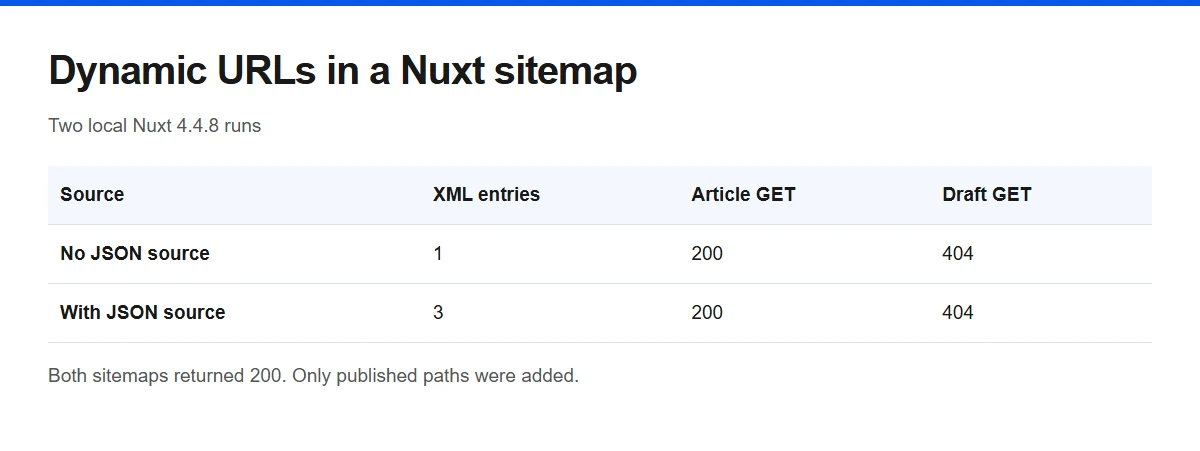
In the Nuxt 4.4.8 and sitemap 8.2.2 fixture, both sitemap requests returned 200. /notes/alpha was already public during the first run even though it was missing from the map. Connecting the source added two published paths. The draft stayed out of both maps and returned a public 404.
Validate the published sitemap
Check the JSON and XML separately, then open the added pages. The local servers used different ports, so the comparison here uses paths. On production, verify the complete loc values, including hostname and HTTPS. Use the Reproleaf sitemap checker for XML validation.
curl -fsS https://example.com/api/__sitemap__/urls
curl -fsS https://example.com/sitemap.xml -o sitemap.xml
If the JSON includes the record but the sitemap does not, inspect the sources wiring, sitemap filters, and cache. If the record is missing from JSON, check the CMS query and publication filter first. After repairing the source, publish a control record on staging and verify the URL appears within the expected publication window.
Save the XML before and after a release and use the sitemap comparison workflow for the location set. Add the public page checks to your SEO release checklist. A sitemap describes the URLs you want discovered. Check crawl and index status separately. Google sitemap documentation.
FAQ
How do I check whether a draft stays out?
Inspect both the JSON source and final XML. Open the draft URL while logged out as an independent check. Leaving it out of XML does not restrict who can open it.
What if Nuxt is deployed as static files?
If the hosting output does not run server endpoints, make published URLs available during build or prerendering. Inspect the resulting XML in the build artifact and again after deployment.
Need help with your website?
Development and SEO services →