Why a child route inherits the homepage canonical
Set one metadataBase in the root layout. If you also set the homepage canonical there, child routes without an override can inherit it. A page with distinct content needs an intentional canonical. The Metadata API behavior was checked on Next.js 16.2.9 App Router.
export const metadata = {
  metadataBase: new URL('https://example.com'),
  alternates: {
    canonical: '/',
  },
};
The /inherited route had its own text but returned the root layout’s homepage canonical. If the route should stand on its own, set the homepage canonical in app/page.js and set the correct static canonical on the child. Use the public origin from a trusted deployment configuration.
Set the dynamic canonical with generateMetadata
export async function generateMetadata({ params }) {
  const { slug } = await params;
  return {
    alternates: {
      canonical: `/catalog/${encodeURIComponent(slug)}`,
    },
  };
}
In the dynamic route, read the slug after awaiting the route parameters. If the CMS has a preferred slug, build the path from that value. Return notFound() or the appropriate redirect for missing content. A canonical tag cannot turn a missing page into a working route.
The canonical tags returned by three Next.js requests
| Case | URL | Status | Canonical from HTML | Tag present in head |
|---|---|---|---|---|
| Inherited route | /inherited |
200 |
https://example.com |
yes |
| Dynamic page | /catalog/guide |
200 |
https://example.com/catalog/guide |
yes |
| Campaign parameter | /catalog/guide?utm_source=fixture |
200 |
https://example.com/catalog/guide |
yes |
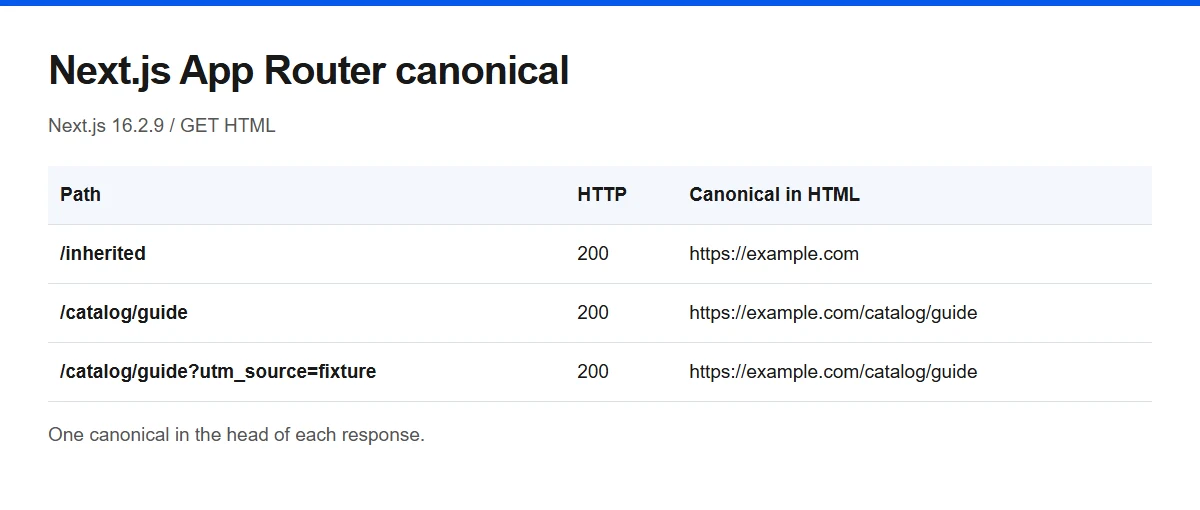
All three responses returned 200 and emitted one canonical in the head. The inherited example pointed to the homepage. The tagged and clean versions of the same guide returned the same canonical. These are local webpack development responses, not observations of Google indexing.
Validate canonical metadata in the production HTML
Fetch the complete document at the final URL after redirects. Check the HTML and the actual destination named in the tag. In production, repeat for the homepage, several dynamic pages, a tracking variant, and translated paths. For dynamic metadata, consider the rendering mode and compare the original response with the completed DOM. Each recorded fixture response included the tag directly in its head.
curl -fsSL https://example.com/catalog/guide -o page.html
grep -i canonical page.html
Match canonical policy to the content. A campaign parameter normally leaves the page unchanged. If a filter, locale, or paginated route serves distinct indexable content, check the intent before selecting one shared canonical. Google can choose a different URL, so confirm that separately in Search Console. Google duplicate URL guidance.
Use Reproleaf to verify delivered metadata. When the tag looks correct but Google chooses another page, follow the canonical tag audit. Add the representative path set to your SEO release regression tests.
FAQ
Why does canonical point to the staging hostname?
Check the release configuration and any absolute canonical added by the child layout. An absolute metadata URL can override the base.
What if Google chooses a different canonical?
Compare redirects, internal links, sitemap entries, and content equivalence. Use the indexed URL Inspection result to see Google’s choice. A local HTML test does not measure that decision.
Need help with your website?
Development and SEO services →