Download the evidence (JSON) · Download the local fixture (Node.js)
What Soft 404 really means
In Search Console, Soft 404 is a specific status, not the same thing as generic crawled-but-not-indexed behavior and not just any crawl error. The key is the combination of three signals: the HTTP status, the page body, and the final URL after redirects. Google’s troubleshooting guidance makes the same point: check the server response first, then the content, then the final destination. If a page returns 200 but the visible content is essentially “Page not found” or an almost empty shell, Google may treat it as a Soft 404.
The official docs are especially useful for JavaScript sites because a page can look fine in the browser to a human yet still render poorly for Google if the initial HTML is thin or a dependency fails. See Troubleshoot crawling errors and JavaScript SEO basics.
Separate the problem into three user intents
Before changing anything, decide what the old URL is supposed to mean.
- Removed with no replacement: return a real 404 or 410.
- Real successor exists: send the old URL to the new one with 301.
- The page should still exist: keep 200 and serve real content that Google can render.
This is not about style; it is about matching the response to the intent. A deleted page that says “Page not found” but still returns 200 sends mixed signals. A moved product that stays on the old URL with 200 creates duplication and confusion. A valid page that renders empty because data failed to load can look soft-404-like even though the route exists.
Worked decision table
| Symptom | Possible cause | How to check | How to fix | Evidence the fix worked |
|---|---|---|---|---|
| Search Console shows Soft 404 | The server returns 200 for an error page | Run a GET and inspect status, body, and title separately | Return a real 404 or 410 for deleted URLs | GET shows 404, while the body still says “Page not found”; that is now a truthful signal instead of a fake 200 |
| An old address should point to a new product | A move exists but no redirect is in place | Check whether Location is set and where the final URL ends up | Add a 301 to the real successor | The first response is 301, the final URL changes, and the destination page returns 200 with “Product guide” |
| A live page looks blank to Google | JS did not render the main content or a dependency failed | Compare URL Inspection live versus indexed, then inspect the rendered page | Make the core content visible in the render and fix data loading | Live inspection shows content, and the final page responds 200 with a meaningful title |
| A deleted URL still seems like a page | A 200 placeholder is left behind | Compare headers, title, and body | Remove the 200 placeholder and return 404 or 410 | The status becomes 404, the title remains “Page not found,” and the URL is no longer pretending to be a live page |
| Both old and new URLs appear to be valid | Wrong choice between 200 and 301 | Check whether the content actually matches | Use 301 for the successor, 200 for the live page | The old URL redirects and the final page shows the real content |
What the synthetic evidence shows
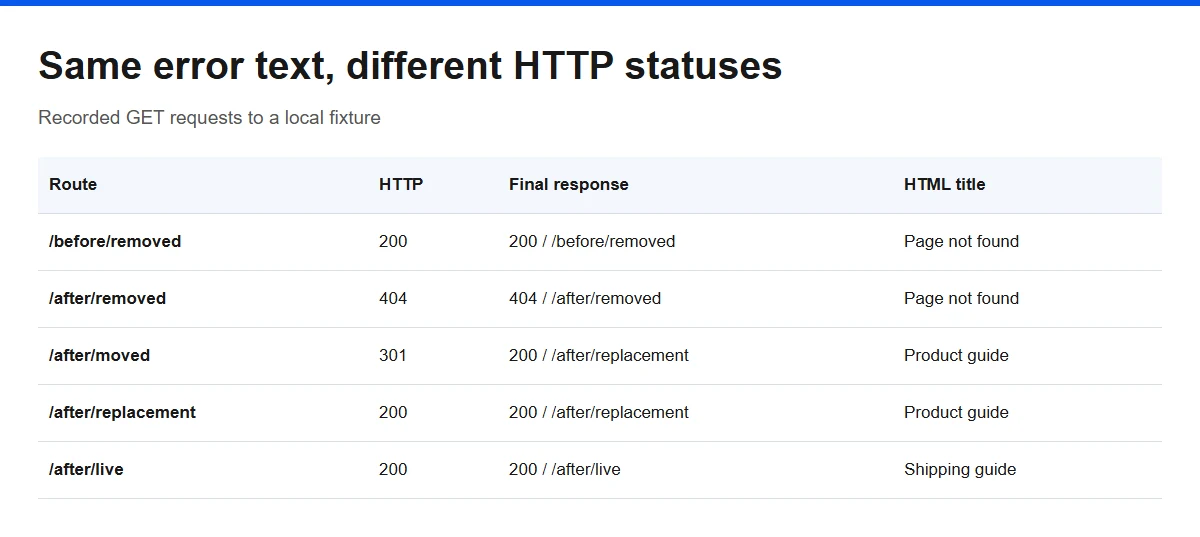
The supplied evidence gives five clean examples. Before the fix, /before/removed returns 200 and the title is Page not found. After the fix, /after/removed returns 404 with the same title, which is the correct response for a removed URL. /after/moved returns 301 to /after/replacement, and the final destination responds 200 with the title Product guide. The destination itself, /after/replacement, also responds 200 with the same title. Finally, /after/live responds 200 and shows Shipping guide. Those five rows show the clean pattern you want: deleted equals 404, moved equals 301, live equals 200.
How to verify the fix
Use commands that separate headers, body, and the final destination:
To reproduce the screenshot, download the fixture, save it as soft404-demo.mjs, and run node soft404-demo.mjs. In a second terminal, run the requests below. For your own site, substitute the URL you want to inspect. On Windows, use curl.exe.
curl -sS -D before.headers http://127.0.0.1:8080/before/removed -o before.html
curl -sS -D after.headers http://127.0.0.1:8080/after/removed -o after.html
curl -sS -L -D redirect.headers http://127.0.0.1:8080/after/moved -o final.html
The first command shows headers only. The second saves the response and headers separately so you can see the original status and any Location header. The third follows redirects so you can confirm the final URL and final status. In URL Inspection, compare the live result with the indexed result. If live already shows the correct render but indexed is old, that is usually just delay. If live is still empty or broken, the page still needs work.
Quick checklist
- You know whether the URL is deleted, moved, or still live.
- Deleted URLs return a real
404or410, not a fake200. - Real successors use
301. - Live pages return
200and show useful, visible content. - The body is not just a “Page not found” placeholder.
- URL Inspection shows the right content in live and indexed where appropriate.
curl -Lends on the expected final URL.
What to check next
If the page redirects, verify the final URL and HTTP status with the redirect chain checker. Use Reproleaf to check adjacent technical signals on a live URL. If Soft 404 clears and the page is still absent, investigate its Search Console indexing status. If the failure is on the sitemap URL itself, use the sitemap fetch guide.
Compact Q&A
Is Soft 404 always a site bug?
No. A truly removed page should return a real 404.
Can I leave a 200 page that says “not found”?
Not for a deleted URL. Use 404 or 410 instead.
If a new page exists, do I still need 404?
No. Use 301 from the old URL to the successor.
Why do JavaScript pages get Soft 404 issues?
Because the rendered page can be empty if data fails to load or the app shell is too thin.
What should I check first?
HTTP status, page body, and final URL after redirects.
Need help with your website?
Development and SEO services →