Three URLs on a local server return three different responses. The tricky one succeeds with a 200 yet serves HTML in place of the sitemap. Use the comparison below to find the same failure in your own response.
Download the measured results (JSON)
What the error usually means
In Search Console, a sitemap that could not be read usually points to a delivery problem: Google cannot reach the file, gets a server error, follows a redirect to the wrong place, receives HTML instead of XML, or gets an otherwise accessible response that is not a valid sitemap. The first thing to separate is “could not fetch” from “fetched but could not parse.” In both cases, the first diagnostic anchor is the exact URL you submitted in the Sitemaps report.
If the sitemap URL redirects, check the destination carefully. A redirect that changes host, protocol, or path can be enough to break the fetch, especially when the final location is on a different subdomain or a staging environment. A 401 or 403 usually means access control is blocking the request. A 404 means the path is wrong or the file is missing. A 5xx means the server needs attention before you try to resubmit.
The three synthetic HTTP cases in the evidence file
The downloadable sitemap-fetch-evidence.json file records three reproducible HTTP cases. These are synthetic local examples, not a measurement of any Google fetch. The first route is /sitemap-html.xml: it returns 200 with text/html; charset=utf-8, and the body begins with <!doctype html>.... That is the classic trap: the URL ends in .xml, but the payload is HTML, so Search Console may report that the sitemap could not be read.
The second route is /sitemap-missing.xml: it returns 404 with Not found. Here the diagnosis is straightforward: the sitemap is not published at that address, or the path is wrong. The third route is /sitemap-ok.xml: it returns 200 with application/xml; charset=utf-8, and the body begins with the XML declaration and a <urlset> root. This shows a valid server response, but it does not prove or measure Google’s own fetch.
How to check the problem in order
Work in this sequence: the exact submitted URL, then a GET request that shows the status and redirects, then the actual response body, and finally another pass through Live URL Inspection and the Sitemaps report. This order keeps access problems separate from XML syntax problems. A file that looks fine in a browser is not always fine for a crawler, because the browser can hide details that matter to Googlebot.
Here is a copyable curl example that saves the headers separately from the body. It uses example.com as a safe demonstration domain:
curl -sS -L --max-redirs 10 -D headers.txt -o body.xml -w "%{http_code} %{url_effective}\n" https://example.com/sitemap.xmlIn this example, headers.txt contains the HTTP headers, while body.xml contains only the response body. That makes it easier to spot mismatches between the declared Content-Type and the actual payload.
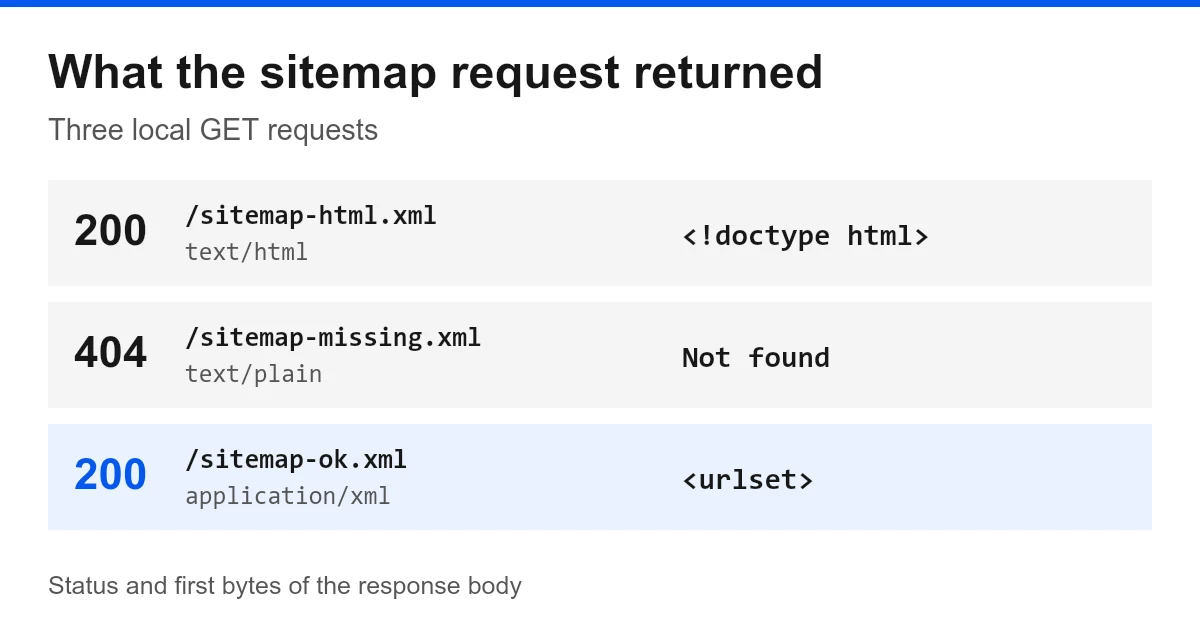
How a single-page app serves its home page in place of a sitemap
Suppose the build leaves sitemap.xml out of the publish directory. The server cannot find /sitemap.xml, so its SPA catch-all serves index.html. The status is 200 and the browser displays the site. Reading the first bytes of the body reveals the fallback.
Use two URLs for acceptance testing. Expect XML with a urlset or sitemapindex root at /sitemap.xml. Expect 404 for a made-up /sitemap-missing.xml. If both return the same page, exclude XML routes from the SPA fallback and confirm the build publishes the file.
Why an XML sitemap with XSL is still XML
Sometimes a valid XML sitemap links an XSL stylesheet so humans can read it comfortably in the browser. That does not make the document HTML. If the root element is still urlset or sitemapindex, and the file is valid XML, the XSL is only a presentation layer. Search engines care about the network response and XML structure, not whether the browser renders a styled view. So a pretty page can still be a proper sitemap.
urlset versus sitemapindex
These are the two core sitemap structures:
| Format | Use it for | Root element | Common mistake |
|---|---|---|---|
urlset | A list of page URLs | <urlset> | HTML masquerading as XML, wrong namespace, broken URLs inside |
sitemapindex | A list of other sitemap files | <sitemapindex> | Mixing hosts, linking to non-existent sitemap files |
If you have one sitemap file listing pages, urlset is usually the right choice. If you split large sites into multiple sitemap files by section or content type, then use sitemapindex to point to those child files. Do not mix the two formats casually; parsers and reporting tools treat them differently.
Comparison table: symptom to action
| Scenario | Status | Response type | What to do |
|---|---|---|---|
| HTML page served as a sitemap | 200 | text/html | Remove the page template and return clean XML |
| File not found | 404 | text response | Fix the path, publishing step, or generation job |
| Access denied | 401/403 | any | Review authentication, access rules, CDN/WAF rules |
| Server error | 5xx | any | Repair the server-side failure first |
| Wrong host or redirect chain | 200/3xx | any | Check canonical host and final destination |
This table matters because the same Search Console message can hide different root causes. For 404 and 401/403, the fix is usually clear. For HTML instead of XML, inspect templating, CMS behavior, rewrite rules, and CDN error pages. For 5xx, resubmitting the sitemap before the server is stable usually just repeats the same failure.
What to verify after the fix
Once the response contains XML, validate it in the Reproleaf Sitemap Checker. If you saved the old file, compare the two versions to spot removed URLs. Use Reproleaf for adjacent technical checks. If a specific page remains absent after Google reads the map, investigate its indexing status. For the sitemap report itself, see Google’s documentation.
Reader checklist
- Confirm the exact sitemap URL in the Sitemaps report.
- Run a GET request and save headers separately from the body.
- Make sure the status is not 404, 401/403, or 5xx.
- Verify that the URL does not return HTML instead of XML.
- Check the root element:
urlsetorsitemapindex. - Review any redirects, host changes, and the final URL.
- Re-open Live URL Inspection and the Sitemaps report after the fix.
- If there is XSL, confirm that the document is still XML.
Quick Q&A
Why does Search Console say the sitemap could not be fetched if the file opens in a browser?
Because a browser can display an HTML wrapper or styled response even when the crawler expects a directly reachable XML file. The actual GET response is what matters.
Can a styled sitemap still be valid?
Yes. If the document is valid XML and the root element is correct, XSL does not turn it into HTML.
What should I check first?
The exact URL, the HTTP status, and the redirect chain.
Do I need sitemapindex for a single sitemap file?
No. A single list of URLs usually belongs in urlset.
Will the report update instantly after I fix it?
Not always. The important part is that the server already returns the correct XML and is available for a fresh crawl.
If the sitemap is reachable, review its modification dates with Which lastmod date format should a sitemap use?.
When the sitemap URL for WordPress is unclear, check the native endpoint using How to find and check a WordPress XML sitemap without a plugin.
Need help with your website?
Development and SEO services →