Sitemap lastmod date format with or without a time zone
A calendar date is enough if your editorial system records the day of an update. With an exact timestamp, use UTC with Z or include an explicit offset. For example, 09:30:00+05:00 is the same instant as 04:30:00Z. Keep a date-only value when the time is unknown.
The date formats are described in the Sitemap protocol. Google uses the timestamp when it consistently and verifiably reflects significant changes. See the Google sitemap documentation.
Test six lastmod values in an XML sitemap
Paste the sample into the sitemap checker and run it. The public tool checks the supplied XML in your browser. The impossible date and the locale-formatted date were flagged as problems. The month without a day received a separate precision warning.
<urlset xmlns="http://www.sitemaps.org/schemas/sitemap/0.9">
  <url><loc>https://example.com/page-1</loc><lastmod>2026-11-17</lastmod></url>
  <url><loc>https://example.com/page-2</loc><lastmod>2026-11-17T09:30:00+05:00</lastmod></url>
  <url><loc>https://example.com/page-3</loc><lastmod>2026-02-29</lastmod></url>
  <url><loc>https://example.com/page-4</loc><lastmod>17.11.2026</lastmod></url>
  <url><loc>https://example.com/page-5</loc><lastmod>2026-11</lastmod></url>
  <url><loc>https://example.com/page-6</loc></url>
</urlset>
Results from the Reproleaf checker
| Value | Result | Action |
|---|---|---|
2026-11-17 | Accepted | Use for day-level precision |
2026-11-17T09:30:00+05:00 | Accepted | Use for an exact timestamp |
2026-02-29 | Problem | Check the original date in the CMS |
17.11.2026 | Problem | Remove localized formatting |
2026-11 | Precision warning | Add the day or omit the element |
| Field omitted | Accepted | Valid for an unknown date |
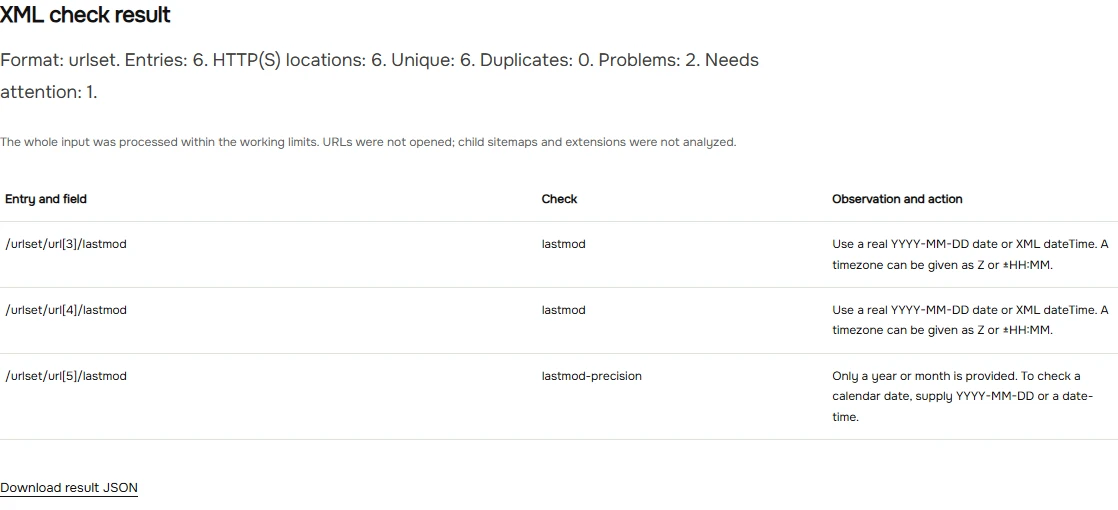
The test uses example.com URLs. The report shows which values the tool recognizes and locates the affected XML entries. Confirm the date against the actual page revision before treating it as accurate.
Page lastmod versus child sitemap modification date
In urlset, the timestamp belongs to the page. In sitemapindex, it belongs to the child sitemap. For example, the timestamp for articles.xml can change after a new article is added to the file. That tells you nothing about when the other articles were edited.
Check whether the generator uses the real revision date
Save the sitemap before and after one meaningful page change. Pick two URLs using the same template. Update the main content or structured data on the first and keep the second as a control. If the sitemap uses date-only precision, run the comparison across two calendar dates or test a timestamp with a timezone. Rebuild it once more without further changes.
curl -fsS https://example.com/sitemap.xml -o sitemap-before.xml
# Make one meaningful page change and publish the sitemap.
curl -fsS https://example.com/sitemap.xml -o sitemap-after.xml
The edited URL should have a timestamp that matches the new CMS revision. The control URL should keep its date across both runs. If the control changes too, check whether your generator inserts the build time. If the edited URL keeps an old date, inspect the date source and check whether cached XML is still being served.
Use the sitemap comparison guide if the release also added or removed URLs. Compare modification dates separately for surviving loc values. If the file fails to load at all, start with the Search Console sitemap fetch guide.
Use Reproleaf to inspect the updated page independently and confirm it is the URL listed in the sitemap. A reachable page and a valid date do not establish that Google indexed it.
FAQ
Should I update lastmod every time I rebuild?
Update it when the page’s main content, structured data, or significant links change. Keep the existing value for a rebuild that only updates the copyright year.
Can I leave the lastmod element empty?
Remove the element when the date is unknown. An empty value is not a date.
What if all dates pass validation even though something looks wrong?
Compare the timestamp for two URLs against their CMS revision logs before and after a release. Use one URL that nobody edited as a control.
For WordPress core sitemaps, locate the child XML before reviewing timestamps using How to find and check a WordPress XML sitemap without a plugin.
Need help with your website?
Development and SEO services →