What causes the Unparsable structured data error?
When Search Console reports Unparsable structured data, start with syntax, not semantics. Google’s help page points you to the malformed markup itself, and the structured data policies require markup to be valid and aligned with the page content. In practice, the most common causes are:
- a trailing comma before the closing brace;
- a missing comma between properties;
- unescaped quotes inside string values;
- template corruption inside a
<script type="application/ld+json">block.
Important boundary: a syntax error prevents Google from parsing the block at all. Missing fields are a different layer and usually lead to warnings or reduced eligibility, not an unparsable error. See the structured data policies and the Search Console error help: support.google.com/webmasters/answer/9166415.
How to reproduce the JSON-LD error locally
You can reproduce the issue with three static HTML snippets, each containing one JSON-LD block. The point is to test the server response and static HTML first, not only the browser DOM after scripts run. That distinction matters because client-side rendering can hide or alter the markup.
<script type="application/ld+json">
{"@context":"https://schema.org","@type":"Article","headline":"Local example",}
</script>
<script type="application/ld+json">
{"@context":"https://schema.org","@type":"Article" "headline":"Local example"}
</script><script type="application/ld+json">
{"@context":"https://schema.org","@type":"Article","headline":"Local example"}
</script>The first two blocks are broken. The first has a trailing comma before }. The second is missing a comma between properties. The third is syntactically valid.
If your markup is template-driven, check whether the same defect repeats across URLs. It often does. Inspect the generated HTML response, then run the exact block through a local parser or validator. Use serialization instead of hand-building JSON strings so escaping is handled consistently.
Observed versus expected values
| Example | Expected | Observed | What it means |
|---|---|---|---|
| broken-trailing-comma | Block parses and exposes an Article entity | 1 block, 0 entities, 1 SCHEMA_INVALID_JSON error |
JSON is unparsable because of the trailing comma |
| broken-missing-comma | Block parses and exposes an Article entity | 1 block, 0 entities, 1 SCHEMA_INVALID_JSON error |
JSON is unparsable because of the missing comma |
| valid-json | 1 Article, no syntax errors | 1 block, 1 entity, 0 errors, 2 warnings | Syntax is fine, but the local article profile checks author and datePublished |
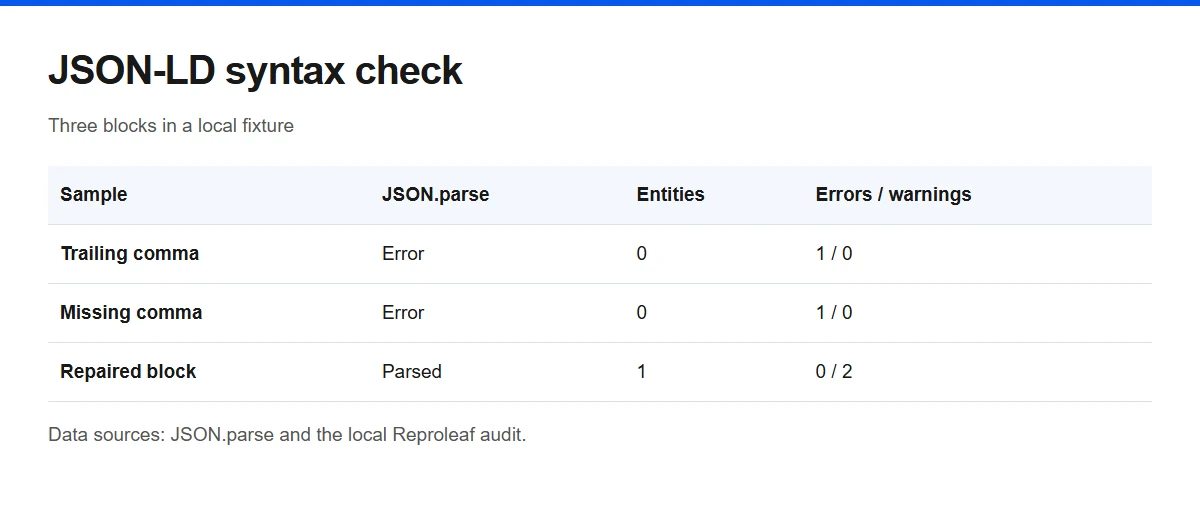
The local Reproleaf audit for the valid snippet reports 1 Article, 0 errors, and 2 warnings: missing author and datePublished under the local article profile. That is not a universal Schema.org requirement; it is a profile-specific check. For Google Search Console, the key point is simpler: broken JSON-LD cannot be parsed, so it cannot be evaluated for richer processing until the syntax is fixed. Source: Google help.
Use the symptom to choose a fix
| Symptom | Cause | Check | Fix | Verification |
|---|---|---|---|---|
| Unparsable structured data | Broken JSON-LD block | Copy the script body and run it through JSON.parse() |
Remove trailing commas, add missing commas, escape quotes with a serializer | The parser returns an object and the local audit shows 1 entity |
| Error disappears, but there is still no rich result | Possible missing fields or other eligibility issues | Compare the fields with the visible page and Google policies | Add only truthful, visible properties | Google’s test lists the detected types and remaining issues |
| The same issue appears across many URLs | Template bug | Inspect several pages and the raw HTML response | Fix the generator or template in the CMS/rendering layer | After deployment, the blocks are valid on every tested URL |
Verify the repaired JSON-LD in production
curl -fLsS https://example.com/article -o page.htmlSave the actual HTTP response. Open page.html in an editor, find each application/ld+json block, and paste its contents separately into the JSON-LD validator. If the block is inserted by JavaScript, also check the rendered HTML in Google’s test.
The Reproleaf report helps when the HTML contains several blocks. In the downloadable evidence, blockIndex: 0 identifies the first block. Confirm the repaired sample yields an Article entity and zero syntax errors, then review any field warnings separately.
If several URLs share the defect, repair the generator and add a regression check to your SEO fix acceptance workflow. Test the report sample, two related entries, and a control URL on another template. After deployment, run the Rich Results Test against the live URLs and start fix validation in Search Console. The historical report updates after processing.
Validate JSON-LD locally without a browser
Save the script body as block.json. This command prints the entity type when the JSON parses. When parsing fails, read the position in the exception and inspect the preceding character as well. With a missing comma, the parser often stops at the beginning of the next property.
node -e "console.log(JSON.parse(require('node:fs').readFileSync('block.json', 'utf8'))['@type'])"To test the template, create a controlled entry with straight double quotes in its headline. Serialize the data with your CMS or framework’s HTML-safe output helper. Download the resulting page and confirm the parsed headline matches what readers see.
FAQ
Why does Search Console say the JSON is unparsable when the snippet looks almost correct?
Because JSON is strict: one extra character can invalidate the whole block. A trailing comma or a missing comma breaks parsing both in JSON.parse() and in local audits.
Are author and datePublished warnings the same as a parsing error?
No. In the local profile shown here, they are warnings after the JSON is already valid. They indicate profile review, not syntax failure.
Can the error affect only some pages using the same template?
Yes. Test a page with a quote in its headline, one with an optional field left blank, and an ordinary control page. A template that builds JSON from string fragments can fail only on certain content.
Need help with your website?
Development and SEO services →