Start with Cloudflare’s documentation. For a manual comparison, convert the source HTML in Reproleaf. Use the v2 guide to check standalone .md files, and llms.txt Studio to organize their index. See the llms.txt proposal for format details.
What this verification actually proves
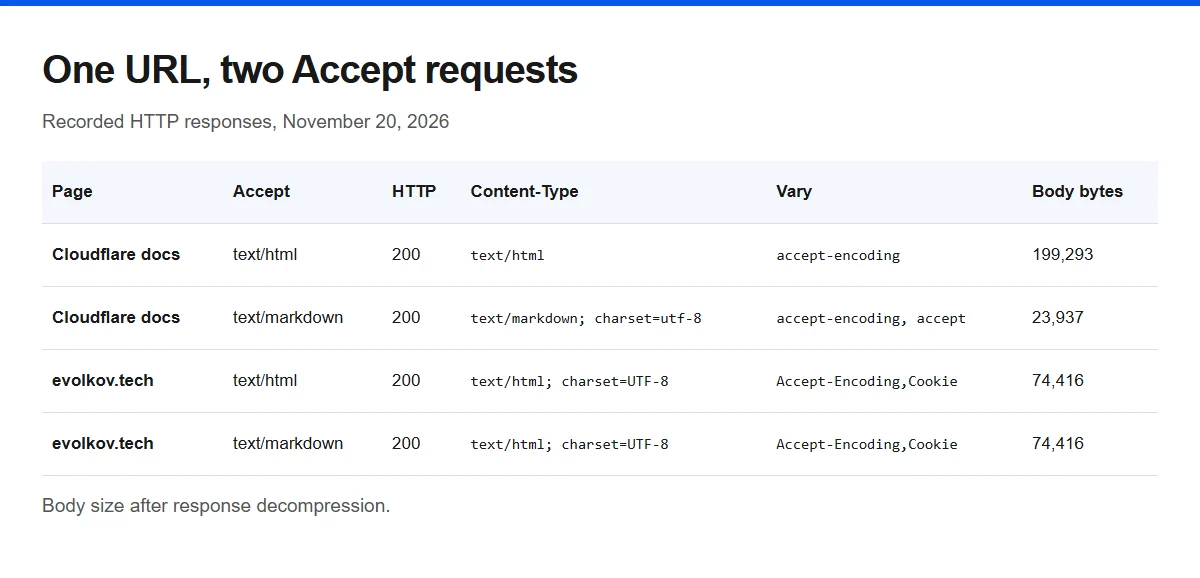
This is a content-negotiation test, not a standalone Markdown v2 converter test. The point is to see whether the same URL can serve HTML for one request and Markdown for another request based on Accept. For Cloudflare Docs, the Markdown response is explicit: Content-Type: text/markdown; charset=utf-8 and Vary: accept-encoding, accept. For the same URL with Accept: text/html, the response is HTML with Content-Type: text/html and vary=accept-encoding. On the control page from the evidence, the site returns HTML in both cases, each at 74416 decoded bytes.
That distinction matters. A 200 status only tells you the request succeeded. It does not tell you whether the server switched representations, whether a proxy altered the result, or whether the page is simply HTML-only.
Worked comparison: confirmed responses
Use this as the baseline when you compare your own results. The documented Cloudflare page demonstrates a true split between HTML and Markdown. The control page demonstrates a no-switch case. When comparing outputs, focus on title, code samples, links, and tables, not just byte counts.
| symptom | possible cause | how to check | how to fix | evidence the fix worked |
|---|---|---|---|---|
| Markdown request returns HTML | The feature is not enabled for that zone or URL | Repeat the same GET with Accept: text/markdown and inspect Content-Type |
Enable the correct Cloudflare Markdown for Agents path, then retest | Response becomes text/markdown; charset=utf-8 and body bytes change from 199293 to 23937 |
| Both requests return 200 but look identical | A cache or intermediary is masking negotiation | Save headers and body separately for each request | Bypass, purge, or reconfigure the intermediary and try again | Markdown response shows Vary including accept and a different body size |
| Markdown request still shows the same HTML content | Only HTML delivery is configured | Compare the decoded body bytes and the response media type | Do not assume negotiation is active; confirm the Cloudflare setting first | Either you get Markdown, or you correctly confirm HTML-only delivery |
| Links or table rows seem to shift | Rendering rules or source structure need attention | Check a link-rich paragraph and one table by eye | Adjust the source content and rerun the same URL test | Titles, links, and table rows remain readable in both outputs |
Two copyable curl requests
The following commands are designed to be copied as-is on Windows using curl.exe. They save headers and bodies separately so you can audit the result later. Keep the URL constant and change only the Accept header.
curl.exe -sS -D html.headers.txt -o html.body.txt -H "Accept: text/html" "https://developers.cloudflare.com/fundamentals/reference/markdown-for-agents/"
curl.exe -sS -D md.headers.txt -o md.body.txt -H "Accept: text/markdown" "https://developers.cloudflare.com/fundamentals/reference/markdown-for-agents/"
For the Cloudflare Docs URL, the evidence shows status 200 in both cases, but the responses differ: HTML is text/html with 199293 decoded bytes, and Markdown is text/markdown; charset=utf-8 with 23937 decoded bytes. The Markdown response also includes Vary: accept-encoding, accept. For the control page, both requests return text/html; charset=UTF-8 and 74416 bytes, so you can see what HTML-only delivery looks like in practice.
How to inspect parity correctly
Use a simple three-part audit: title, code, links. If a page contains a table, verify that the rows are still readable in Markdown. If the body is shorter, that is expected, but the structure should remain coherent. A practical way to sanity-check the transformation is to compare the rendered outputs manually or use a tool such as HTML to Markdown. That tool is useful for review, but it is not a Cloudflare negotiation simulator.
It also helps to keep separate notes for different delivery strategies. Markdown for Agents, llms.txt-based discovery, and v2/describedby approaches are distinct mechanisms. They may coexist, but they are not the same thing. The linked v2 markdown discovery article is a good companion reference when you want to compare those strategies without mixing their semantics.
Checklist
- Request the same URL twice and change only
Accept. - Save headers and body files separately.
- Confirm both responses return
200. - Verify the media type in
Content-Type. - Check whether
Varyincludesaccepton the Markdown response. - Compare decoded body bytes, not just transfer size.
- Audit one title, one code sample, and one or two links.
- If the Markdown request still returns HTML, inspect zone settings and intermediaries first.
Quick Q&A
Does HTTP 200 prove Markdown delivery?
No. It only proves the request succeeded. You still need to inspect the media type, Vary, and body content.
Why does the Cloudflare Docs page show two different byte counts?
Because the page really negotiates two representations: 199293 bytes for HTML and 23937 bytes for Markdown.
Why does the control page return HTML for both requests?
That is what the evidence shows: the site serves text/html; charset=UTF-8 in both cases, each with 74416 bytes.
Should I compare only size?
No. Size is useful, but the real check is whether links, code, and tables still match the intended content.
Can llmstxt.org replace the HTTP test?
No. llmstxt.org is an official reference for the broader concept, but the Cloudflare test itself is a direct HTTP negotiation check on the target URL.
Need help with your website?
Development and SEO services →