The official references for the underlying pieces are here: llmstxt.org, RFC 8288, and Google’s AI features guidance. The downloadable evidence file is linked below the first paragraph in the published article.
Download the measured results (JSON)
What the v2 idea is trying to solve
The proposal does not require a new crawler protocol or an extra indexing layer. It tries to make document discovery cleaner: a web page has an HTML version, a Markdown version, and an llms.txt file that points to the right resources. That matters for docs sites, knowledge bases, and help centers where one source can be rendered in more than one form. Google’s AI features documentation does not say you need an extra machine-readable file beyond what is already available to crawling and understanding. So the practical job is to expose coherent representations, not to invent a hidden feed for AI.
The evidence gives a controlled local HTTP fixture, and the tests are GET-only. For /docs/reset/, the server returns HTML with both a head link and an HTTP Link header equivalent: <link rel="alternate" type="text/markdown" href="/docs/reset/index.md"> plus <link rel="describedby" href="/docs/llms.txt">. The Markdown URL /docs/reset/index.md returns text/markdown; charset=utf-8 and also points to the same llms.txt. That is the core parity pattern: one meaning, two renderings.
Worked decision table
| Symptom | Possible cause | How to check | How to fix | Evidence the fix worked |
|---|---|---|---|---|
| HTML page does not advertise Markdown | Missing or wrong rel=”alternate” href | Run curl -I https://example.com/docs/reset/ and inspect the Link header, then view the HTML source | Add <link rel="alternate" type="text/markdown" href="/docs/reset/index.md"> and keep the same page content | The chosen HTML or HTTP relation points to the intended URL, and GET returns Markdown |
| Markdown URL serves HTML fallback | Server or route is configured to return text/html | Check Content-Type on /docs/reset/index.md | Serve the file as text/markdown; charset=utf-8 | The response body starts with # Reset an access key and the content type is Markdown |
| llms.txt points to the wrong section | Stale or out-of-scope reference | Compare /docs/llms.txt with the actual docs tree | Update the same source of truth and list only the matching page | The file contains [Reset an access key](/docs/reset/index.md) |
How to read the evidence correctly
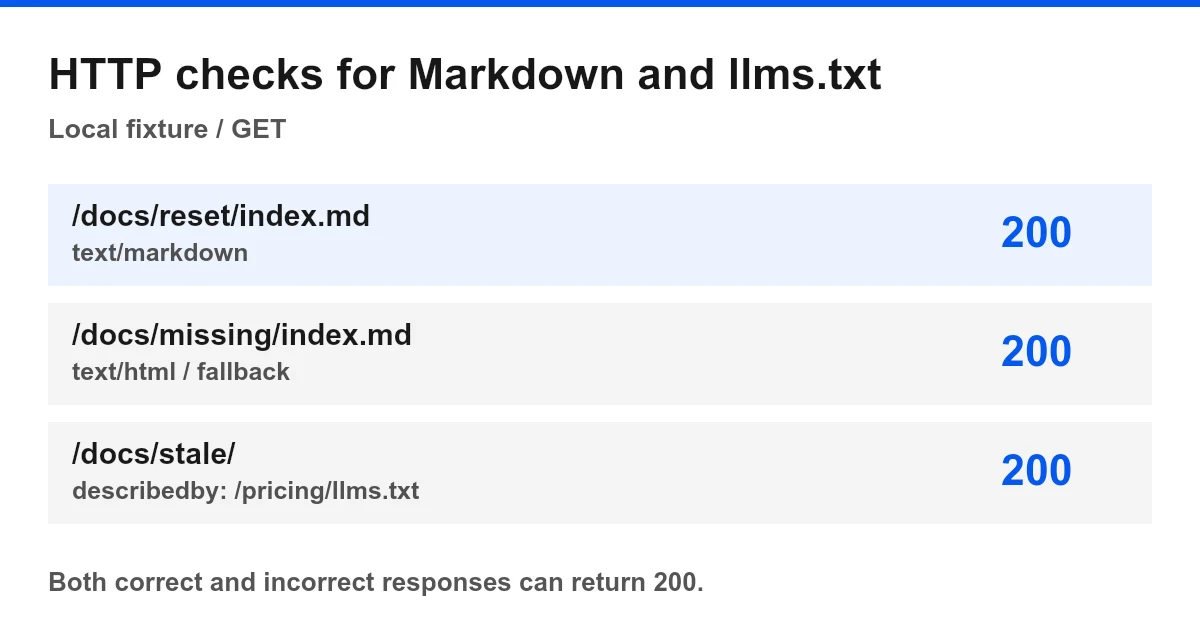
The successful HTML route /docs/reset/ returns 200, text/html; charset=utf-8, and the body begins with <!doctype html> and an <h1>Reset an access key</h1> heading. The Markdown route /docs/reset/index.md also returns 200, but with text/markdown; charset=utf-8, and the body starts with # Reset an access key. That distinction matters because the type hint in the HTML link is only a hint; it does not override the real server response. If the HTML says Markdown is available but the URL actually serves HTML, discovery becomes ambiguous.
The fixture also includes a failure-like case: /docs/missing/index.md returns text/html; charset=utf-8 with a generic documentation page. That is not a Markdown response, even though the path looks Markdown-ish. Another case is /docs/stale/, whose HTTP Link header points to /pricing/llms.txt via rel="describedby". That is a stale or wrong-section relation: the description file points to another area and no longer matches the page scope. In a real site, this kind of mismatch confuses both humans and machines.
Parity rules that keep HTML and Markdown in sync
- Use one source of truth for steps, warnings, and constraints.
- Keep the HTML and Markdown titles aligned.
- Do not change locale when you point alternate to Markdown; same language, same meaning.
- Keep links identical in intent: if HTML links to a settings page, Markdown should link to the same settings page.
- Update llms.txt in the same release workflow as the page content, so it cannot drift.
A simple parity example: if the article says “Open Settings, select the key, then choose Rotate,” both HTML and Markdown should say that exact step sequence and should link to the same settings area. No invented claims, no extra setup steps, no inflated promises. If the HTML version mentions a constraint, the Markdown version should mention the same constraint. The point is not to create a second article; it is to create a second representation.
Concrete markup and header examples
For the HTML source, the relevant snippet is: <link rel="alternate" type="text/markdown" href="/docs/reset/index.md"> and <link rel="describedby" href="/docs/llms.txt">. The equivalent HTTP header is: Link: </docs/reset/index.md>; rel="alternate"; type="text/markdown", </docs/llms.txt>; rel="describedby". The proof shows that exact comma-separated pattern in the response for /docs/reset/. You do not have to implement both the HTML element and the Link header at once; the important thing is consistency and correctness in whichever mechanism your stack uses.
Keep canonical and hreflang untouched. Canonical still identifies the preferred page URL, and hreflang still handles language targeting. The Markdown link should not jump to a different language version. If you need localized documentation, publish a localized HTML page and its own localized Markdown version, then connect those two directly.
If a Markdown URL returns HTML. Check the start of the response body and the publish path. If a missing file triggers a generic HTML fallback, deploy index.md at the advertised path or correct the link. Repeat the GET and require both the actual Markdown body and a text/markdown content type. Changing the MIME type on a fallback page leaves the wrong body in place.
curl -fsS -D page.headers https://example.com/docs/reset/ -o page.html
curl -fsS -D markdown.headers https://example.com/docs/reset/index.md -o reset.md
curl -fsS -D index.headers https://example.com/docs/llms.txt -o llms.txt
If describedby points to another section. Compare the HTML source and HTTP Link response header to see which layer supplies the path. In the fixture the bad path appeared in the response header. Update the layer that emits it and repeat GET on both resources. /docs/reset/ should reference /docs/llms.txt, whose list should include the matching Markdown page.
How to verify the setup with Reproleaf
Use llms.txt Studio to assemble the Markdown URLs that matter. Then audit the published index and use a GET request for each newly advertised Markdown URL. Use Reproleaf to check related access conditions. If WordPress generates the file and it lags a release, diagnose Yoast’s refresh first.
Checklist before launch
- The HTML page exposes a Markdown alternate with the correct href.
- The Markdown URL returns
200andtext/markdown; charset=utf-8. - The Markdown body is semantically equivalent to the HTML page.
- The page points to the right scoped llms.txt with rel=”describedby”.
- The llms.txt file lists the correct Markdown entry.
- No alternate link points to another language.
- No describedby link points to a stale or wrong section.
- GET and header checks were both verified before publishing.
Q&A
Do I need a separate machine-readable file for AI features? No. Google’s guidance does not require an extra machine-readable file; what matters is that your content is accessible and well structured.
Can the Markdown URL be a different language? Not if it is meant to be the alternate for this page. It should stay in the same locale and describe the same content.
What matters more, the link hint or the response? Both, but the response is the final truth. A Markdown hint that returns HTML is a mismatch.
How do I know llms.txt is stale? If it points to an unrelated section, like a pricing file for a docs page, it is stale or out of scope and should be updated.
Is this pattern only for docs? No, but it is easiest to maintain for docs, help centers, and other content with stable sections and clear parity.
Need a Markdown copy of a page? Open Reproleaf’s HTML to Markdown converter to extract the main content and download a .md file.
If a server delivers HTML and Markdown at the same URL, verify both HTTP responses with curl.
Need help with your website?
Development and SEO services →