Official references worth keeping open: Yoast llms.txt functional specification, Yoast help: enable llms.txt, WP-CLI cron event run, and Google Search AI features. For practical post-publish checks, use audit published llms.txt and llms.txt v2 markdown discovery; for working tools, see LLMS TXT Studio and ReproLeaf.
Download the measured results (JSON)
What breaks, exactly: symptom, cause, and first check
The failure is usually not a hard outage. It is one of three patterns: a new post does not enter the file, old links survive after a migration, or the file looks right but the public response never changes. Keep three layers separate: Yoast content selection, scheduled generation via WP-Cron, and the file the server actually serves. Start with read-only inspection:
wp cron event list --fields=hook,next_run_gmt,recurrenceFilter for wpseo_llms_txt_population, then verify the plugin version and the correct site. If the event is missing, that is not the same as a cache delay. If the event exists but the bytes do not change, look for generator ownership problems or a competing source.
Worked decision table
| Symptom | Possible cause | How to check | How to fix | Evidence the fix worked |
|---|---|---|---|---|
A newly published page is missing from llms.txt |
The page is excluded by Yoast selection rules | Compare selection/exclusion settings with the published URL list | Adjust the selection rule, not the scheduler | The expected URL appears in the next public body |
| The file does not change after publication | wpseo_llms_txt_population did not run |
Check wp cron event list --fields=hook,next_run_gmt,recurrence |
Run it manually only if the event exists, Yoast is enabled, and the site is correct | The next run updates, then the public body changes |
| Public bytes stay identical after a regeneration attempt | Another generator owns the served file | Compare the served file with the expected Markdown URL and the ownership checksum | Choose one generator deliberately and restore that path | A fresh GET includes the expected links when a change was due |
| Links are stale after a migration | Cache or a transferred file is still being served | Compare the current body with the previous body, not just the status code | Refresh delivery cache and repeat publication | New links appear while expected prior links remain preserved |
| The manual run does nothing | The plugin is disabled or you are on the wrong site | Verify Yoast is active and the WP-CLI context matches the site | Use the correct installation; do not blindly edit internal options | The event executes and the response body changes |
Step-by-step: read first, run second
First confirm that your site really schedules the job. This command shows whether the event exists and when it should fire:
wp cron event list --fields=hook,next_run_gmt,recurrence | grep wpseo_llms_txt_populationIf the event is present, the plugin is active, and you are on the correct site, a site admin can run it manually:
wp cron event run wpseo_llms_txt_populationThat is only a generation test. It does not tell you whether the served file comes from Yoast, a cache layer, or a different generator. After the run, compare the expected Markdown URL and the body itself, not just the status or timestamp.
What counts as evidence
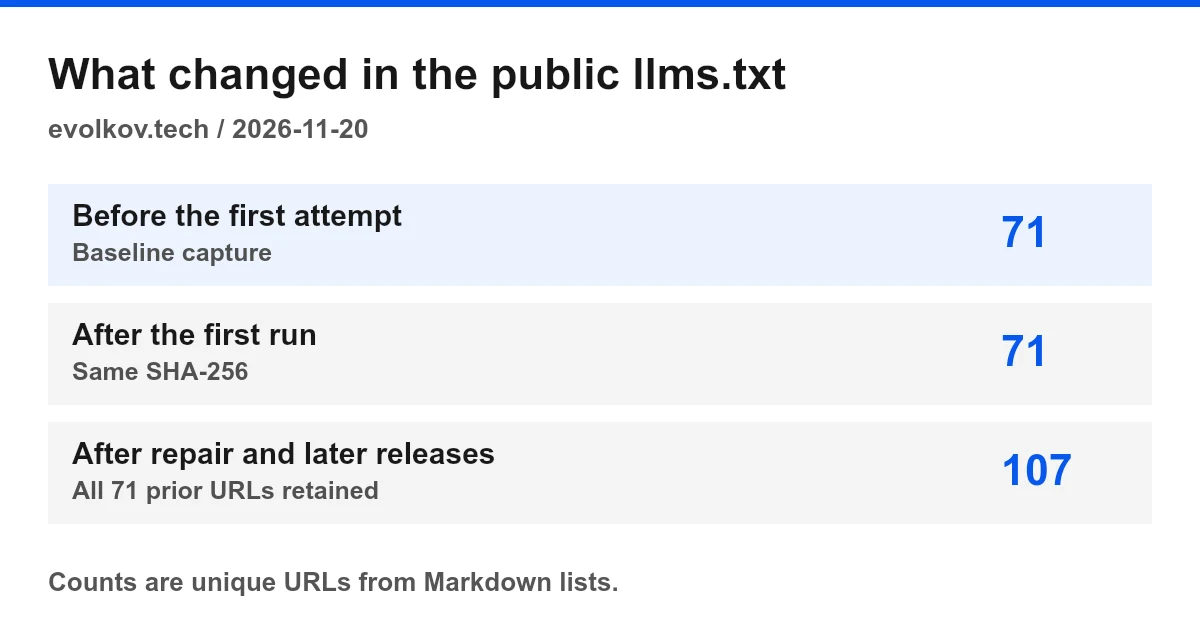
In the migration case that matters here, the first regeneration attempt changed nothing in public. The SHA-256 stayed a77ddfb339e7eedcc76acbe3723be76c56c75fab80b58d78f48027eab8a6abb0, and the file still contained 71 unique links. The diagnosis was not_managed_by_yoast_seo: the saved generator checksum did not match the served Yoast file. After repair and subsequent publications, a later GET returned 200 with text/plain, the SHA-256 changed to 61aa724da2e568e3e1041ced36e5fbd0100bbe17c00403997edca4f27bace6fc, and the file reached 107 unique links while retaining 71 prior links. Those exact numbers are the proof; a vague sense that “it refreshed” is not.
Tell a cached response apart from a failed rebuild
Save the public response before and after the run. If the file on the origin changed while the public response stayed old, inspect CDN headers and purge just /llms.txt. If the origin file stayed old too, check Yoast’s generation and error logs. The same acceptance test applies: a fresh GET lists the intended URL and retains the required older links.
curl -fsS -D before.headers https://example.com/llms.txt -o before.txt
# Run the confirmed WordPress event between captures.
curl -fsS -D after.headers https://example.com/llms.txt -o after.txt
diff -u before.txt after.txt
Checklist you can use now
- Confirm you are checking the correct site and the correct public URL.
- Inspect the WP-Cron queue read-only first.
- Find
wpseo_llms_txt_population. - Separate content selection from scheduled generation.
- Verify which generator owns the served file.
- Compare the expected Markdown URL with the live body.
- Check SHA-256, status
200, content typetext/plain, and link composition. - After the fix, repeat the GET and confirm the needed old links are still present.
Quick Q&A
Should I edit internal Yoast options first?
No. Determine file ownership and whether WP-Cron runs first.
Is a 200 response enough?
No. You also need the body, the hash, the content type, and the link list.
Can I run the event manually?
Yes, if the event exists, Yoast is active, and you are on the right site.
After migration, what matters more: date or links?
The links and the expected Markdown URL matter more than the date.
Will cache alone fix ownership mismatch?
No. If ownership is wrong, you must repair the generator source.
If you want to verify a live file directly, use a normal GET with shell tools or Windows curl.exe, then compare the response body to the expected content. Example:
curl.exe -sS -D - https://example.com/llms.txt -o NULThe goal is simple: identify who owns the served file, what was generated, and whether the public response matches what Yoast should deliver.
Exporting several posts? The WordPress to Markdown guide shows how to verify a batch and its links.
If generation has not been configured yet, start with How to publish and maintain an llms.txt file in WordPress.
Need help with your website?
Development and SEO services →