Read the Page with redirect status in Search Console
Decide what the starting URL should do before changing a rule. An obsolete guide should lead to its replacement. A live booking page should show the booking content. Both requests can end with a 200 response even when one lands on the wrong page.
A permanent 301 or 308 gives Google a signal about the preferred URL. Temporary redirects serve a different purpose. See Google’s redirect documentation.
Trace a GET request to find the final URL
Three routes were tested with GET on a local HTTP fixture. The first command leaves redirects unfollowed, exposing the first status and Location. In the second, -L follows redirects, -D saves the headers, and -w prints the final status and address. Replace example.com with your own site. In PowerShell, use curl.exe.
curl -sS -D - -o /dev/null https://example.com/old-guide
curl -sS -L --max-redirs 10 -D headers.txt -o destination.html -w "%{http_code} %{url_effective}\n" https://example.com/old-guide
On Windows, replace /dev/null with NUL.
For one public URL, use the Reproleaf redirect chain checker and record both ends of the trace. If only the browser redirects, repeat a direct navigation in a fresh context and inspect Network. Look separately for client-side JavaScript redirects or reuse of a cached response.
Why a redirect that ends in 200 can still be wrong
| Starting path | GET statuses | Final path | Page title |
|---|---|---|---|
/old-guide | 301 / 200 | /guide | Current guide |
/services/booking | 302 / 200 | / | Homepage |
/services/booking-fixed | 200 | /services/booking-fixed | Booking service |
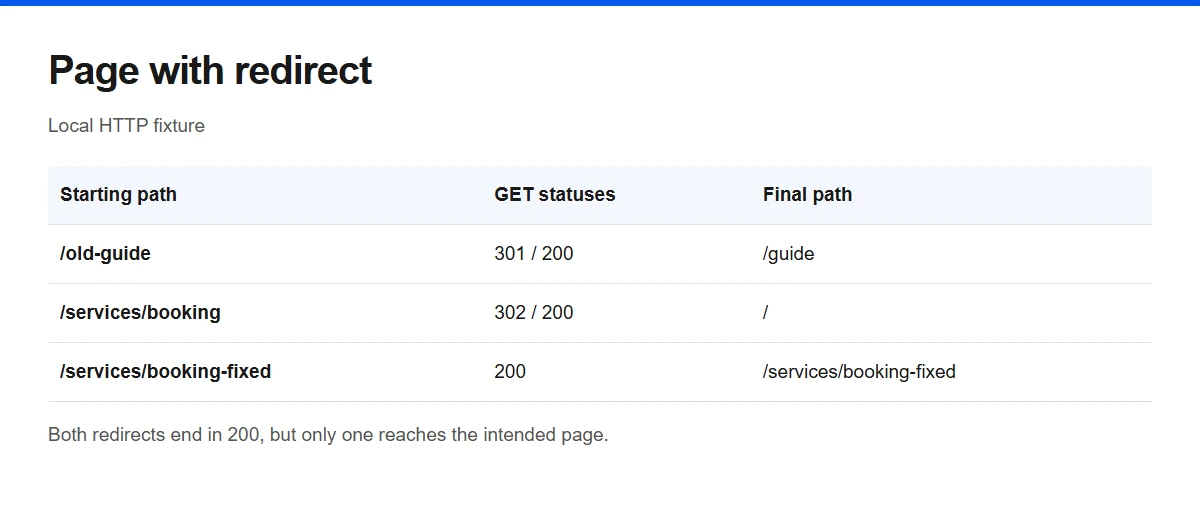
Both redirects end with a 200. The path and document title show the difference. The old guide reaches its replacement, while the booking URL reaches the homepage. The separate /services/booking-fixed route acts as a control. Search Console was not run against these local URLs.
Inspect the source and destination separately in Search Console
The Page indexing report can retain the old URL in Page with redirect. That is expected for a URL that was replaced. Search Console’s live test follows redirects, so a passing live test of the old URL does not establish that the old URL was indexed. Inspect the destination separately and read its indexed result and Google-selected canonical.
See the Page indexing report documentation for the distinction between the live test and historical result.
If the destination returns 200 but remains unindexed, use its own reason. For example, check the difference between Crawled and Discovered, currently not indexed.
Repair the rule and retest the affected URLs
Record the starting URL, intended destination, observed statuses, final page title, and sitemap membership. For a permanent move, keep the 301 or 308, replace internal links, and list the destination in the sitemap. For an unintended rule, try a sibling page as a control. If both routes jump to the homepage, inspect the shared section rule. If only one does, inspect its specific rule and template. After deployment, retest both URLs.
For multiple URLs, use the migration checklist to compare source and destination pairs in the URL map. Use Reproleaf to inspect the target’s published HTML and canonical.
FAQ
Why does Google still show the old URL in the report?
Compare the last crawl time with the live trace. Check the sitemap and internal links point to the replacement. Historical entries can remain until Google processes another crawl.
How is Page with redirect different from Redirect error?
Page with redirect reports that a URL redirects. For Redirect error, look for an incomplete chain, a loop, or an invalid destination. Start with the full request trace.
For repeat redirects on WordPress behind a proxy, use the scheme diagnostics in How to diagnose a WordPress redirect loop behind a reverse proxy.
Need help with your website?
Development and SEO services →