Why a WordPress redirect loops behind a proxy
This check fits a site where the browser requests HTTPS, the proxy passes the request internally over HTTP, and WordPress redirects back to HTTPS. The browser can land on the same public URL repeatedly. Compare the application’s scheme decision with each redirect header. WordPress reverse proxy guidance, is_ssl() reference.
How WordPress detects HTTPS at the origin
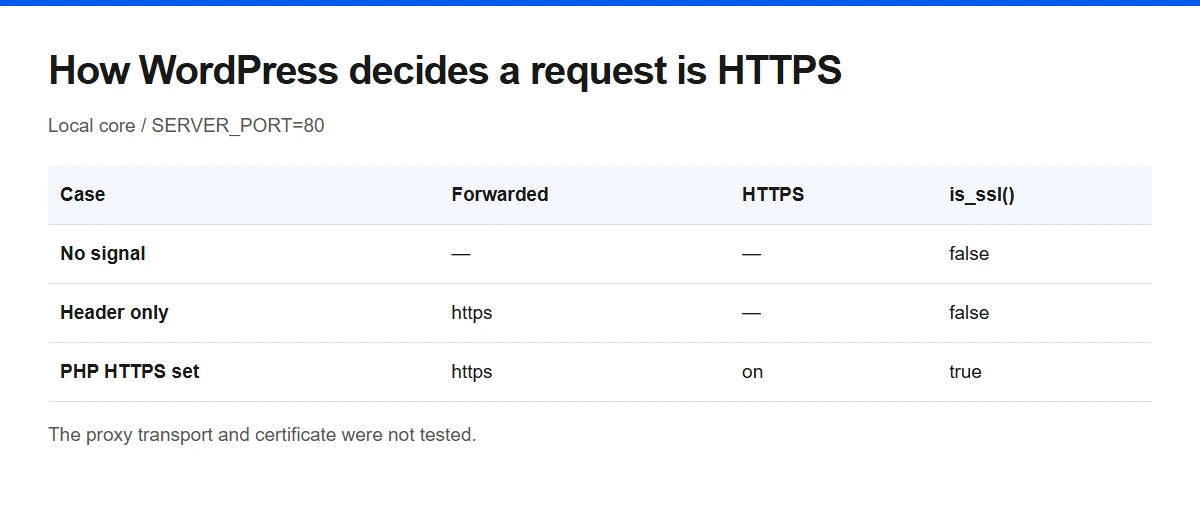
The disposable WordPress fixture changed controlled server variables. The internal port was 80 in all three cases. The table shows how core classified the request. It did not exercise a deployed proxy or TLS certificate.
| Case | SERVER_PORT | HTTP_X_FORWARDED_PROTO | HTTPS | is_ssl() |
|---|---|---|---|---|
| origin | 80 | — | — | false |
| forwarded-only | 80 | https | — | false |
| normalized | 80 | https | on | true |
On staging, record is_ssl() for a proxied request and locate where PHP receives the scheme. Use logs or an access-controlled diagnostic route. Make the proxy overwrite the forwarded scheme and configure the application to trust it only from the known proxy. A direct origin request should not be able to change scheme detection with a client-supplied header.
Find a repeated Location header
curl -sS -L --max-redirs 5 -D redirects.txt -o response.html https://example.com/wp-admin/The separate local HTTP test returned three 302 responses with Location: /loop/. Its control route returned 200 without Location. On your site, record each hop and look for repetition. A redirect to a login page can be expected if the chain terminates there. For a public route, use the redirect chain checker.
Verify the public route after fixing scheme detection
If WordPress detects HTTPS and the loop persists, compare the proxy rules, home, siteurl, and application redirects. If the host alternates on every hop, check whether different layers enforce opposite hosts. When WordPress is mounted under a subdirectory, verify that the final URL retains the required prefix.
wp option get home
wp option get siteurl
Record the public HTTPS result and the expected HTTP-to-HTTPS chain in your migration tests. If the redirect reaches the intended URL and only the index report remains in question, use the Search Console Page with redirect guide.
Distinguish scheme detection from other WordPress loops
From redirects.txt, record the first status and Location, then the next responses. One repeated URL suggests the same rule keeps firing. Two different schemes or hosts alternating in the trace suggest competing rules. A chain that terminates at the legitimate login page is a separate behavior to check against the expected result for a signed-out visitor.
Verify internal and public routes separately
On staging, record what the external proxy accepted and which scheme signal it sent upstream. Compare that with is_ssl(). Then test the public HTTP and HTTPS URLs. HTTP may redirect once to HTTPS. HTTPS should reach the intended page or the expected login flow. If only one browser loops, repeat a direct GET and check a fresh browser profile to rule out old redirects or cookies.
After repair, retain traces for the homepage, affected route, and login page. If one proxy handles multiple sites, check a control URL on each site and confirm that scheme handling is scoped to the intended host. Retest existing admin access controls with the same request set.
Need help with your website?
Development and SEO services →