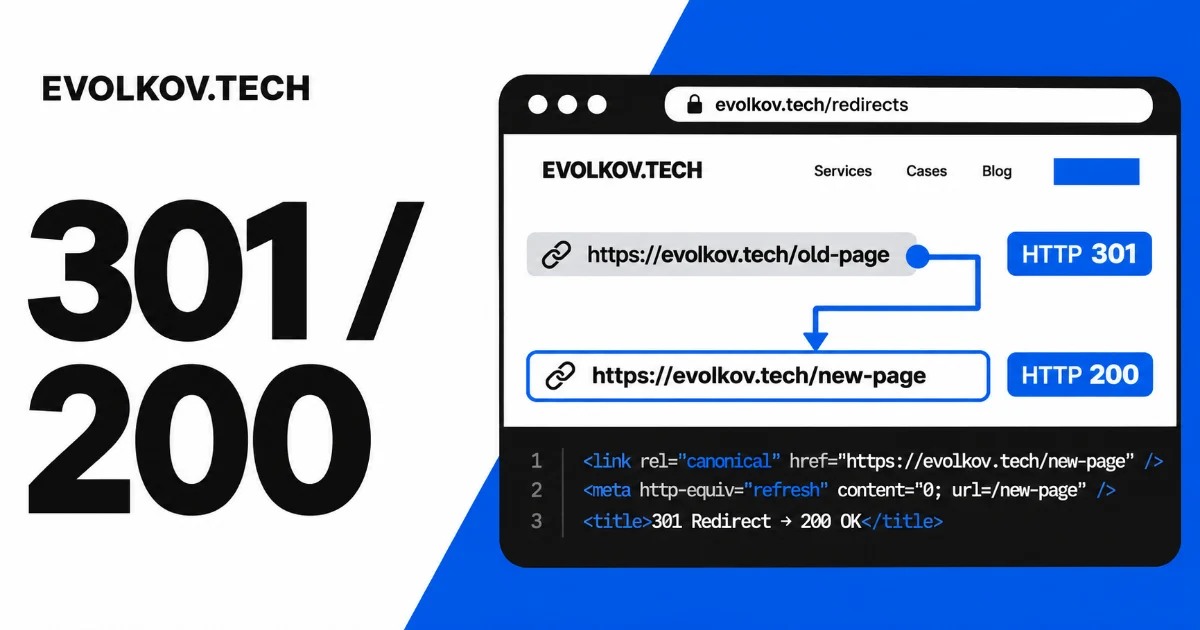
The working rule is simple: preserve equivalent pages with a direct redirect, remove content only when there is no equivalent, and verify the result on a staging or local fixture before release. The worked example in this article uses Reproleaf to inspect recorded HTTP traces from a disposable local server, not production traffic. That example shows why a two-step chain and a final 404 are not acceptable as a release result, and why a direct 301 to a live destination is better evidence.
- Build the URL map before launch.
- Use the right redirect type for the intended permanence.
- Check canonical, hreflang, internal links, and XML sitemaps separately.
- Test query strings, methods, cookies, forms, and payment flows outside the redirect trace.
- Release only when the evidence matches the intended URL behavior.
For the actual trace review workflow, use the Reproleaf methodology and the dedicated redirect-chain-checker to paste JSON, run a local check, and download the result.
Baseline: what must be true before anyone can approve the move
A pre-migration checklist is really a decision checklist. It answers three questions: what is moving, what must remain equivalent, and what proof is enough to release. This is where teams separate a hosting change from a URL or domain migration. If the URLs stay the same, you usually do not need a forced redirect strategy for those same URLs. If the URLs change, you need explicit mapping and redirect rules.
Before you touch production, inventory the current URLs and decide which ones have a new equivalent, which ones should be retired, and which ones need special handling. The same review should cover locale pairs such as ru and en, because locale pages should map to equivalent locale pages, not all funneled to one language or to the home page.
| Inventory item | Why it matters | Evidence to collect | Decision owner |
|---|---|---|---|
| Old URL list | Defines the scope of redirects and retirement decisions | Current crawl, sitemap export, manual exceptions | SEO / content owner |
| New target URLs | Shows the intended equivalent destination | Staging URL map, route inventory | SEO / development |
| Locale mapping | Prevents cross-language mismatches | ru-to-ru and en-to-en equivalence rules | Localization owner |
| Canonical and internal links | Prevents mixed signals after launch | Template audit, crawl sample | SEO / engineering |
| Assets and forms | Redirect traces do not cover them | Manual functional test list | QA / product |
One practical check is to compare the old and new URL sets before release, then verify that the release plan preserves the intended pages and removes only what no longer has a destination. If your move affects page inventory rather than just routing, a supporting comparison workflow such as compare sitemaps before and after can help confirm whether the URL set changed in the way you expected.
This baseline is also where you define limits. A redirect-chain check does not prove indexing, ranking, cookies, form submission, or payment logic. It proves the HTTP path you asked it to inspect. That is valuable, but it is not the full migration story.
URL mapping decisions: keep, redirect, remove, or retire
The URL map is the release contract. Each row should say what happens to the old URL, what the new equivalent is, who owns the decision, and what would count as acceptable evidence. This is not a place for vague notes. If a page has a clear replacement, point it there. If it has no replacement, decide whether the correct result is removal or a controlled retirement response. Do not treat every missing page as automatically bad; the right answer depends on whether an equivalent exists and whether the page should still be accessible.
| Old URL pattern | Target | Action | Owner | Acceptance rule |
|---|---|---|---|---|
| /ru/old | /ru/new | 301 or 308 to equivalent page | Localization + SEO | Direct redirect, no chain, final URL returns 200 |
| /en/old | /en/new | 301 or 308 to equivalent page | Localization + SEO | Direct redirect, no chain, final URL returns 200 |
| Removed legacy page | None | Retire, return 404 or 410 where appropriate | Content owner | Only if there is no relevant equivalent |
| Same URL, same content | Same URL | No forced redirect | Engineering | Stays accessible without unnecessary hops |
For canonical and duplicate handling, use a separate audit instead of assuming redirects solve everything. A redirect can point a request to a new location, but it does not by itself prove that the canonical tag, hreflang return links, or internal references are consistent. Use dedicated checks such as canonical tag audit and hreflang return links audit where those signals matter.
The type of redirect also matters. Google’s redirect guidance distinguishes permanent redirects from temporary ones. If the move is meant to be permanent, choose a permanent redirect; if it is temporary, do not pretend otherwise. That sounds obvious, but it is one of the easiest ways to create future cleanup work.
Google’s guidance for site moves is to map old URLs to relevant new equivalents, test the new site, avoid irrelevant bulk redirects to the home page, update canonical and internal links, and monitor after the move. For redirect status codes, Google distinguishes permanent 301/308 from temporary 302/303/307; use the code that matches the intended behavior.
Do not over-apply the rule. A 404 or 410 is not universally “bad”; it can be the correct outcome when there is no equivalent page. The key question is whether the page should preserve value or legitimately disappear.
Use the before-and-after sitemap comparison to compare old and new URL lists. It supports the mapping but does not prove redirect behavior.
Google guidance for moving URLs.
Staging: what to test before public release
Staging should answer one question: does the planned URL behavior work in a controlled environment? That means the move is not ready until the redirect map, page content, and non-HTML checks have been reviewed in a place that is not public production. For some teams that means a private staging host; for others it means a disposable local fixture that reproduces the routing logic without exposing live traffic.
Authentication restricts access to a staging environment. A noindex directive concerns indexing, while robots rules concern crawler access; neither is a substitute for authentication when the content is confidential. Before release, check that temporary restrictions have not reached pages intended to be public and indexable. A staging check does not replace a fresh check of production routing.
Separate the checks:
- Redirect paths for old URLs.
- Canonical tags on the destination pages.
- Hreflang return links for localized variants.
- Internal links and navigation templates.
- XML sitemaps and any URL lists used by crawlers.
- Assets, forms, contact flows, and payment flows.
Query strings, request methods, cookies, and session-dependent flows require explicit review. A redirect trace alone does not validate how POST forms behave, whether cookies persist as intended, or whether checkout and contact flows survive a change. Those are separate tests.
The useful staging question is not “did we see a redirect?” but “did we see the right redirect, to the right equivalent, with the rest of the page ecosystem aligned?”
Check declared canonical URLs separately with the canonical audit guide. A 200 response does not establish the canonical selected by a search engine.
For RU/EN pages, use the reciprocal hreflang guide to check language counterparts. Redirecting a language version to the other language homepage is not a substitute for an equivalent page.
Worked walkthrough: baseline before the change
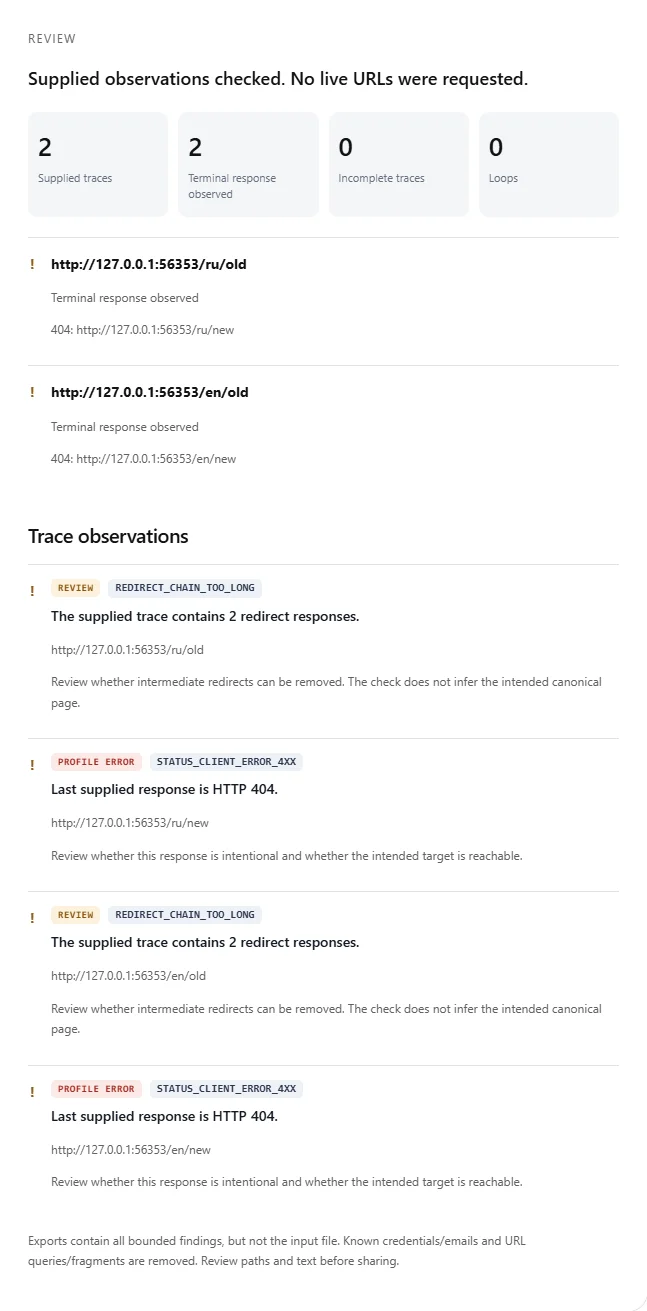
The worked example below uses a disposable local HTTP fixture and offline trace inspection. It is an actual local server experiment, not a customer deployment. Reproleaf’s local CLI and browser-based component were used to inspect recorded responses without making production requests. The fixture made 10 GET observations across two locale paths, ru and en. Before the change, each /{locale}/old returned a 301 to /{locale}/intermediate, then another 301 to /{locale}/new, and the final URL returned 404.
| Start URL | Hop 1 | Hop 2 | Final | Status |
|---|---|---|---|---|
| http://127.0.0.1:56353/ru/old | 301 /ru/intermediate | 301 /ru/new | 404 | Broken target |
| http://127.0.0.1:56353/en/old | 301 /en/intermediate | 301 /en/new | 404 | Broken target |
That trace pattern is a classic pre-release warning. It shows two chains, two broken targets, and no terminal success. The important point is not the existence of a redirect; it is the destination outcome. A chain that ends in a 404 does not establish a useful replacement.
| Metric | Before | Meaning |
|---|---|---|
| Total traces | 2 | Two locale paths were tested |
| Errors | 2 | Each trace ended badly |
| Warnings | 2 | Each trace had a chain |
| Chains | 2 | Both paths required multiple hops |
| Broken targets | 2 | Final destinations returned 404 |
| Terminal traces | 2 | Both traces terminated, but not successfully |
In practice, this is where a redirect-chain-checker helps. You paste the recorded JSON, run a local check, and download the result. You are not asking the tool to fetch live pages; you are reviewing captured responses and their chain structure. That distinction matters when you need a reproducible audit trail for a release decision.
For a related pre-check on whether the URL inventory itself changed in a meaningful way, you can pair the redirect review with a sitemap comparison workflow, but the redirect result and the sitemap result answer different questions. One is about routing, the other is about list membership.
The downloadable JSON retains the actual 127.0.0.1 addresses and temporary port used by our fixture. The server has been stopped; do not try to open those URLs. Load the files as recorded observations in the Reproleaf redirect-chain checker. Use the standalone Node.js example in the checklist to collect your own fresh local observations.
Recorded HTTP responses before the fix (JSON)
Reproleaf before report (JSON)
What the fix looks like when the redirect is direct and the target resolves
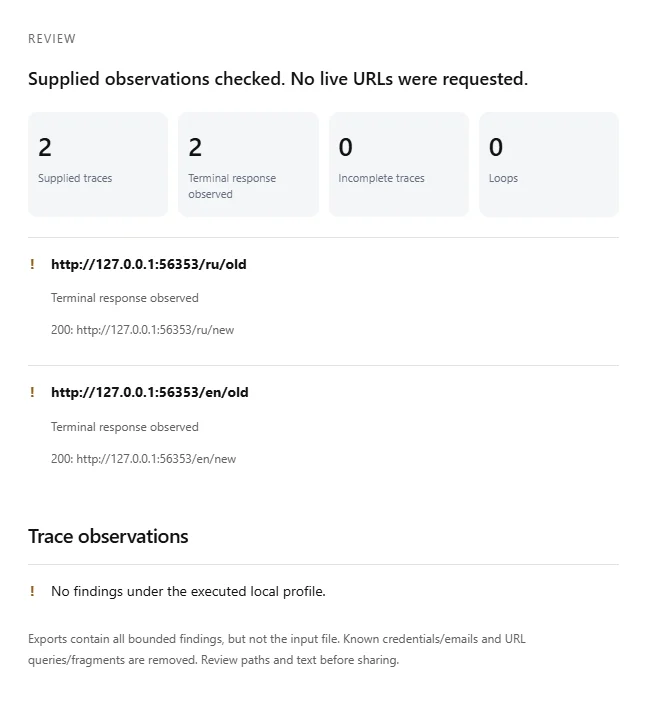
After the change, the same two start URLs were observed again. This time each /{locale}/old returned a single 301 directly to /{locale}/new, and /{locale}/new returned 200. That is the intended shape for an equivalent move: one hop, one destination, no broken final page.
| Start URL | Hop 1 | Final | Status |
|---|---|---|---|
| http://127.0.0.1:56353/ru/old | 301 /ru/new | 200 /ru/new | Successful |
| http://127.0.0.1:56353/en/old | 301 /en/new | 200 /en/new | Successful |
| Metric | Before | After |
|---|---|---|
| Total traces | 2 | 2 |
| Errors | 2 | 0 |
| Warnings | 2 | 0 |
| Chains | 2 | 0 |
| Broken targets | 2 | 0 |
| Temporary redirects | 0 | 0 |
| Terminal traces | 2 | 2 |
This is better evidence, but it is still only evidence about the recorded redirect behavior. It does not mean the whole migration is done, and it does not prove indexing, traffic, or ranking outcomes. It simply shows that the old URL now points directly to the intended equivalent and that the final destination resolves successfully.
For a migration that is not changing URLs at all, the decision is different. If the content and path stay the same, you do not need to invent a redirect story. In that case, the task is usually to keep the URL stable and avoid unnecessary routing changes.
If you need to preserve the same URL structure across hosting changes, treat the move as a hosting or infrastructure change rather than a URL migration. The release decision should reflect the scope: same URLs do not require the same redirect plan as new URLs.
Both 301 and 308 indicate a permanent move, but request-method handling differs. RFC 9110 permits a POST-to-GET change with 301 and identifies 308 for cases where that behavior is unwanted. Our example uses GET only; it does not test form submissions. Choose the status for the application and test forms separately.
Negative control: removing the final response from both updated traces produced zero errors and zero broken targets, but two incomplete traces and zero observed terminal responses. This does not pass acceptance: the destination response remains unobserved.
Google on permanent and temporary redirects.
Recorded HTTP responses after the fix (JSON)
Release decisions: go, hold, or stop
Use a stop/go table before launch. The point is to make the release call explicit rather than emotional. A good redirect result is necessary, but not sufficient by itself. The release should only move forward when the URL map is complete, the destination pages resolve, and the non-redirect checks are not blocking the launch.
| Condition | Decision | Why |
|---|---|---|
| Old URLs map directly to relevant equivalents | Go | Preserves intent and reduces chain risk |
| Old URLs chain through intermediates | Hold | Clean up routing before release |
| Destination returns 404 with no equivalent | Hold or retire intentionally | Confirm whether removal is correct |
| Canonical, hreflang, or internal links still point to old URLs | Hold | Fix supporting signals before launch |
| Forms, query strings, or payment flows are untested | Hold | Redirect traces do not cover them |
| Same-URL hosting change only, no routing change needed | Go with limited change | No forced redirect plan should be added without reason |
The release checklist should also include a tested recovery path. If something goes wrong, rollback must be done carefully so that you preserve new transactions and do not blindly restore an entire database snapshot that would erase valid post-release data. Recovery planning is part of release planning, not a separate emergency thought.
When the move is public, keep the post-launch process separate from the release decision. Monitoring is still necessary after launch, but monitoring is not the same as a guarantee. You can watch server responses, crawl coverage, and URL inspection results, yet none of those produce a fixed recovery date or a guaranteed traffic percentage.
Checklist, URL map, and reproduction code (Markdown)
Monitoring after release: what to watch, and what it does not prove
After launch, monitor the change in layers. First, confirm that the old URLs continue to resolve as intended. Second, check the destination pages and internal navigation. Third, inspect Search Console or your equivalent indexing tools for coverage and URL inspection results. These are separate from HTTP tests. A page can return 200 and still not be indexed immediately, and a URL inspection result is not the same thing as a live crawl of every page variant.
The release process is therefore a sequence, not a single test:
- Validate the URL map and redirect behavior.
- Deploy the release.
- Check that internal links, canonical tags, and hreflang signals were updated.
- Inspect crawl and indexing tools separately from HTTP traces.
- Review logs and exceptions for missed rules or unhandled paths.
Do not read too much into one metric. A redirect-chain check can show that your routing works, but it does not measure how search engines will respond over time. Likewise, search console data can confirm discovery and indexing signals, but it does not tell you whether your old URL mapping is clean. The two views complement each other.
If you need a methodology reminder for how the evidence is collected and reviewed, use the Reproleaf methodology page. It is helpful as a process reference when you want the same check to be repeatable across releases.
FAQ
1. If the URLs do not change, do I still need redirects?
Usually no. For a same-URL hosting move, the job is to keep the existing URLs working, not to force a new redirect structure where none is required.
2. Should I use 301 or 308?
Use the permanent redirect type that matches your implementation and policy. The important thing is permanence, not a blind switch from one status code to another.
3. Is redirecting everything to the home page acceptable?
Only in limited edge cases. For site moves, broad irrelevant redirects to the home page are specifically discouraged. Use the closest relevant equivalent instead.
4. When is a 200 response not enough?
A 200 on the final URL is necessary but not sufficient. The page must also be the correct equivalent, and the surrounding signals such as canonical, internal links, and locale mapping should be aligned.
5. How should I handle WordPress, Vue, Astro, or custom routing?
The platform changes the implementation details, not the release logic. Whatever stack you use, define the URL map first, then implement and test the redirects, and then verify the surrounding SEO signals separately.
6. Does a redirect trace prove everything is safe?
No. It does not test form submissions, cookies, payment flows, method preservation, or indexing behavior. It proves the recorded redirect path only.
Next step: download the working files and build your own release checklist
Start with Reproleaf: reproduce the example, then build your own URL map. Upload recorded HTTP responses to the redirect-chain checker and retain the report. Verify canonical, hreflang, internal links, indexability settings, and business flows separately before approving the launch.
After migration, distinguish expected redirects from misrouted pages using What does Page with redirect mean in Google Search Console?.
When a WordPress migration introduces a proxy, include the HTTPS checks described in How to diagnose a WordPress redirect loop behind a reverse proxy.
Need help with your website?
Development and SEO services →