
- Specify inputs, units, and the source of calculation rules.
- Agree expected results for normal and boundary cases.
- Define integrations, formula ownership, and the update process.
When a custom calculator is worth building
A website calculator is useful when the user must combine a few inputs and get an immediate answer that supports a purchase, inquiry, or internal decision. It is especially helpful when the formula is part of your commercial logic, such as quantity thresholds, service bundles, or scenario comparison. If the rule is simple and stable, a standard widget may be enough. If the rule reflects your business model, custom development is usually the safer option.
| Use case | Inputs | Output | Acceptance focus |
|---|---|---|---|
| Pricing or quote estimator | Quantity, options, ranges, exclusions | Estimated total or range | Thresholds, rounding, invalid input handling |
| Comparison tool | Scenario A, scenario B, toggles | Difference or recommendation | Label accuracy, default states, reset behavior |
| Qualification tool | Project size, location, timing | Next step or route | Missing values, consent, follow-up routing |
| Operational estimator | Units, duration, frequency | Workload or capacity view | Edge values, formatting, accessibility |
For the broader build context, custom calculators are one part of web application development, where the decision is driven by logic, integration, and maintainability rather than by design trend alone.
What to define in scope before development
The brief should be specific enough that a developer can implement the calculator without guessing. The best brief describes the user goal, the business rule, the allowed ranges, the output format, and the places where the result will appear. It should also state whether the calculator is a standalone page, a widget embedded in content, or a component inside a larger application.
| Editable brief requirement | What to specify | Why it matters |
|---|---|---|
| Formula owner | Who approves the rule and future changes | Prevents unclear revisions later |
| Input examples | Realistic values and edge values | Helps define behavior before coding |
| Units | Count, hours, items, percent, or other measure | Avoids mixed interpretations |
| Output | Single value, range, breakdown, or status | Shapes the interface and messaging |
| Validation | Empty, zero, fractional, negative, and overflow cases | Determines what the user can submit |
| Integration | CMS, CRM, analytics, form handler, or API | Defines implementation work and ownership |
Useful supporting material for release-oriented SEO and technical work is available in the technical SEO audit and website fixes guide and the implementation of SEO audit fixes article. For a separate example of canonical handling, see canonical tag audit.
Also prepare the acceptance environment. If the calculator is intended to be public, you need keyboard access, clear labels, visible results, and a form submission path that still works when JavaScript is unavailable or blocked. If analytics or consent handling is involved, define it before launch rather than after users begin testing the tool.
Download the brief, formula, and tests
How to define the formula, boundaries, and data rules
The formula is the heart of the project, but it should not be treated as the only deliverable. You need to define how the calculation behaves, what counts as valid input, and what the user sees when data is missing or invalid. A good implementation separates the business rule from the page layer so the formula can be tested, changed, and documented without rewriting the entire interface.
In practical terms, a calculator brief should answer these questions: Which inputs are required? Which values are optional? Are decimals allowed? Is the output rounded up, rounded down, or shown exactly? What happens at thresholds? What happens when the user enters zero, a negative number, or a value outside the allowed range?
The source data for this guide includes a local example with quantity-based logic. The rule changed from a strict greater-than threshold to a greater-than-or-equal threshold. The example uses illustrative calculation units, not currency, and the units are hypothetical rather than commercial pricing.
| Factor | Decision needed | Typical evidence |
|---|---|---|
| Threshold rule | Should the discount start at 10 or above 10 only? | Business approval and test cases |
| Number format | Are fractions accepted? | Validation rules and UI hints |
| Rounding | How is the final value displayed? | Expected outputs for boundary values |
| Error handling | What happens on invalid submission? | Rejected-input tests |
| Data freshness | Must rates or rules be editable without deploys? | Admin workflow or versioned configuration |
For development workflow support, a tool like web-dev-mcp can help a developer structure implementation and checks, but it does not replace business review of the formula or acceptance criteria.
Working example: quantity rule and test cases
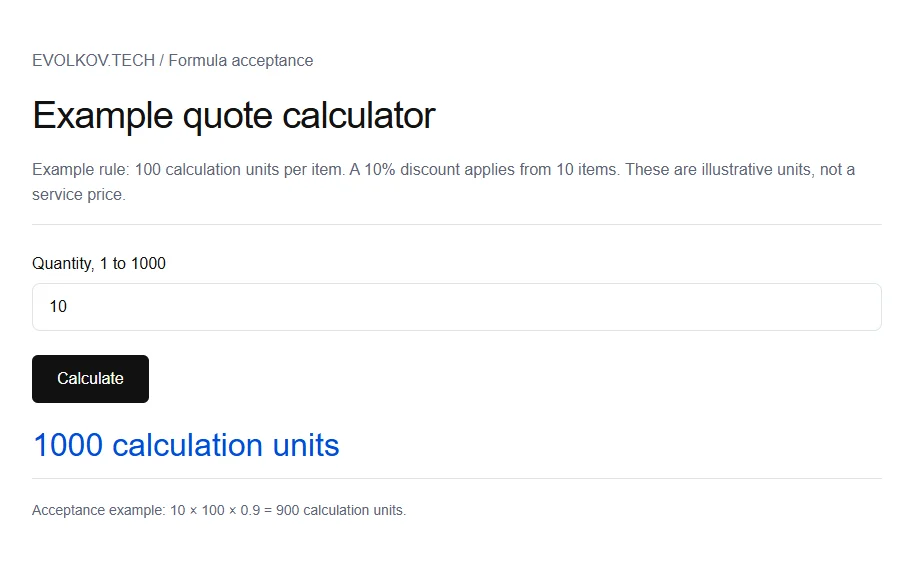
Here is the practical example from the source set. The calculator uses quantity as the input. The illustrative unit value is 100. A 10% discount starts at 10 units and above. The bug was a threshold error: the old version used a strict condition, so 10 units were handled incorrectly. The corrected version uses the intended threshold and returns the expected result.
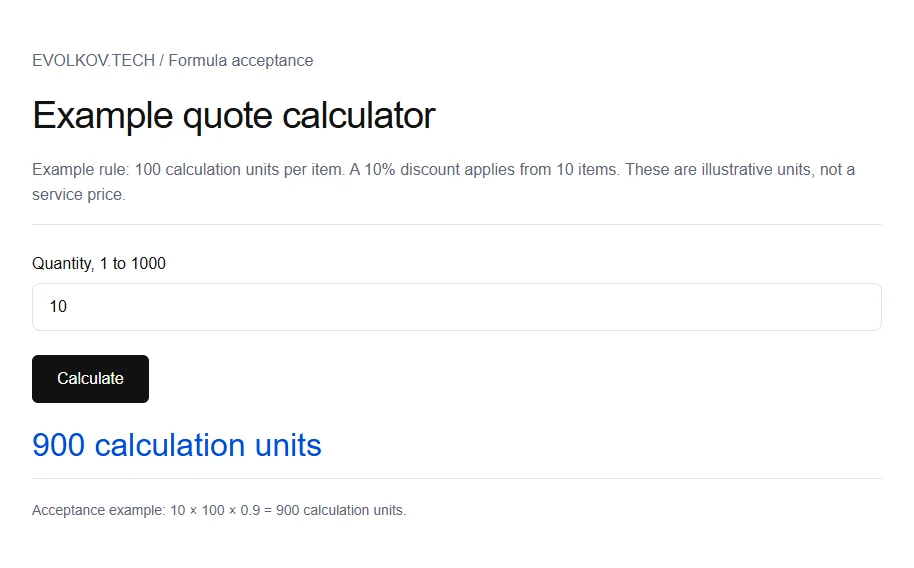
Before the fix, quantity 10 produced 1000 in the browser check instead of the expected 900. After the fix, the same input returned 900. The case set also included 9 and 11, with expected outputs of 900, 900, and 990 across the three test values.
| Quantity | Expected output | Before | After |
|---|---|---|---|
| 9 | 900 | 900 | 900 |
| 10 | 900 | 1000 | 900 |
| 11 | 990 | 990 | 990 |
The invalid inputs 0, -1, 1.5, and 1001 were rejected. That matters because a calculator is not only about the happy path; it must also protect the business rule from nonsense values and accidental misuse. If the calculator is part of a regulated or high-stakes decision, the validation and formula review should involve qualified subject-matter review appropriate to the domain.
The example data set is available in the before inventory JSON, the before report JSON, the after inventory JSON, the after report JSON, and the editable brief at en-calculator-brief.md.
The screenshot shows the working educational form, rather than a client outcome. For quantity 10, the original q > 10 condition returned 1000 calculation units; changing it to q >= 10 returned 900. These are illustrative units, not development fees or a commercial product price.
What acceptance should cover after release
Acceptance should verify two different things. First, it should verify the business formula: for example, whether quantity 10 now returns the correct calculated result and whether the invalid inputs are rejected. Second, it should verify the emitted HTML and page structure. Those are related, but they are not the same check.
The source example used browser checks in both Russian and English, and the calculator form was verified in the browser. The local HTML audit was then run on each emitted HTML file as a separate check. That audit is useful for markup quality, but it is not math validation. Reproleaf is therefore best understood as a release check for the delivered HTML, not as a calculator engine that magically proves the formula.
- Verify the final formula against the approved test cases.
- Check keyboard use, labels, focus order, and submit behavior.
- Confirm that results are visible and understandable without relying on color alone.
- Test the no-JS path if the calculator must still function or fail gracefully without scripts.
- Review consent and analytics behavior only if those features are actually present.
- Record the version of the formula and the version of the UI together so future changes are traceable.
For post-release checks that focus on technical changes, the blog guides on technical SEO audit and website fixes and implement SEO audit fixes are relevant references.
The downloadable JSON records two separate results: formula tests and a Reproleaf HTML audit. The three calculation cases cover quantities 9, 10, and 11; the validator rejects 0, -1, 1.5, and 1001. The HTML audit does not execute those calculations or establish mathematical correctness.
The Reproleaf methodology explains which facts the tool can verify from supplied inputs.
How to integrate the calculator into your site or app
Integration choice should follow your existing platform, not a trend. If the site is on WordPress and the calculator is mostly content-led, a widget or shortcode can be the fastest route. If the calculator needs richer state, complex validation, or deeper business logic, a custom frontend component may be a better fit. The final stack could be Vue, React, Astro, or another approach, but the right choice depends on how the calculator will connect to the rest of the site.
Ownership matters here. Decide who owns the source code, the formula definition, the tests, the content copy, the documentation, and any API keys or server-side dependencies. Also decide whether the logic lives on the client, on the server, or in both places. For sensitive or critical rules, server-side validation should confirm the final submitted values even if the UI performs fast client-side checks.
A practical integration plan often includes:
- Input collection and validation in the interface.
- Server-side verification of submitted data.
- Versioned formula logic so changes are tracked.
- Accessible output area that announces the result.
- Fallback behavior when scripts fail or are disabled.
- Documentation for content editors and maintainers.
For custom development and deployment work beyond the calculator itself, the most relevant service context is the main web application development page.
How to estimate the project and what evidence you need
Estimate quality depends on how complete the brief is. A calculator that only displays a result is a smaller job than a calculator that stores leads, sends data to a CRM, supports multilingual content, and includes server-side checks. The point is not to guess a price from a template; the point is to provide enough evidence that the scope can be sized responsibly.
| Estimate factor | What changes the scope | Quote evidence to provide |
|---|---|---|
| Formula complexity | Single rule, tiered rule, or multiple branches | Example inputs and approved outputs |
| Integration depth | Standalone page, CMS widget, or API-backed app | Target platform and data flow |
| Validation needs | Basic checks or server-confirmed rules | Invalid input list and failure behavior |
| Accessibility | Keyboard support, labels, live regions, fallback | Acceptance checklist |
| Maintenance | Static rule or editable configuration | Who changes the rule and how often |
Price ranges are not provided here because they would be fabricated without your actual scope. Instead, prepare the decision inputs first: site URL, business decision the calculator supports, formula owner, sample inputs, and desired integration method. Do not send passwords. If you want the formula reviewed in context, include the edge cases and the expected outputs as part of the brief.
For SEO-related implementation context, note that a calculator page can be indexable and useful if it contains clear explanatory content, examples, and limitations. A blank embed or an infinite set of parameterized URLs is not a useful strategy. Search visibility depends on helpful content and crawlable structure, not on a promise of traffic.
Frequently asked buyer questions
Can the calculator be built in my CMS?
Yes, if the CMS supports the needed fields, templates, scripts, and maintainable content workflow. For WordPress, a widget or embedded component may be enough, but the best choice depends on the logic and ownership requirements.
Who owns the formula after delivery?
The formula should be explicitly assigned in the brief and in the handover materials. Ownership includes the logic, test cases, and change process, not only the visible page.
What if the rules change later?
Plan for versioning. A calculator that changes often should have documented test cases and a clear way to update the business rule without breaking old behavior unexpectedly.
How do you estimate a calculator project?
Provide the input examples, output expectations, platform, integrations, and validation rules. Without that evidence, any estimate is only a guess.
Will the page help SEO?
It can help if it is genuinely useful, descriptive, and indexable. Do not rely on thin content or parameter spam. Also remember that search titles and canonical signals are handled by search systems; they are not guaranteed by local markup alone.
How is math validation different from HTML audit?
Math validation checks the formula and boundary behavior. HTML audit checks supported facts in the supplied emitted markup; it does not prove the page has no markup defects. A calculator project needs both, but they solve different problems.
Next step
If you want a custom calculator or web tool scoped correctly, send a short request with five items: the site URL, the business decision the tool supports, the formula owner, three or four sample inputs with expected outputs, and the integration you want. If the brief is ready, include the editable markdown brief and the release-test notes in one package. If you need a technical workflow for development and release checks, start with web-dev-mcp and pair it with the calculator brief, not with guesswork.
For readers who want the example evidence package, the related files are the four JSON input and report files and the brief markdown already linked above. For a practical next move, ask for a scoped review of your calculator logic and integration path before you commit to implementation.
Need help with your website?
Development and SEO services →