- Collect URLs and links from a defined section.
- Check which pages and link types the export covers.
- Analyze the inventory in Reproleaf and review candidates.
- Add a useful contextual link and recheck the same URLs.
What an orphan page is, and what it is not
An orphan page is usually understood as a page with no observed internal incoming links from the set of pages you inspected. That definition is intentionally narrower than “a page nobody can find.”
A page can still exist, be indexed, be in a sitemap, or receive traffic from external sources and still be an orphan candidate in your observed internal graph. Conversely, a page can be excluded from your sample because login walls, JavaScript rendering, pagination, or crawl limits prevented you from seeing the relevant links.
That is why this article treats the report as evidence about the supplied graph only. It does not claim to measure the whole web, HTTP status, indexing, or traffic.
Google’s guidance is consistent with that distinction: crawlable links should be standard a elements with href and clear anchor text, and sitemaps help discovery but do not guarantee crawling or indexing.
Google recommends crawlable links built with standard anchors and meaningful text. A sitemap can help discovery, but it is not proof that a page is crawled or indexed.
The internal linking audit guide covers graph metrics, link direction, and unknown targets. This guide focuses on candidates with no observed incoming link.
What to trust: links, sitemaps, CMS exports, and logs
Before you label anything an orphan, decide which signal you are using and what that signal can actually prove. The comparison below keeps the boundaries clear.
| Source | What it tells you | What it cannot prove | Best use |
|---|---|---|---|
| Observed internal links | Which pages link to which URLs in the data you collected | That the whole site was crawled or that search engines indexed anything | Finding orphan candidates and link gaps |
| Sitemap | Which URLs you exposed for discovery | That a URL has an incoming HTML link, or that it will be crawled/indexed | Discovery support and inventory checks |
| CMS export | Stored content relationships, menus, and templates | What is actually live in rendered HTML everywhere | Coverage review and editor workflow |
| GSC reports | Search-side visibility and some indexing hints | Exact internal linking topology | Validation and issue triage |
| Server logs | Observed bot and user requests | Whether a page is internally linked in the site architecture | QA, crawl behavior, and access patterns |
Use URLs carefully. Normalize equivalent forms such as trailing slashes or lowercase hostnames if your site treats them as the same resource, but do not collapse different locales, faceted states, or query-string content blindly. A query parameter can carry meaning, and a localized path can represent a distinct page set. Treat those as separate until your site rules prove otherwise.
Reproleaf fits here as a practical inspector for the internal-link graph you supply. It is central for this task because the point is to verify coverage from observed links, not to pretend that every absence is a crawl failure.
Use the before-and-after sitemap comparison when the URL set changes. It compares listed URLs rather than incoming HTML links.
Google guidance on crawlable links.
Google on the role and limits of sitemaps.
Prepare the inventory before you run anything
The quality of your result depends on the inventory. If you feed the tool a partial or noisy export, the output will faithfully reflect that limitation.
- Collect the pages you want to assess from your CMS, crawl export, or hand-built inventory.
- Make sure the link data includes source URL, target URL, and anchor text where possible.
- Keep locale variants separate unless your site structure intentionally merges them.
- Record whether the inventory comes from rendered HTML, editor data, or another export.
- Review privacy before upload. Avoid tokens, private credentials, or raw text that should not leave your environment.
The supplied checklist is editable and meant to be adapted to your process. A practical workflow usually includes owner, status, source, target, and acceptance fields so the next person can see what changed, why it changed, and how to verify it.
For reference, the downloadable checklist and the four JSON assets in this guide are the supplied files for the example run: en-orphan-checklist.md, en-before-inventory.json, en-before-report.json, en-after-inventory.json, and en-after-report.json.
Run the observed-graph check and read the before result
In this walkthrough, the supplied inventory is a six-page educational fixture. The data is stored as links, not from a live network crawl, HTTP check, or indexing measurement. That matters because the report only describes what is present in the JSON graph.
Open Reproleaf, use the Site inventory / Карта сайта mode, paste the supplied inventory, and run the report. Then inspect the page-by-page link map before you decide what is orphaned. The useful question is not “does the site have a sitemap?” but “which pages have observed incoming internal links in the inventory I actually collected?”
Here is the kind of HTML link you should look for in source data, shown as code rather than a live site link:
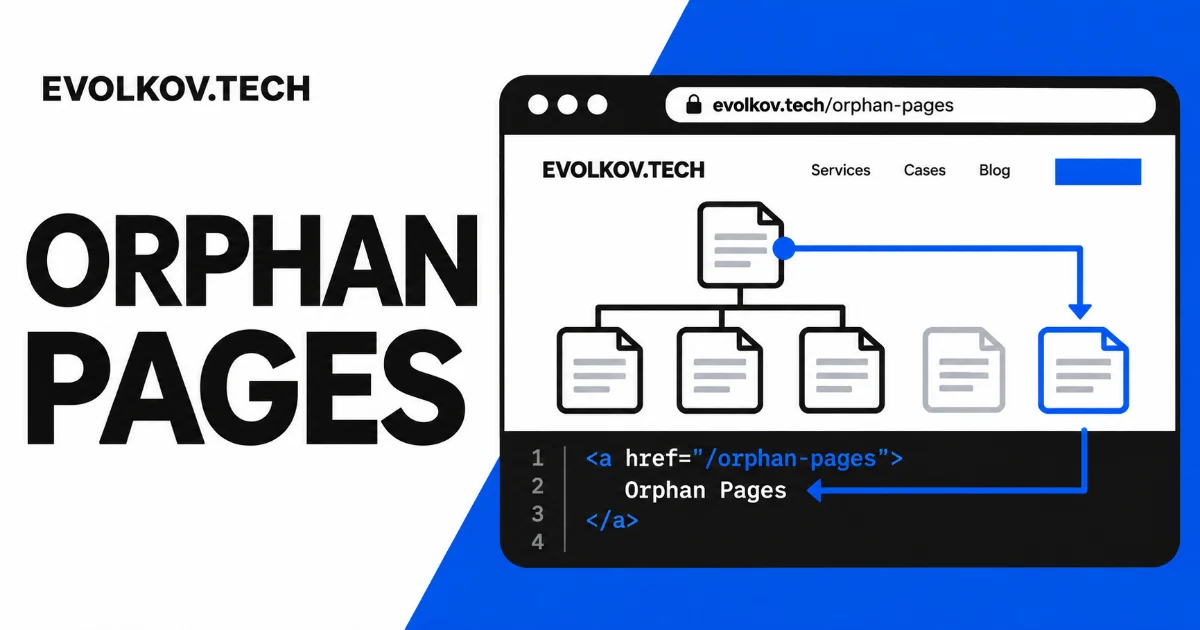
<a href="/orphan-pages">Orphan page checklist</a>
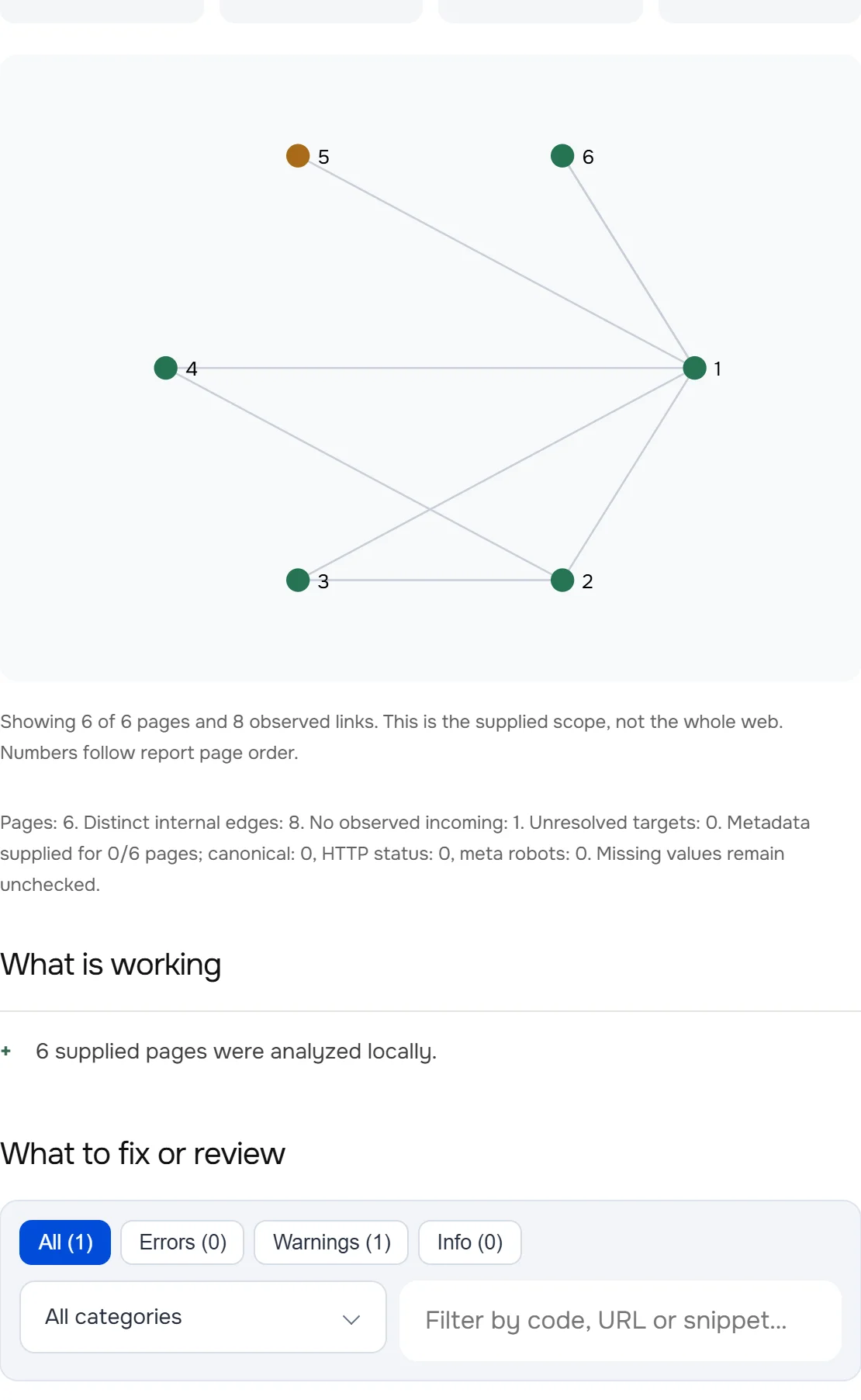
The before-state summary is straightforward: six pages, three articles, eight resolved internal link occurrences, eight distinct internal edges, and one page with no observed incoming internal link. That is the candidate you investigate first.
| URL | Role | Observed incoming internal links | Decision before fix |
|---|---|---|---|
https://example.org/ | Hub | Present | Not an orphan candidate |
https://example.org/guides | Hub | Present | Not an orphan candidate |
https://example.org/internal-links | Article | Present | Not an orphan candidate |
https://example.org/migration | Article | Present | Not an orphan candidate |
https://example.org/orphan-pages | Article | None observed | Candidate to review |
https://example.org/services | Other | Present | Not an orphan candidate |
Reproduce the example: open Reproleaf, choose Site inventory, paste the complete JSON, and run the analysis. Save the report, then repeat with the after inventory. Both downloadable inventories contain all six pages.
Original six-page link inventory (JSON)
Choose the right fix for the candidate
The known candidate in the fixture is /orphan-pages. The important detail is that the page is not being inferred from a crawl failure or a guessed index problem. It is simply the one URL with no observed incoming link in the supplied graph.
The fix table below shows the decision space. Do not default to noindex or deletion just because a page is isolated. Sometimes the right move is to add a relevant contextual link. Sometimes the right move is to merge redundant content and plan a redirect. Sometimes the right move is to keep a utility page private and out of public discovery. Sometimes you need more investigation before doing anything.
| Candidate situation | What it means | Typical next action |
|---|---|---|
| Useful page with no observed incoming links | Likely orphan candidate in the observed graph | Add a relevant contextual link from a page that naturally mentions the topic |
| Redundant page overlapping another page | Two URLs compete for the same intent | Consolidate content and plan the appropriate redirect |
| Private utility or internal-only page | Not meant for public discovery | Keep it out of public navigation and discovery paths |
| Data looks incomplete or ambiguous | Coverage may be partial | Investigate further before changing the site |
For the supplied example, the added link is meaningful and contextual: /migration now links to /orphan-pages. That is a reasonable editorial move because the migration checklist naturally points to a page about orphan-page checking. It is also specific enough to be maintainable. The home page linking out to a page does not create an incoming link for that target; it only gives the home page an outgoing link. That is why the candidate exists in the first place.
If you want broader context on the surrounding work, this is distinct from a general internal-linking audit, which is about graph metrics; it is also distinct from comparing sitemaps before and after, which tracks URL set changes rather than orphan detection. If you hand the verified finding to development, the implementation guide is the next sibling step.
Recheck the graph after the fix
After the new internal link is added, rerun the same inventory so you can compare like with like. In the supplied example, the page count stays at six, the article count stays at three, and the internal graph changes only where the new contextual edge appears. That is the right shape of evidence for this task.
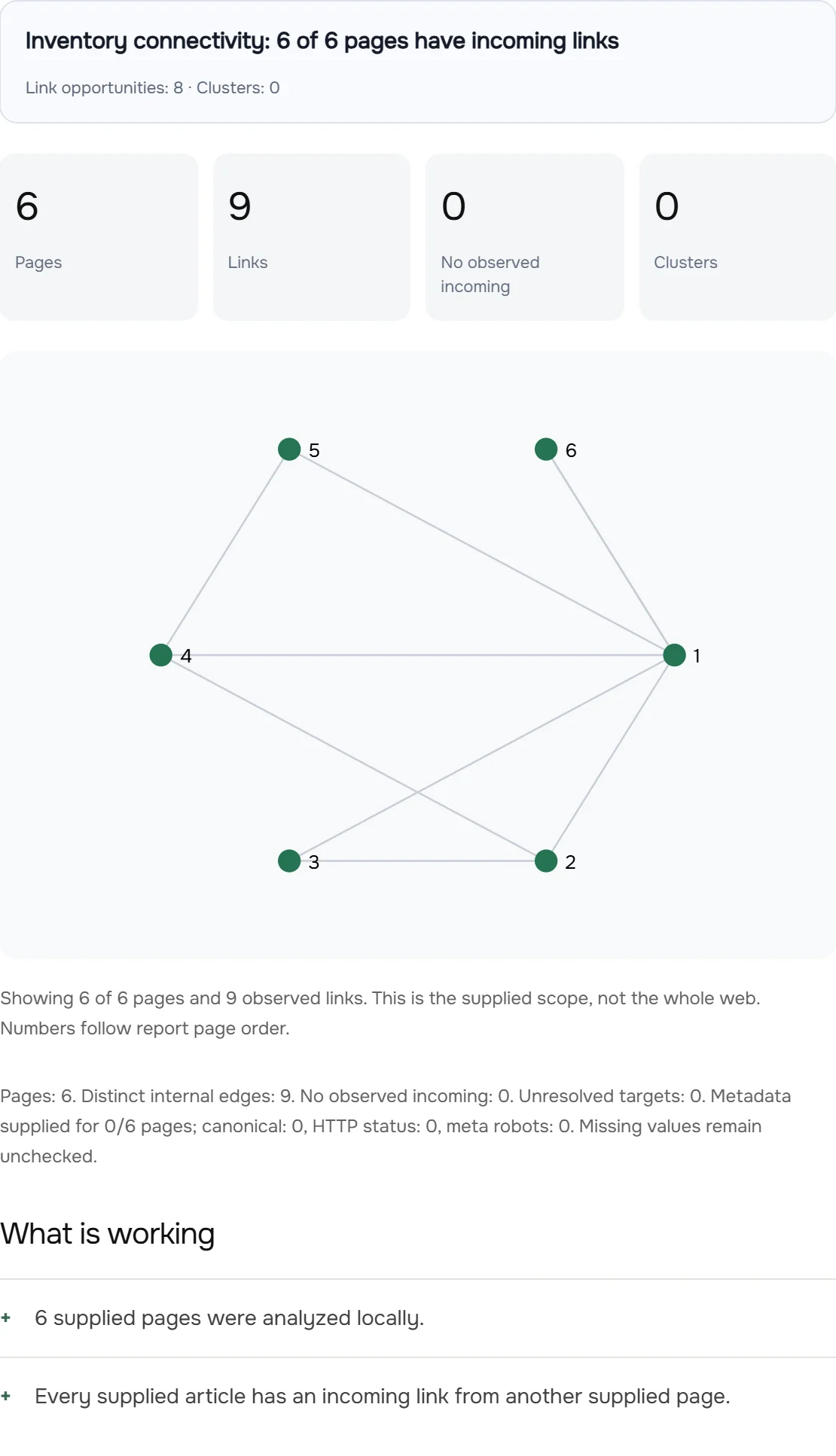
The after-state removes the observed orphan candidate: noObservedIncoming goes from 1 to 0, and distinctInternalEdges go from 8 to 9. There are still no unresolved targets and no external domains in the fixture. The change is narrow and testable.
Read the result carefully. This confirms the supplied graph changed, not that indexing improved, traffic rose, or every crawler now sees the page. It also does not mean a sitemap alone could have found the problem. A sitemap helps discovery, but by itself it cannot calculate incoming internal links because it is not an internal-link graph.
Use the after report and the before report together when you document the fix. Those two JSON assets are the evidence trail for the example run, and they make the change auditable without relying on screenshots or assumptions.
The Reproleaf methodology explains the evidence supplied by an uploaded graph and the limits of incomplete coverage.
A local negative control used the same six pages with metadata-only scope and no extracted links. It returned noObservedIncoming: null. The result is unknown, rather than zero link problems.
The retained files contain six pages before and after, eight internal edges before and nine after, and zero unknown targets in both reports. The sole change is the added /migration to /orphan-pages link. This result concerns supplied links, not a network crawl.
Same pages after adding the link (JSON)
A repeatable workflow for your own site
Here is a practical workflow you can reuse on your own inventory:
- Export your pages and internal links from the system that best represents your site structure.
- Normalize URLs carefully, but keep distinct locales, parameter states, and content variants separate unless you have a documented rule to merge them.
- Paste the inventory into Reproleaf and review the observed incoming link count for each page.
- Mark candidate orphan pages, then confirm whether each one should be linked, merged, hidden, or investigated.
- Make the smallest appropriate change and rerun the same inventory.
- Record owner, status, source, target, and acceptance criteria so the fix can be closed or reopened later.
That workflow works well alongside CMS exports, Google Search Console, and server logs, because each source answers a different question. CMS data tells you what editors intended. GSC shows search-side signals. Logs show requests. Reproleaf shows the observed link graph you supplied.
Be careful with JavaScript-rendered links, login-gated pages, mobile-only navigation, pagination, and crawl budget limits. Those can make an inventory incomplete. A zero-orphan report from a partial crawl does not prove the site is fully linked; it only proves that no orphan candidates were observed in the data you collected.
In the Reproleaf workflow, the point is to validate the graph you have, not to claim automatic extraction from every possible rendering state. If the inventory is incomplete, say so.
Use the SEO audit implementation workflow to hand a confirmed finding to a developer: record the source page, target, change boundaries, and repeat-check condition.
Orphan-page decision checklist (Markdown)
Common questions
Are pages in the sitemap automatically not orphan pages?
No. Sitemap presence helps discovery, but it does not prove a page has an incoming HTML link. A URL can be in a sitemap and still be an orphan candidate in the observed internal-link graph.
What if the page is already indexed?
Indexing and internal linking are different questions. A page may be indexed for reasons outside your current graph, while still lacking a useful internal path in the site structure.
What if the report shows zero orphan candidates but I know the crawl was incomplete?
Then treat the result as incomplete evidence. Re-run with a better inventory, review JS rendering and access constraints, and compare against CMS or logs before closing the issue.
Does this work for WordPress and custom CMS setups?
Yes, if you can export or assemble the internal link data. The workflow is about observed links, not platform branding.
Is the free local browser mode enough?
It is enough for the supplied inventory workflow, but it is still limited by the quality of the data you provide. A local run cannot magically recover links that were never exported or rendered into the input.
What to do next
Start with the free Reproleaf check: reproduce the example first, then prepare your own JSON with observed links. For each page with no incoming link, decide whether it is useful, where a reader should find it, and whether the available evidence supports the finding. Save the baseline, make the agreed change, and repeat the analysis.
Need help with your website?
Development and SEO services →