Define an accepted lead for landing page tracking
A campaign landing page has two distinct questions: which campaign brought the visitor and whether the backend accepted their lead. UTM parameters describe acquisition. Clicking Submit shows intent. The generate_lead event records successful lead generation. Google Analytics event reference.
Keep UTM parameters until form submission
Open the tagged URL, then visit an internal page without those parameters in the same tab. The fixture stored the allowlisted UTM fields in sessionStorage under campaign. This works within one tab and origin. Check your own handoff when using another domain, device, or tab. Google Analytics campaign parameters.
https://example.com/landing?utm_source=newsletter&utm_medium=email&utm_campaign=release-test
https://example.com/contact
Decide how a new campaign visit affects stored attribution. The fixture replaces the old tags with the new ones. If you need the first observed campaign, preserve that entry and test another visit with different values. These are different attribution rules. Keep email and phone values out of campaign fields and analytics payloads. Google Analytics personal data guidance.
Trigger generate_lead after acceptance
Use a response body that confirms acceptance. A 200 response can still contain an application error. If a connection drops, retry with the same submission ID. The server checks whether it already accepted that request. The browser tracks whether it logged the event for that ID. A separate inquiry from the same person may still be a new lead.
const key = "counted:" + submissionId;
if (analyticsAllowed && response.ok && result.accepted && !sessionStorage.getItem(key)) {
  dataLayer.push({ event: "generate_lead" });
  sessionStorage.setItem(key, "1");
}
Four measured submission paths
| Case | HTTP | Accepted leads | Events |
|---|---|---|---|
| Validation error | 422 | 0 | 0 |
| First acceptance | 200 | 1 | 1 |
| Same ID retried | 200 | 1 | 1 |
| Distinct inquiry | 200 | 2 | 2 |
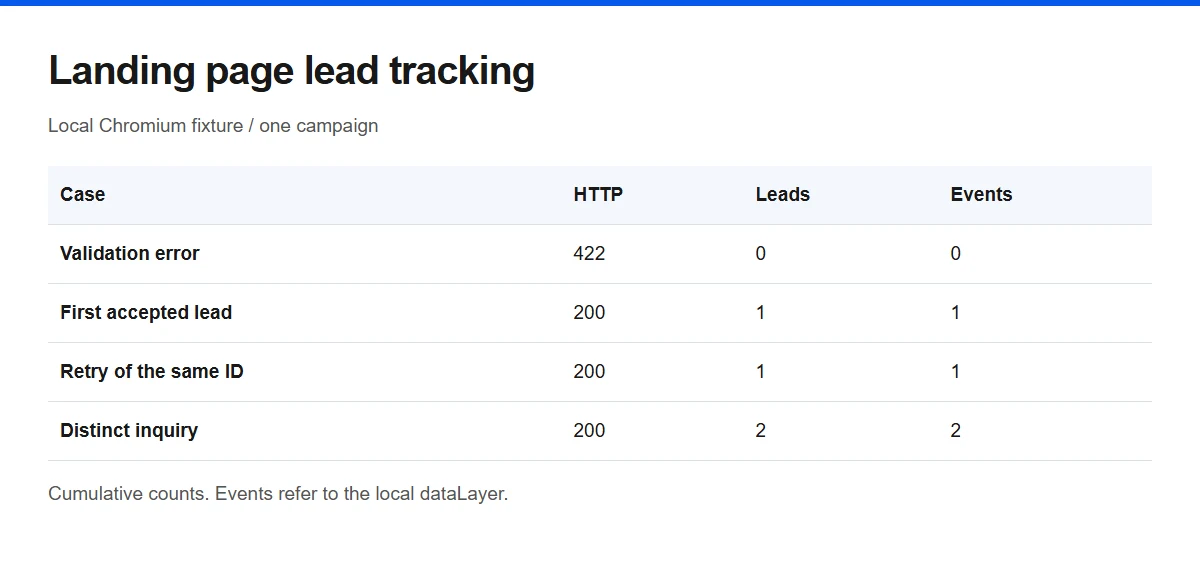
The local Chromium fixture used a mock endpoint and a local dataLayer. Nothing was sent to GA4, a CRM, or email. On the first accepted submission, both counts reached one. A retry with the same ID was acknowledged without changing those counts. The campaign stayed release-test in all four cases.
Verify the analytics chain after deployment
Repeat the sequence on a test site with a labeled campaign. In Network, inspect the HTTP status and response body. Separately count the events in Tag Assistant or the test property’s DebugView. Enable debugging for the test device, respect consent settings, and keep test events out of production reporting. Google Analytics DebugView.
For reconciliation, record attempted submissions, accepted leads, emitted events, and collected events. A gap between accepted leads and collected events does not always mean form delivery failed. The analytics request may be blocked or subject to consent. Use backend records to reconcile actual inquiries.
Test delivery separately with the landing page form checklist. If you use individual destinations for campaigns, run the navigation checks for each. In the landing page estimate, include campaign signal, event configuration, and duplicate testing as three acceptance items.
FAQ
Why does the CRM show more leads than analytics?
Compare the date range and filters, then look at consent settings, blocked requests, and event configuration. Reconcile accepted inquiries against backend or CRM records.
Why reuse an ID for a retry and use a new ID for a separate lead?
The ID ties repeated deliveries to a single submission. Reusing it for different inquiries can cause the server to treat them as one.
Verify that rejected submissions cannot increment your lead metric with How to add a honeypot to a form and verify it still accepts real leads.
To distinguish a repeated form event from overlapping tags, use Duplicate Google Tag Manager containers: how to find double conversions.
Need help with your website?
Development and SEO services →