Three things change the estimate fastest: whether the copy is ready, whether the design is already approved, and whether the page needs integrations such as CRM, email routing, or custom analytics. Before you accept any quote, ask what is included, what is excluded, who owns the files, and what happens after launch if you need edits.
- Check deliverables, not just the total.
- Separate launch cost from ongoing fees.
- Confirm ownership, access, and post-release support before you pay.
What a landing page quote actually covers
| Quote item | What it usually delivers | How to accept it |
|---|---|---|
| Structure and wireframe | Section order, offer logic, user flow, and conversion path | Confirm the page has a clear offer, evidence, CTA, and form flow |
| Copywriting | Headlines, benefits, calls to action, objections, and microcopy | Check who writes the text and who approves it |
| Design | Visual concept, layout, typography, and component style | Approve a draft or a reference before build starts |
| Responsive build | Desktop, tablet, and mobile implementation | Test on real devices, not only in browser tools |
| Forms and tracking | Lead capture, email or messenger routing, analytics events | Verify the form sends data and the conversion goal is set |
| Hosting and launch | Deployment, domain connection, SSL, and live release | Check what hosting is included and for how long |
Also clarify the business purpose. A landing page is usually built for one offer and one primary action: a lead form, booking, trial request, or product inquiry. That is different from a multi-page corporate website or an online store. The quote should match the task.
How requirements change the estimate
The price changes when the scope changes. The main drivers are content readiness, design complexity, technical integrations, and how much control you need over SEO and performance.
Below is a practical way to think about it:
- Prepared copy: if the text is already written and approved, the project moves faster. If the writer must create it, the scope grows.
- Prepared design: if you already have a design system or a finished concept, the build is simpler. If the visual direction still needs work, budget more time.
- Mobile priority: mobile responsiveness is not optional. If the page must work well on phones, that is part of the real build effort.
- Forms and CRM/API integration: a basic email form is simpler than a page that pushes leads into a CRM or sends data to multiple services.
- Measurement: analytics setup, events, and consent handling need to be specified early.
- Accessibility and keyboard use: if you need the page to be usable without a mouse, say so in the brief.
There is also a hidden cost that many quotes ignore: updates after launch. A landing page is not a one-time object. Offers change, sections are rewritten, and campaigns are adjusted. If the scope includes post-release edits, the quote should say whether they are included, how long they last, and what counts as a new change request.
Taxes, usage fees, license fees, ad spend, staff time, and scheduled maintenance should be budgeted separately unless the proposal states otherwise. This is especially important for buyer comparison across countries, because the same headline price may include very different assumptions.
Website builder or custom code?
| Constraint | Builder-based page | Custom-coded page | How to verify |
|---|---|---|---|
| Launch speed | Usually faster to publish | Usually slower to prepare | Ask for the delivery timeline in the proposal |
| Ongoing platform fee | Usually yes | Usually no platform rent | Check monthly or annual charges separately |
| Design portability | Can be limited by platform structure | Code and files can be handed over | Ask whether source files and repo are included |
| Technical control | Depends on platform constraints | Control depends on architecture, access, dependencies, and hosting | Ask who controls headers, scripts, and rendering |
| SEO and rendering control | Basic controls, platform limits remain | More detailed technical control | Confirm how metadata, markup, and render output are handled |
| Vendor lock-in | Possible | Lower risk if the code is handed over | Ask if another developer can continue the work later |
Check the required editor, integrations, performance, and handover before choosing a platform. Either approach can serve a long-lived page when its constraints fit the job. Portability depends on the platform, plan, licenses, documentation, and access. The official Tilda help center documents code export on the Business plan, but export does not automatically mean every managed function will behave the same outside the platform; you still need to check the documented setup and hosting requirements. Official Tilda export help
Google also states that it crawls and renders JavaScript and uses rendered HTML among its checks, so the actual output and crawlability matter. Server-side rendering alone does not guarantee rankings, but it does give you more control over the HTML a crawler can see. Google JavaScript SEO basics
Create a short proof of the critical requirement before committing: edit representative content, submit the form, exercise the integration, and check the handover route. Compare the required ongoing work and its cost for both options. A short campaign may need a custom integration, while a long-lived page may work well on a builder.
Three-year comparison model: inputs
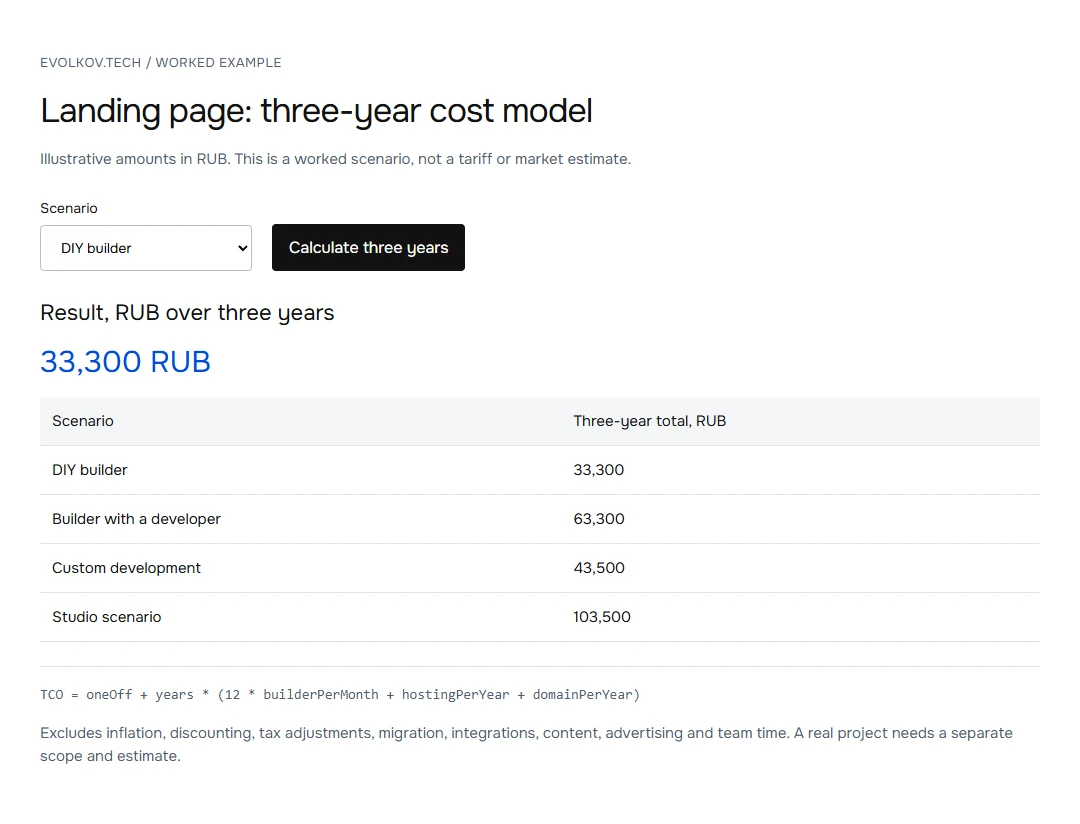
This worksheet was prepared for the article on 17 November 2026. Its RUB inputs are hypothetical, not Tilda tariffs, market averages, or a US quote. All four scenarios use the same three-year period and annual domain cost. For another market, enter consistent local prices, keeping one currency throughout.
This is the input view of the worksheet.
| Scenario | One-off build | Hosting / platform | Annual recurring cost | Assumption notes |
|---|---|---|---|---|
| DIY builder | 0 RUB | 800 RUB per month | 9,600 RUB per year | Self-managed page on a builder; no one-off development fee |
| Builder with developer | 30,000 RUB | 800 RUB per month | 9,600 RUB per year | Builder plus one-off development work |
| Custom-coded page | 30,000 RUB | 3,000 RUB per year | 3,000 RUB per year | Custom delivery with separate annual hosting |
| Studio delivery | 90,000 RUB | 3,000 RUB per year | 3,000 RUB per year | Higher initial build cost with separate annual hosting |
Shared assumptions across the model:
- Domain cost is 1,500 RUB per year.
- The model excludes taxes, inflation, discounting, ad spend, content, migration, integrations, training, internal staff time, maintenance, future changes, and exit costs. No support allowance is included.
- The model is for illustration and comparison of ownership cost, not for conversion or performance claims.
- The numbers above reflect the workbook logic used in the source material and are presented for parity across scenarios.
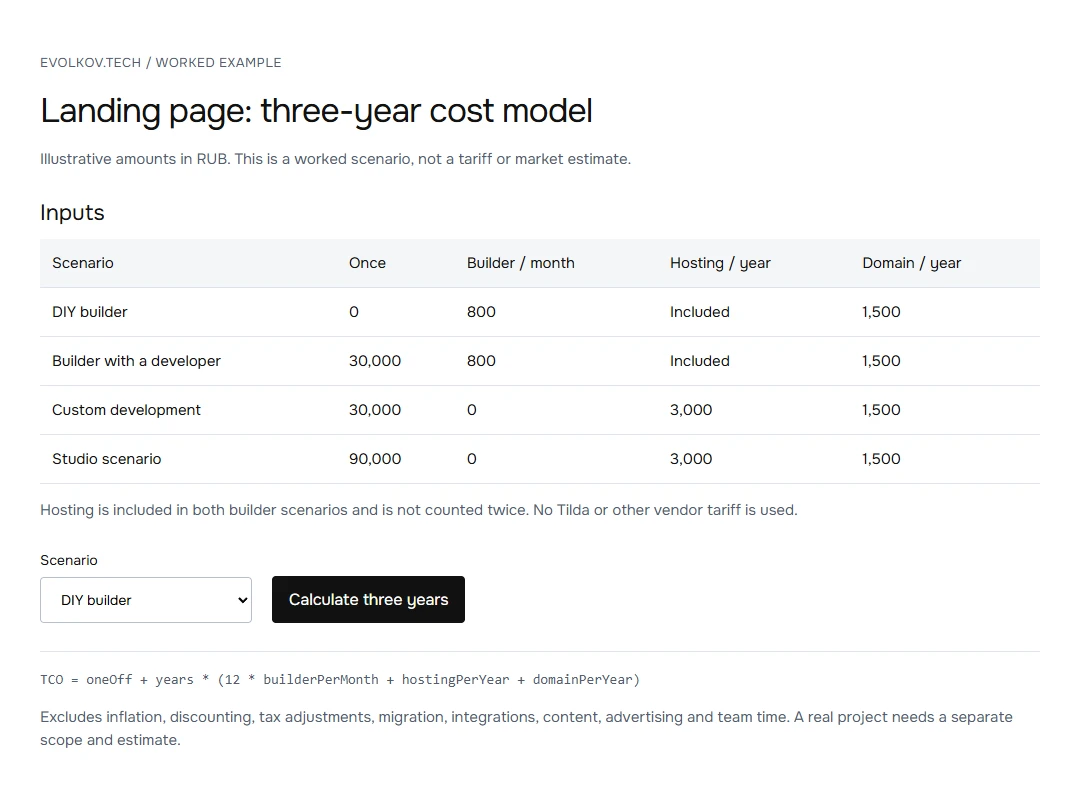
Three-year comparison model: results
This is an actual capture of the local worksheet results for the same inputs. The formula is one-off work + 36 × monthly platform fee + 3 × annual hosting + 3 × annual domain. The unused platform or hosting line is zero for each scenario. Maintenance is excluded, so these are modelled expenses rather than a complete ownership budget.
| Scenario | Year 1 total | Year 2 total | Year 3 total | Three-year total |
|---|---|---|---|---|
| DIY builder | 11,100 RUB | 11,100 RUB | 11,100 RUB | 33,300 RUB |
| Builder with developer | 41,100 RUB | 11,100 RUB | 11,100 RUB | 63,300 RUB |
| Custom-coded page | 34,500 RUB | 4,500 RUB | 4,500 RUB | 43,500 RUB |
| Studio delivery | 94,500 RUB | 4,500 RUB | 4,500 RUB | 103,500 RUB |
In this scenario, the builder with 30,000 RUB of one-off work costs 19,800 RUB more over three years than the custom-coded scenario with the same one-off input. DIY builder costs 10,200 RUB less than that custom-coded scenario, before valuing the owner’s time. These differences follow from the selected inputs; they do not demonstrate market savings, conversion gains, or automatic payback.
For a buyer, the question is not only “what is the launch quote?” It is also “what will I keep paying, and what do I actually own at the end of year three?”
Use the result as a budgeting template, not a universal benchmark. If your local platform fee, hosting, or domain cost is different, replace the inputs and recompute the total consistently.
What should be delivered at handoff
Download the model explanation and its matching machine-readable inputs and results: model notes, input JSON, and result JSON. The JSON and Markdown files are editable inputs and documentation; they do not execute calculations by themselves.
At handoff, request the following:
- The live page URL and the final source files or repository access.
- Domain and hosting access, or clear ownership of those accounts.
- The form destination and a test submission path.
- Analytics access, event names, and confirmation that the key conversion is tracked.
- Any design files, assets, and text sources used to build the page.
- A short note on what is included in post-release edits and for how long.
If the task involves a builder platform, ask what can be exported and what remains tied to the platform account. If the task uses custom code, ask which files you receive and whether another developer can continue without redoing the page from scratch.
Reproleaf is useful here only as a public-site and technical SEO verification step after delivery: it helps check the published HTML and crawl-facing details, not private business logic, access control, formula correctness, or CRM behavior. If your next task is a release review, that is the right time to use it. For the workflow behind that check, see the methodology.
How to review and accept the work
Acceptance should be based on evidence, not on a screenshot that looks fine at first glance. A page can look polished and still fail on mobile, analytics, form delivery, or accessibility.
Use this release guide when the next task is a public launch or a handoff review:
- Open the page on desktop and mobile.
- Check the heading order, readable text, and visible call to action.
- Submit the form and confirm the lead reaches the intended destination.
- Verify the analytics event fires once and only once.
- Test keyboard navigation, focus order, and any visible error states.
- Check that the domain, SSL, and live URL are correct.
- Confirm that the source files, assets, and access details were handed over.
Acceptance criteria can be written in the quote itself. A simple and useful version looks like this:
| Criterion | Expected result | How to verify |
|---|---|---|
| Prepared copy and design | The page reflects the approved text and visual direction | Compare against the agreed brief or mockup |
| Mobile behavior | Text, buttons, and forms work on small screens | Test on a real phone and a narrow viewport |
| Forms and CRM/API integration | Leads arrive in the agreed destination | Send a test submission and check the destination record |
| Consent and analytics | Tracking is configured as agreed | Check events, tags, or analytics reports after a test action |
| Accessibility and keyboard use | The page can be operated without a mouse for basic actions | Tab through the page and observe focus behavior |
| Hosting, domain, and ownership | Accounts, access, and files are handed over or documented | Confirm access list before final payment |
If the project includes a builder export, remember that portability depends on the plan and the documented export method. If the project includes custom code, ask for the repository, environment notes, and deployment steps. The more precisely the handoff is defined, the fewer surprises appear after final payment.
Use the website acceptance and fixes guide to turn public-site findings into scoped work.
After changing published pages, use the release verification guide to compare the same URLs and capture method.
Buyer questions before you approve a quote
1. What should be included in the estimate?
At minimum, the quote should state structure, copy, design, responsive build, forms, analytics, hosting or deployment, and what is excluded. If any of these are missing, ask before you sign.
2. Do I need copywriting separately?
If your text is not ready, yes. Copy is often the first hidden cost. Make sure you know who writes it, who edits it, and who approves the final version.
3. Should I choose a builder or custom code?
Check the required editing workflow, integrations, export route, licenses, and support costs for each option. Choose the approach that meets those requirements; project life alone does not determine the answer.
4. How do CRM and API integrations affect the price?
They add implementation work, testing, and failure handling. A simple form is not the same as a form that routes leads into a CRM and triggers internal workflows.
5. What about consent, analytics, and measurement?
If you care about lead quality, you need a tracking plan. Ask which events are tracked, how consent is handled, and how you will confirm that the data is actually recorded.
6. What should I receive when the job is done?
Ask for the live URL, source files or repository access, domain and hosting details, analytics access, and a written note on what support is included after launch.
7. Can I transfer a builder page later?
Sometimes, but the answer depends on the platform and the plan. The official export path exists on Tilda’s Business plan, but you still need to review what is and is not portable before you rely on it. Tilda export documentation
8. Is server-side rendering enough for SEO?
No. It helps with the HTML a crawler sees, but it is not a ranking promise. The page still needs good content, crawlability, and proper metadata. Google’s guidance on JavaScript makes that point clearly. Google JavaScript SEO basics
Next step
If you want a practical quote, use the parent service page and send a clear brief with your offer, target audience, needed sections, content readiness, and any integrations. The parent service page is here: website creation services.
When you contact a developer, include these five details:
- What the landing page must achieve.
- Whether the copy and design are ready or still need work.
- Whether you need forms, CRM, analytics, or API connections.
- Whether you need a builder-based launch or a custom-coded handoff.
- Who owns the domain, hosting, source files, and ongoing edits.
If your next task is a release review, ask for a concise acceptance checklist before final payment. If your next task is the launch itself, ask for a deliverables list and a handoff date. A good brief makes the quote easier to compare and the final delivery easier to accept.
For background on the person behind the work, see the about page. If you need the broader service context, start with the main website services page and then decide whether your project is best handled as a builder launch or a custom build.
Worked guide: form testing checklist for landing pages. Inputs, check limits and downloadable JSON results.
Worked guides — Landing page or website: which should your business build?.
If analytics is in scope, specify what counts as an accepted lead using How to track landing page leads from campaign URL to accepted form.
Need help with your website?
Development and SEO services →