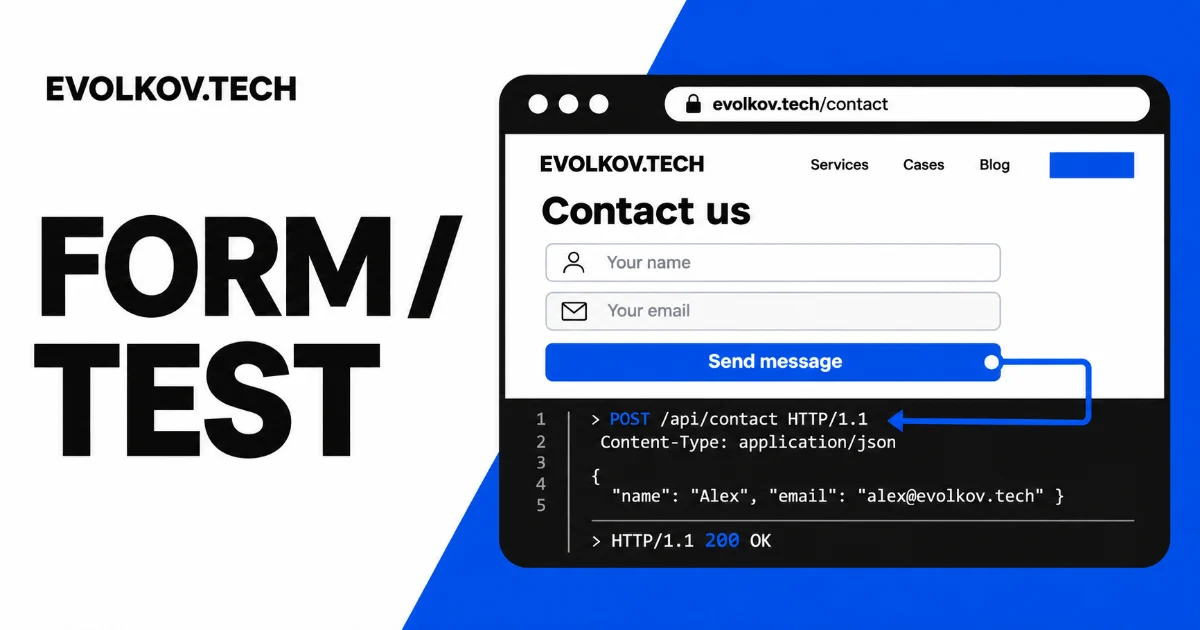
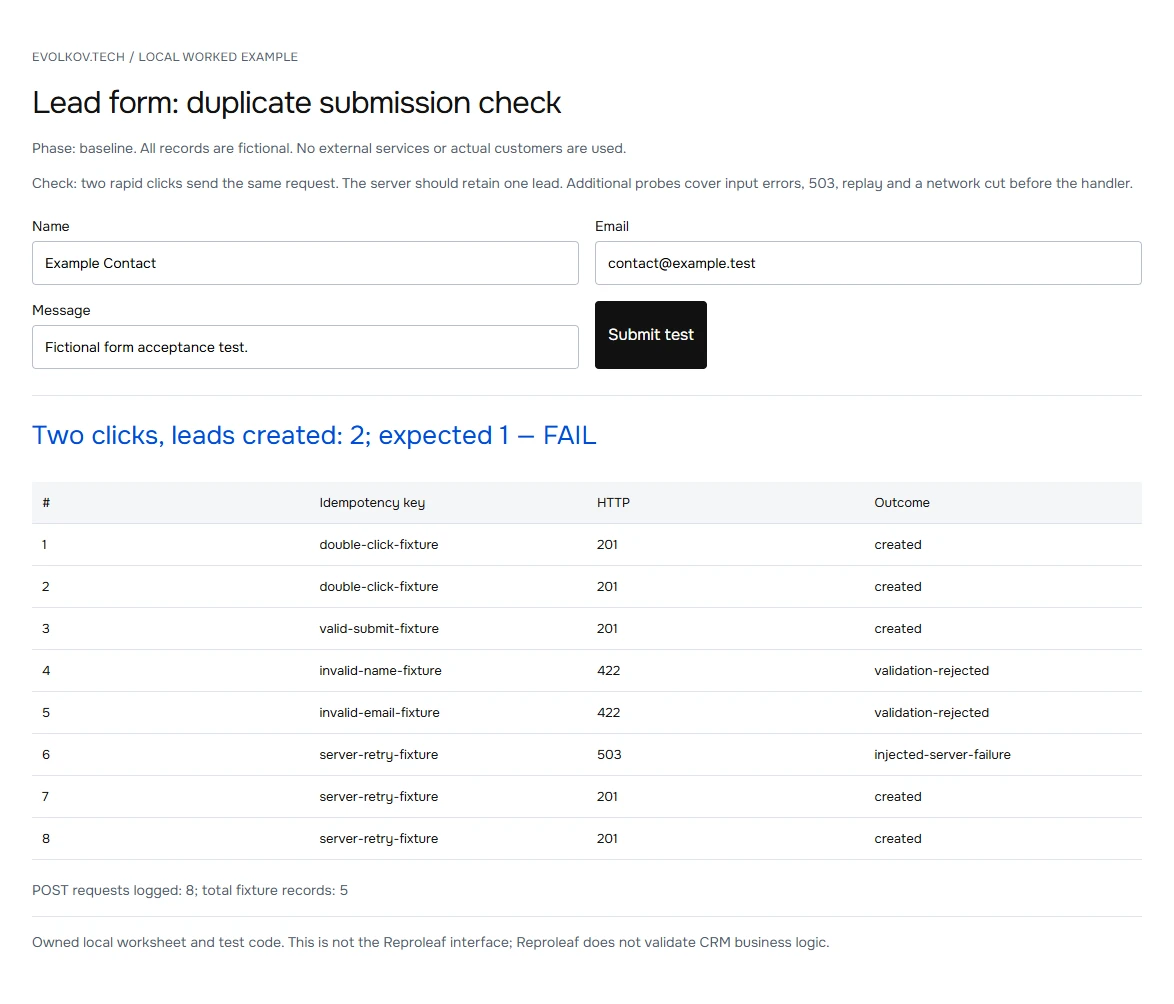
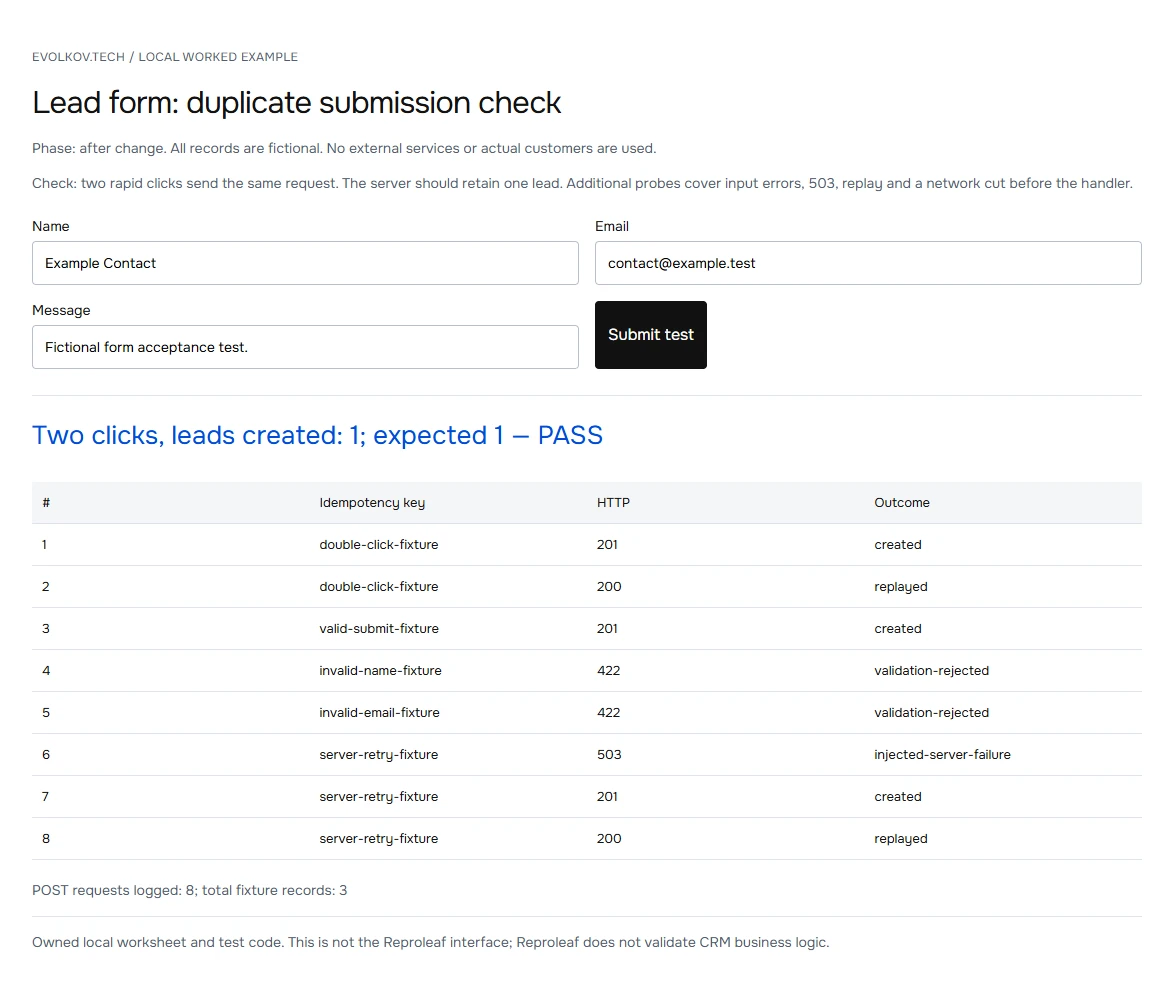
For the fixture in this article, the before run was not acceptable: 6 of 8 cases passed. The after run was acceptable: 8 of 8 passed. The biggest difference was duplicate handling. Before, a rapid double submit created 2 records with 201/201. After the change, the same action created 1 record with 201/200, and replay after success returned 200 instead of creating a new record.
That is the core of a form testing checklist: separate field validation from delivery acknowledgement, and separate both from any later analytics or CRM work that is outside the test boundary.
For the broader landing page context, see the landing-page cost and scope article when you need to align this checklist with the page’s overall work.
Scope: what this checklist covers and what it does not
This checklist is for an agreed test environment where a browser submits a lead form to a local in-memory HTTP endpoint. It is about acceptance, not about proving the entire business pipeline.
Use it to verify the user flow from form input to server response and stored record. Do not use it to claim production CRM delivery, consent compliance, external notification delivery, anti-spam robustness, or distributed exactly-once behavior.
| User action | UI acceptance to check separately | HTTP evidence | Destination check |
|---|---|---|---|
| Enter valid data and submit once | Success feedback is expected by project design | 201 | One stored record is expected |
| Enter invalid name or email | Inline validation or error message is expected | 422 | No record should be created |
| Submit, then repeat quickly | Second submit should not look like a second lead | 201 then 200 after the change | One logical record should remain |
| Network fails before the handler runs | Browser shows a network error | No server request | No record should be created |
The evidence here is local and in-memory. It does not prove the production service, the email provider, or the CRM.
After changing the public page, use the guide to SEO regression checks. That is a separate task from form acceptance.
Validation: what should happen before the request is accepted
MDN explains why client-side feedback does not replace validation on the server. A browser-side check can be bypassed.
That means a good checklist must test both the visible form behavior and the server result. In this fixture, invalid-name returned 422, and invalid-email returned 422. Those outcomes are useful because they show the form is not blindly accepting bad data.
At the same time, do not infer more than the fixture proves. These checks do not establish secure input handling, privacy compliance, or downstream notification quality.
For a landing page team, the practical question is simple: does the form stop bad input early, and does the server still reject it if the browser check is bypassed? If the answer is yes, you have a stronger acceptance basis than client validation alone.
Delivery: what counts as a successful lead
In this fixture, success means the local endpoint acknowledges the request and stores a record. A valid submission returned 201 both before and after the change. External delivery requires a separate observation at the intended destination.
That is useful, but it is not the same thing as external delivery. No email, Telegram, or production CRM integration was tested here. No real analytics event tracking was measured either.
So the acceptance conversation should stay precise. You can say the form accepted input and created or reused a stored record in the test endpoint. You cannot say this fixture proved live lead delivery outside that endpoint.
When you write the release note, separate the three layers:
- field validation: input rules in the browser and on the server
- HTTP result: 201, 200, 422, or 503 as appropriate
- destination check: whether exactly one logical lead record exists in the agreed environment
That separation keeps acceptance honest and prevents a local test from being described as a production delivery proof.
For a real email, messenger or CRM integration, agree a test recipient and use fictional data with a correlation marker. Record the submission time and local identifier, then confirm receipt in the actual destination: the right inbox, pipeline or owner, the expected fields and one logical lead. A provider accepting a message into its queue is not the same observation as the intended person receiving it. Repeat the agreed failure path and record whether the lead remains in storage, a queue or the external system. Define who retries pending work and how duplicate delivery is detected. These are proposed project checks; no external destination was contacted by this example.
Example: eight test cases in the local fixture
The following example uses the local in-memory fixture and browser submissions. It is a specimen, not a production system. The data and case names are part of the example test set.
| Case | Before outcome | After outcome | What it shows |
|---|---|---|---|
| rapid-double-submit | Failed; expected 1 record, got 2 with 201/201 | Passed; 1 record with 201/200 | Duplicate handling changed from creating two records to reusing the original result |
| valid-submit | Passed; 201 | Passed; 201 | Successful single submit is accepted |
| invalid-name | Passed; 422 | Passed; 422 | Name validation is enforced |
| invalid-email | Passed; 422 | Passed; 422 | Email validation is enforced |
| server-failure | Passed; 503 and 0 new records | Passed; 503 and 0 new records | The injected failure stored no new record |
| retry-after-503 | Passed; 201 | Passed; 201 | A later retry can succeed |
| replay-after-success | Failed; expected 200, got 201 | Passed; 200 | Replay should return the previous result, not create another lead |
| network-cut-before-handler | Passed; browser network error, 0 server requests | Passed; browser network error, 0 server requests | The request never reached the handler |
Important fixture facts: before, 6 of 8 cases passed and 2 failed; after, 8 of 8 passed. The server saw 8 POST requests in both phases. Stored records were 5 before and 3 after; that difference concerns duplicate test records, not business conversion.
The network-cut case happens before the handler. It does not test a failure after record commit.
The control for changed payload returned 409 after an initial 201 and left one record, which helps confirm that the key and payload logic distinguish a changed replay from a plain retry.
Download the fictional before inputs
Retry, replay, and duplicate control
Retries are where many lead forms fail acceptance. Users click twice, the network stalls, or a page resubmits after a refresh. A robust checklist should cover each path separately.
In the before run, a rapid double submit created two records. In the after run, the first request returned 201 and the second returned 200, with only one record stored for that logical submission. That is the behavior you want when the same key is replayed after success.
In the controlled failure case, the endpoint returned 503 and the observed store gained no record; the later retry returned 201. That is evidence for this injected path. A timeout or server error after a record may already have been committed needs a separate reconciliation test.
Keep the distinction clear:
- retry after failure: a fresh attempt after a 503 or other temporary issue
- replay after success: the same logical submission submitted again
- network cut before handler: a browser error before the server even processes the request
These are local fixture outputs, not screenshots from a live production service. They help you inspect behavior, not prove external delivery.
Define one logical submission before choosing a replay policy. If the implementation uses a key, retain it for retries of that submission and use a new key for a genuinely new lead. Compare the response with destination records, not only with the button state. This example keeps keys in memory; restart behaviour, multiple workers, concurrent writes and durable key retention need separate project tests. Its network-cut case stops before the handler and cannot resolve a failure after commit.
Analytics: what you may ask for, and what this fixture did not measure
No real analytics events were measured here. For your project, define which confirmed outcome counts as a lead: a stored record, a queued delivery or receipt in an external system. A button click can be measured separately, but it should not silently stand in for that outcome.
In the test analytics environment, submit one valid lead and inspect the agreed event, time and correlation marker. Replay the request and send invalid input; check that the success count does not increase when the agreed rule treats these as the same lead or a rejection. Match the event to destination evidence. A tag in the page or an event named in a plan is not an observed analytics result.
Agree allowed event parameters and consent behaviour separately. A fictional marker can correlate test evidence without automatically sending message content, names or email addresses into analytics. Retain the observations and their owner. This is a proposed acceptance procedure, not a result of the local HTTP fixture or a compliance assessment.
Acceptance checklist: what to sign off, and what remains unproved
Use this as the release checklist for the agreed environment. It focuses on form acceptance, not on broad marketing claims.
| Check | Evidence in this fixture | Owner | What remains unproved |
|---|---|---|---|
| Valid submit creates one accepted lead | 201 on valid-submit | Product and QA | Production CRM delivery, if any |
| Bad input is rejected | 422 on invalid-name and invalid-email | Frontend and backend | Full abuse prevention or security audit |
| Temporary server failure does not store a record | 503 with 0 new records | Backend | Recovery under real production load |
| Retry after failure can succeed | retry-after-503 returned 201 | Backend and QA | How a real user agent or queue behaves outside the fixture |
| Replay after success does not create a duplicate | before 201 created another record; after 200 reused the prior result | Backend | Distributed exactly-once guarantees |
| Success tracking is defined | No real analytics event tracking was measured here | Analytics owner | Whether the live analytics implementation matches the brief |
Acceptance is complete only when the team agrees on the environment, the expected UI, the HTTP codes, the record count, and the reporting expectations. The fixture supplies observed HTTP outcomes and local record counts. The table’s UI checks still need their own project evidence. It does not cover external notification delivery or compliance sign-off.
Also run a manual user pass on a narrow screen with the on-screen keyboard visible: enter data, trigger an error, correct it and submit. Check that the field, explanation and submit control stay reachable. Repeat without a mouse using the normal keyboard controls; record focus order, labels, visible focus and access to error feedback. Retain valid input after a failed attempt and make the next action clear.
Record the device, browser, viewport and observed outcome. These checks were not established by the eight HTTP cases. They add interface evidence to server and destination checks; they do not turn a small test set into a complete accessibility audit.
Download the checklist and reproduction code
FAQ
1. Should I trust client validation alone?
No. It improves feedback, but the server still needs to validate the submission.
2. Does a 201 response mean the lead was delivered to CRM?
No. In this fixture, 201 only means the local endpoint accepted the submission and stored a record.
3. Why does the before run store five records if only six of eight cases passed?
Because the duplicate cases created extra records. That difference reflects test duplicates, not business conversion.
4. What should I ask for before release if I need analytics evidence?
Ask for the exact success signal, the expected event, and the owner who will verify it in the live environment.
5. Where should I go next after this checklist?
Review the public page again after changes so you can separate form acceptance from page-level regressions.
Next step
Use the downloadable Markdown to repeat the handler contract with the retained input data, without a browser or HTTP. The separate JSON reports retain the actual browser and HTTP observations. Then define and run the agreed tests against your own form and destination, keeping the project observations separate from the sample. Use the guide to landing-page cost and scope to include form testing in the agreed website scope.
The related downloadable files in this package are the acceptance checklist, the before and after inventories, and the before and after reports. Use them as evidence artifacts only; do not treat them as executable by themselves.
That final review should leave you with one clear decision: accept the form in the agreed environment, or return it for another round of fixes.
Verify that the submission reached your CRM
Submit a test lead with a unique submissionId, utm_source, and utm_campaign. Find the CRM record by its external ID and check attribution fields and the assignee queue. Form acceptance and delivery to the CRM can happen at different times.
| Symptom | What to inspect | What to fix | Acceptance check |
|---|---|---|---|
| Form accepted the lead, CRM record is missing | Look up the submission ID and inspect the queue state and CRM response. The fixture starts with 503. | Retain the delivery in the queue and retry according to the CRM policy. Mark it delivered after confirmation. | Zero records and pending after the failure. One record after the successful retry. |
| One submission creates two leads | Compare the external ID and CRM record ID across the two attempts. | Use a stable external ID and the CRM’s deduplication mechanism. | Replaying fixture-001 returns LEAD-01, with the record count still at one. |
| Lead exists with the wrong source or queue | Compare the submitted values with the outgoing request and the saved record. | Correct the field mapping or the routing rule. | The fixture retains newsletter, november, and sales. |
The counts come from a local fixture with simulated CRM responses. Repeat the checks in your own test pipeline before sign-off. Download the three-attempt log.
If the form submits successfully but its notification never arrives, trace the WordPress email delivery from wp_mail to the inbox.
Once delivery works, use How to track landing page leads from campaign URL to accepted form to verify that one accepted lead creates one tracking event and retains its campaign.
To validate a spam trap without losing legitimate submissions, use the tests in How to add a honeypot to a form and verify it still accepts real leads.
If the form delivered one lead but analytics shows two conversions, run Duplicate Google Tag Manager containers: how to find double conversions.
Need help with your website?
Development and SEO services →